Alienware Update, Dell Update ja Dell Command Update eivät pysty tarkistamaan päivityksiä
Summary: Tietoja päivitysvirheistä käytettäessä Alienware Updatea, Dell Updatea tai Dell Command Updatea.
This article applies to
This article does not apply to
This article is not tied to any specific product.
Not all product versions are identified in this article.
Symptoms
Kun olet valinnut Alienware Update-, Dell Update- tai Dell Command Update -sovelluksessa Tarkista päivitykset, näkyviin tulee Ei voi hakea tietokoneen inventaarion tietoja. Seuraavassa on esimerkki viestistä: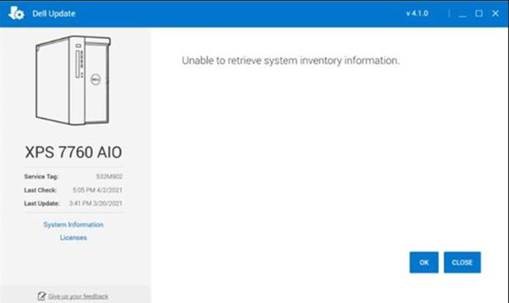
Cause
Tämä johtuu siitä, että ohjelmiston kiinteällä osalla on ongelma tietokoneen tarkistuksen suorittamisessa.
Resolution
Dell Update Recovery -apuohjelma
Voit ratkaista ongelman asentamalla ja suorittamalla Dell Update Recovery Utility -apuohjelman. Tämä on tehtävä jokaisessa haavoittuvuuden sisältävässä tietokoneessa, joka vastaanottaa tämän viestin.
Affected Products
Alienware Update, Alienware, Dell All-in-One, Dell Pro All-in-One, Dell Pro Max Micro, Dell Pro Max Slim, Dell Pro Max Tower, Dell Pro Micro, Dell Pro Slim, Dell Pro Tower, Dell Slim, Dell Tower, Inspiron, OptiPlex, Vostro, XPS, G Series, G Series
, Alienware, Dell Plus, Dell Pro, Dell Pro Max, Dell Pro Plus, Dell Pro Premium, Inspiron, Latitude, Dell Pro Rugged, Vostro, XPS, Fixed Workstations, Mobile Workstations, Dell Command | Update, Dell Pro Max Micro XE FCM2250, Dell Pro Max Slim XE FCS1250, Dell Pro Max Tower T2 XE FCT2250, Dell Pro Max 16 XE MC16250, Dell Pro Micro Plus XE QBM1250, Dell Pro Slim Plus XE5 QBS1250, Dell Pro Tower Plus XE5 QBT1250, Dell Update
...
Article Properties
Article Number: 000185515
Article Type: Solution
Last Modified: 15 May 2025
Version: 4
Find answers to your questions from other Dell users
Support Services
Check if your device is covered by Support Services.