NVP vProxy:从磁带上的克隆副本恢复虚拟机失败。
Summary: 当克隆副本位于磁带上时,Vproxy 虚拟机恢复失败。在运行到恢复命令的克隆部分时,还原失败。从 CLI 和 NMC 手动克隆也失败。
This article applies to
This article does not apply to
This article is not tied to any specific product.
Not all product versions are identified in this article.
Symptoms
- 您正在尝试还原的虚拟机存储集不在磁盘 (Data Domain) 上,该存储集位于磁带上。
- vProxy 无法直接从磁带进行还原,您必须将存储集“复活”(克隆)到磁盘 (Data Domain) 设备。
- 恢复向导会尝试自动将存储集从磁带“复活”(克隆)到磁盘 (Data Domain) 设备,以执行还原。
- 复活进程失败,并显示:
Unable to find a usable device for recovery of saveset SSID: Unable to find enabled Data Domain device for volume 'Volume.01'. An attempt will be made to perform automatic clone resurrection Attempting to automatically resurrect clone SSID with 1 day retention to DD volume in pool POOLNAME 166706:nsrvproxy_recover: ======= nsrclone log begins ================================= 17593:nsrvproxy_recover: 117833 1527496808 3 0 0 9072 8064 0 hostname nsrclone NSR error 97 Following savesets will be skipped please make sure saveset id is valid and target pool is valid. 0 142142 1527496808 1 5 0 9072 8064 0 hostname nsrclone NSR notice 33 Failed to get mmd reservation: %s 1 49 70 117834 60 There are no savesets to clone, mmd reservation is skipped. 0 1527496808 1 1 0 9072 8064 0 hostname nsrclone SYSTEM notice 55 No valid input savesets - check CLONE SKIPPED SAVESETS! 0 0 1527496808 1 1 0 9072 8064 0 hostname nsrclone SYSTEM notice 31 [ORIGINAL REQUESTED SAVESETS] 0 0 1527496808 1 1 0 9072 8064 0 hostname nsrclone SYSTEM notice 2 %s 1 0 22 SSID/CLONEID; 0 1527496808 1 1 0 9072 8064 0 hostname nsrclone SYSTEM notice 26 [CLONE SKIPPED SAVESETS] 0 0 1527496808 1 1 0 9072 8064 0 hostname nsrclone SYSTEM notice 2 %s 1 0 22 SSID/CLONEID; 142778 1527496808 5 3 0 9072 8064 0 hostname nsrclone RAP critical 41 NSRCLONE failed for one or more savesets. 0 SSID/CLONEID 166707:nsrvproxy_recover: ======= nsrclone log ends ================================= Virtual machine recovery failed: Unable to resurrect clone 3256416432 to a Data Domain volume in a staging pool: nsrclone finished with code 1Cause
由复活进程运行的克隆命令不知道将哪个主机用作克隆卷的目标存储节点。
Resolution
1.从 NetWorker 管理控制台 (NMC) 打开“源存储节点”的存储节点属性。通过依次单击“Devices”选项卡和“Storage Nodes”,可以访问存储节点。
2.在“configuration”->“Clone storage nodes”下添加“目标存储节点”FQDN(装载磁盘设备的地方)
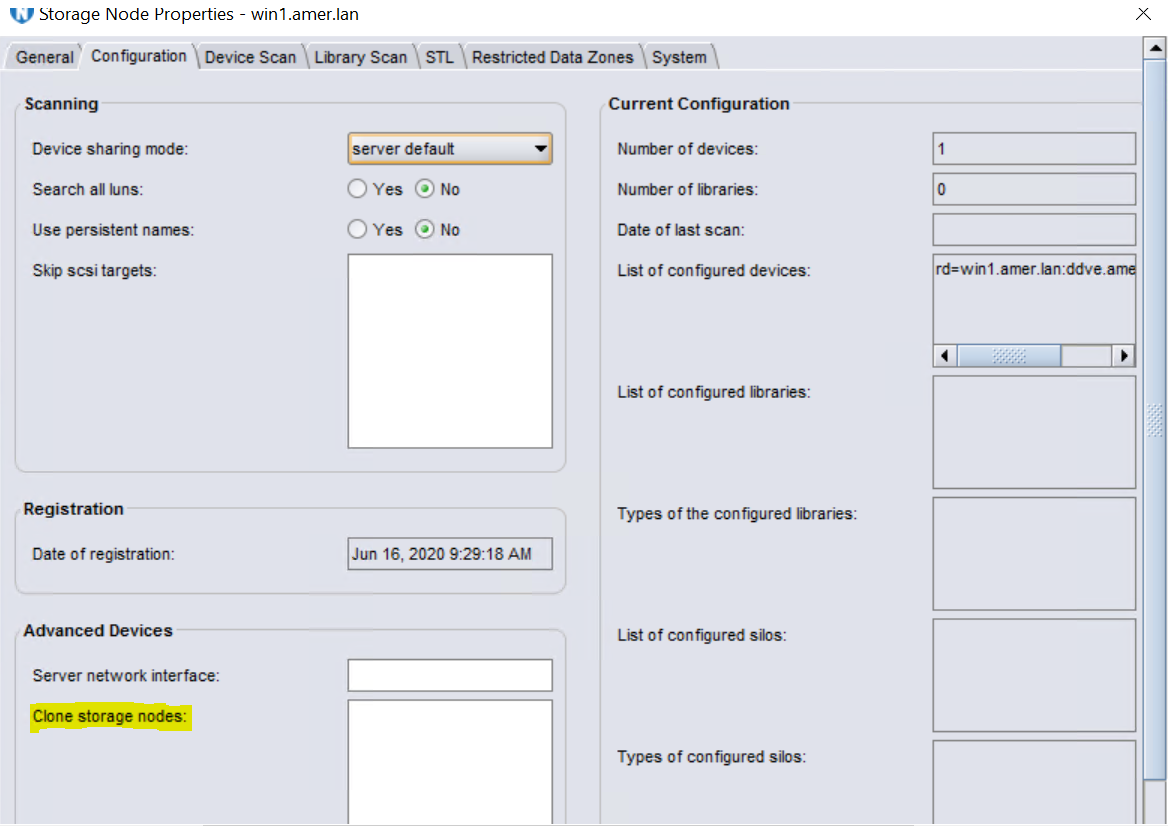
有关此字段的更多信息,请参阅适用于您的 NetWorker 版本的 NetWorker 管理指南。此指南可通过以下网址获得:https://www.dell.com/support/home/en-us?app=knowledgebase
3.返回到 NMC 并启动新的还原,其中存储集将从磁带“复活”(克隆)到 Data Domain 设备。复活进程完成后,将启动还原。
2.在“configuration”->“Clone storage nodes”下添加“目标存储节点”FQDN(装载磁盘设备的地方)
有关此字段的更多信息,请参阅适用于您的 NetWorker 版本的 NetWorker 管理指南。此指南可通过以下网址获得:https://www.dell.com/support/home/en-us?app=knowledgebase
3.返回到 NMC 并启动新的还原,其中存储集将从磁带“复活”(克隆)到 Data Domain 设备。复活进程完成后,将启动还原。
Additional Information
Affected Products
NetWorkerArticle Properties
Article Number: 000186039
Article Type: Solution
Last Modified: 05 Aug 2021
Version: 4
Find answers to your questions from other Dell users
Support Services
Check if your device is covered by Support Services.