PowerEdge: How to generate a vSphere Tanzu Diagnostic Support Bundle and Log Locations
Summary: This article describes how to gather the necessary log files to troubleshoot a vSphere Tanzu issue.
This article applies to
This article does not apply to
This article is not tied to any specific product.
Not all product versions are identified in this article.
Instructions
The vSphere Tanzu support bundle includes the following files:
- vCenter Server support bundle (vc-support)
- Support bundle for each control plane VM
- kube_instance_detail.txt file
Generating a vSphere Tanzu Support Bundle
- Log in to the vSphere HTML5 client
- Click Workload Management
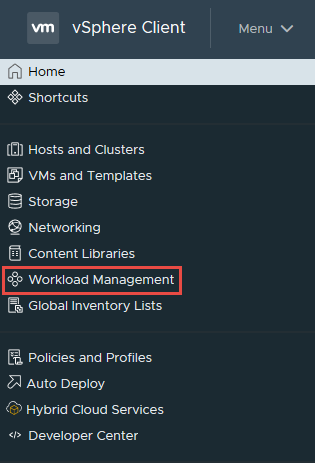
- On the Workload Management page, click Clusters
- Select the radial dial next to the cluster that you are needing logs from
- Click Export Logs

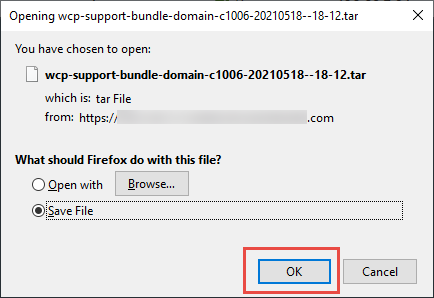
- Choose where you would like them saved on your workstation and click OK
Log Locations Helpful for Troubleshooting vSphere Tanzu Issues
vCenter:
/var/log/vmware/wcp/wcpsvc.logMain vSphere Tanzu service log
Interfaces with the control plane VMs
/var/log/vmware/wcp/nsxd.logNsxd service used to interface with NSX-T Data Center
/var/log/vmware/content-library/cls.logContent Library Service
Used with Harbor and Tanzu Kubernetes Grid (TKG) cluster deployments
ESXi:
/var/log/spherelet.logSpherelet component log (logs API transactions from Kubernetes)
/var/log/hostd.logESXi hostd component log
Control Plane:
/var/log/vmware-imc/configure-wcp.logInitial configuration of the control plane VM
/var/log/vmware-imc/toolsDeployPkg.logCustomization of the control plane VM
Additional Information
Affected Products
C Series, HS Series, Modular Infrastructure, Rack Servers, Tower Servers, XE Servers, XR Servers, OEM Server Solutions, VMware ESXi 7.x, VMware ESXi 8.x, VMware OEM Products with ProSupportArticle Properties
Article Number: 000187022
Article Type: How To
Last Modified: 12 Nov 2025
Version: 4
Find answers to your questions from other Dell users
Support Services
Check if your device is covered by Support Services.