PowerPath/VE: Paths will not get trespassed back automatically to default SP once the paths are back alive from dead in an ALUA setup (like VNX / Unity) especially on CISCO UCS servers with fnic driver and with ESXI 6.7 or later
Summary: PowerPath/VE: Paths will not get trespassed back automatically to default SP once the paths are back alive from dead in an ALUA setup (like VNX / Unity) especially on CISCO UCS servers with fnic driver and with ESXI 6.7 or later ...
This article applies to
This article does not apply to
This article is not tied to any specific product.
Not all product versions are identified in this article.
Symptoms
Environment:
ESXi v6.7 and later
Cisco UCS Server
Cisco nfnic driver
VNX Array
Unity Array
PowerPath/VE: Paths will not get trespassed back automatically to default SP once the paths are back alive from dead in an ALUA setup (like VNX / Unity) especially on CISCO UCS servers with fnic driver and with ESXI 6.7 or later
ESXi v6.7 and later
Cisco UCS Server
Cisco nfnic driver
VNX Array
Unity Array
PowerPath/VE: Paths will not get trespassed back automatically to default SP once the paths are back alive from dead in an ALUA setup (like VNX / Unity) especially on CISCO UCS servers with fnic driver and with ESXI 6.7 or later
Cause
Due to change introduced in CISCO nfnic driver, it changes the C:T:L values of the path every time it comes back alive and the ownership does not get trespassed back to the Default SP.
Here is an example of how it looks like:
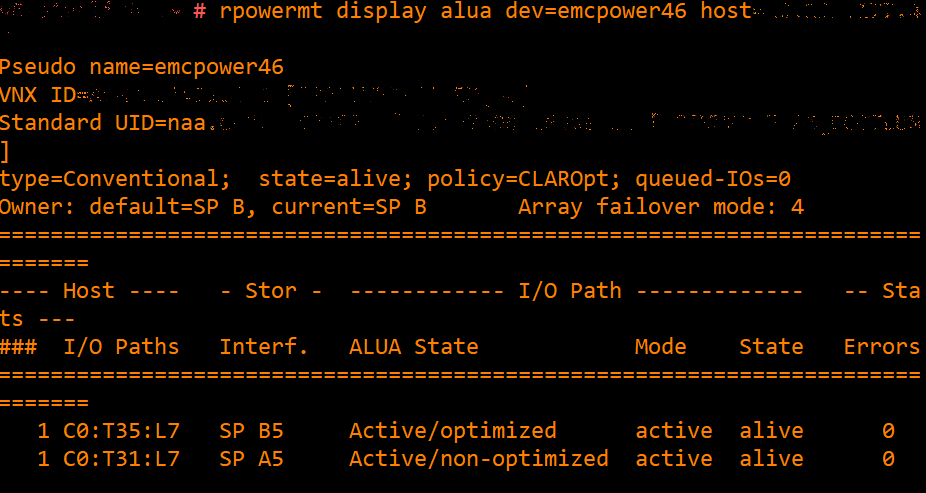
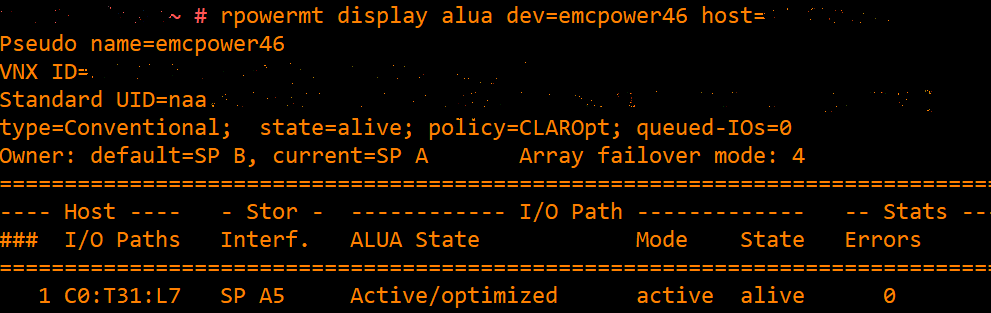
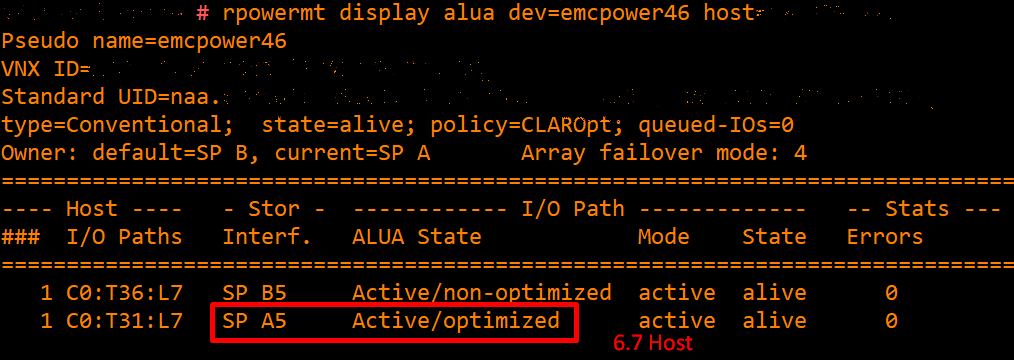
Here is an example of how it looks like:
- When the paths are alive from both SP A(Active/non-optimized) and SP B(Active/optimized):
- Path associated with Default SP B went dead and path associated with SP A becomes Active/optimized:
- Path associated with Default SP B comes back alive but the C:T:L value changes for this new path (from C0:T35:L7 to C0:T36:L7) and SP A5 still remains Active/optimized:
Resolution
This CISCO nfnic behavior change has been addressed in PowerPath/VE v7.2.
Workaround:
A temporary solution is to run "powermt restore" and it should address the issue for then, i.e., it will trespass the ownership back to the Default SP.
Workaround:
A temporary solution is to run "powermt restore" and it should address the issue for then, i.e., it will trespass the ownership back to the Default SP.
Affected Products
VMware ESXi 6.7.XArticle Properties
Article Number: 000189018
Article Type: Solution
Last Modified: 26 Aug 2022
Version: 5
Find answers to your questions from other Dell users
Support Services
Check if your device is covered by Support Services.