RecoverPoint for VMs: Log collection fails with "No system information was collected"
Summary: Log collection in RecoverPoint for Virtual Machines appears to fail with the error "No system information was collected".
This article applies to
This article does not apply to
This article is not tied to any specific product.
Not all product versions are identified in this article.
Symptoms
Running a log collection in RecoverPoint for Virtual Machines (VMs) completes with the message No system information was collected. The user cannot find a log collection file created (sysInfo*.tar) on the RecoverPoint Appliance (RPA) /info location.
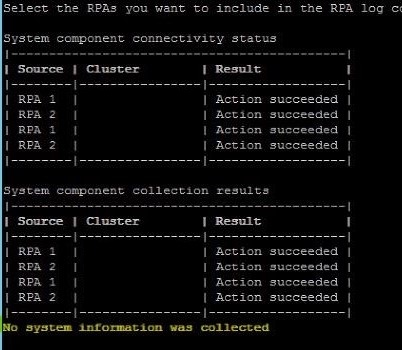
Figure 1. No system information was collected message
Cause
Dell Technologies Engineering is investigating this issue, and a root cause is being investigated.
Resolution
Workaround:
The collection has been seen to work per RecoverPoint Appliance (RPA), and each appliance keeps a copy of its own log collection under:
/home/collector/sysInfo/sysInfo.{Site}.KBox{RPA ID}.{Date}.tar.gz
These logs can be downloaded directly using SCP/WinSCP after root access is enabled.
To enable root access on a RecoverPoint Appliance, log in as admin using ssh/putty -> [2] Setup -> [8] Advanced options -> [2] Security options -> [3] Enable/Disable root access.
The root password is the same as the admin password.
Possible Preventative Workaround:
The issue has been seen to occur when collecting logs from other sites than the cluster to which the user is connected.
Run the log collection only for the cluster (site) the session is connected to.
So, for a customer with three sites - A, B and C (Can be done in parallel):
- Connect to Site IP on Cluster A, run the log collection for any RecoverPoint Appliances on Site A
- Connect to Site IP on Cluster B, run the log collection for any Appliances on Site B
- Connect to Site IP on Cluster C, run the log collection for any Appliances on Site C
Resolution:
Dell Technologies Engineering is investigating this issue. Contact the Dell Technologies Customer Support Center or your service representative for assistance and reference this KB article ID.
Additional Information
This issue has been seen on RecoverPoint for Virtual Machines 5.3 SP1 and later releases.
Affected Products
RecoverPoint for Virtual MachinesArticle Properties
Article Number: 000189073
Article Type: Solution
Last Modified: 10 May 2026
Version: 10
Find answers to your questions from other Dell users
Support Services
Check if your device is covered by Support Services.