PowerStore:在已連線 iSCSI 的 ESXi 主機上建立新資料存放區失敗,並顯示錯誤「無法變更主機組態。無法更新的磁碟分割區」
Summary: 在 iSCSI 連線的 ESXi 主機上建立具有 PowerStore 磁碟區的新資料存放區可能會失敗,並顯示錯誤「無法變更主機組態。無法更新的磁碟分割區...”
This article applies to
This article does not apply to
This article is not tied to any specific product.
Not all product versions are identified in this article.
Symptoms
在 iSCSI 連線的 ESXi 主機上建立新資料存放區失敗,並顯示錯誤「無法變更主機組態。無法更新的磁碟分割區...」
這會在所有 PowerStore 磁碟區上發生。
vSphere 顯示:
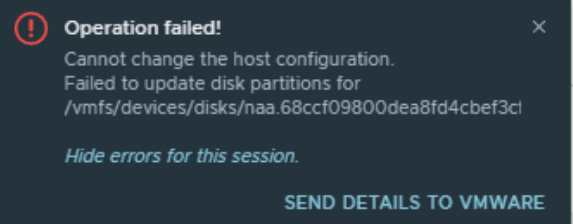
這會在所有 PowerStore 磁碟區上發生。
vSphere 顯示:
Cause
已知網路設定錯誤 (例如 ESXi 主機、交換器和 PowerStore 之間的 MTU 不相符) 會導致此問題。
Resolution
解決此問題的幾個選項:
使用 VMware KB: https://kb.vmware.com/s/article/1003728 測試連線能力
- 確保 ESXi 主機、交換器和 PowerStore 皆具有適用於建議 9000 MTU 大小的有效且一致的 MTU 設定。
- 如果無法做到這一點,請將 ESXi 主機和 PowerStore 儲存網路 MTU 變更為預設值 1500 (不建議)。設定 > 網路 IP > 儲存裝置,選取相關的儲存網路,然後重新設定。
使用 VMware KB: https://kb.vmware.com/s/article/1003728 測試連線能力
Affected Products
PowerStoreArticle Properties
Article Number: 000193550
Article Type: Solution
Last Modified: 23 Dec 2021
Version: 2
Find answers to your questions from other Dell users
Support Services
Check if your device is covered by Support Services.