Connectrix SANnav: Split large archives when struggling to upload supportsaves
Summary: Customers have difficultly uploading SANnav supportsaves to support as the archives are often large. Customers should be directed to split these large archives before uploading. It saves time and effort. The md5sum checksum is an additional step (see below for details) which enables each split element to be checked once received at TAC Support. ...
This article applies to
This article does not apply to
This article is not tied to any specific product.
Not all product versions are identified in this article.
Instructions
The best way to upload large SANnav archives is to split files using any utility (7zip, 7z, split, and so forth). For convenience, there is a utility already in the SANnav installation that splits files in the archives:

The utility is easy to use; the syntax is:

SANnav supportsaves get saved to the following location:

The full path to the SANnav supportsave is: <sannav install directory>/sannav_support_data/.
In the following example, the Full SANnav supportsave is split into 500 Mb parts. If the file chunk size is not provided, by default that size is set to 100 MB.

Once supportsave is split, view the constituent parts:
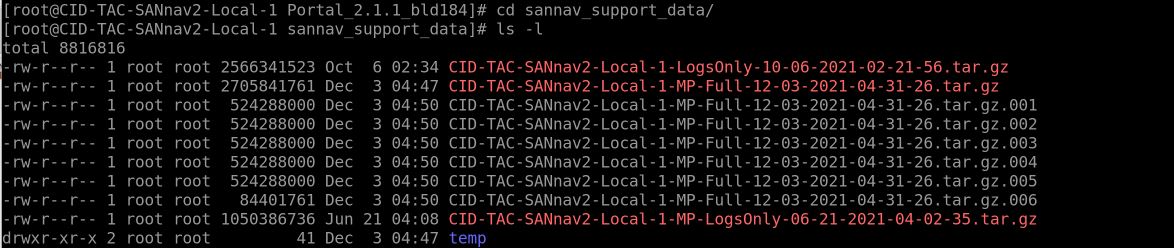
The split components are those which have the file ending *tar.gz.00x where x is the item number, *tar.gz.001, *tar.gz.002, and so forth.
These components must be uploaded to support where they can be merged or recombined, and data analysis can commence.
To check that each file is uploaded correctly, it is recommended to run a 'md5sum' on each of the constituent parts. If there is an issue with one of the parts, only that part with an issue must be reuploaded.
If there are only a few parts that must be checked, do so manually; otherwise, script it for ease.
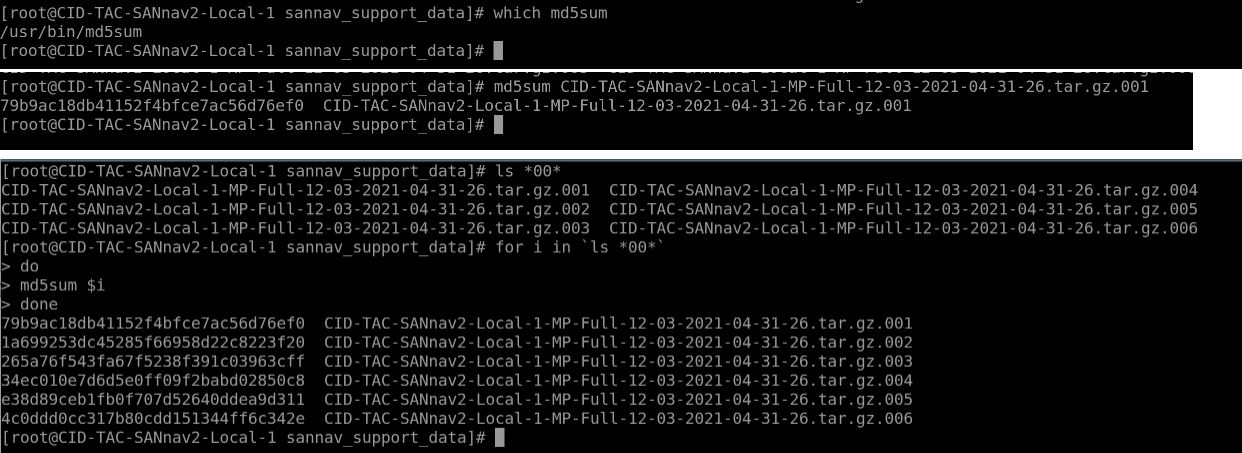
The 32-character string is the unique signature that is assigned to the part of the archive. If the archive does not combine without error, TAC support can compare this signature with what was generated at the source or customer location to identify and reupload the offending element. This saves time and avoids having to upload everything again.
Additional Information
Refer to this video for more information:
Products
Connectrix SANnavArticle Properties
Article Number: 000194123
Article Type: How To
Last Modified: 27 May 2025
Version: 3
Find answers to your questions from other Dell users
Support Services
Check if your device is covered by Support Services.