UICC 適用於 eSIM 與非 SIM 卡組態
Summary: 瞭解使用搭載 eSIM 之 WWAN 且執行 Windows 10 或 Windows 11 的電腦時發生的智慧卡登入問題。
This article applies to
This article does not apply to
This article is not tied to any specific product.
Not all product versions are identified in this article.
Symptoms
如果電腦使用者已設定 eSIM,Windows 會錯誤偵測到新裝置為智慧卡裝置。偵測到的新裝置會自動安裝驅動程式。此驅動程式在裝置管理員中顯示為 Uicc Iso 裝置 。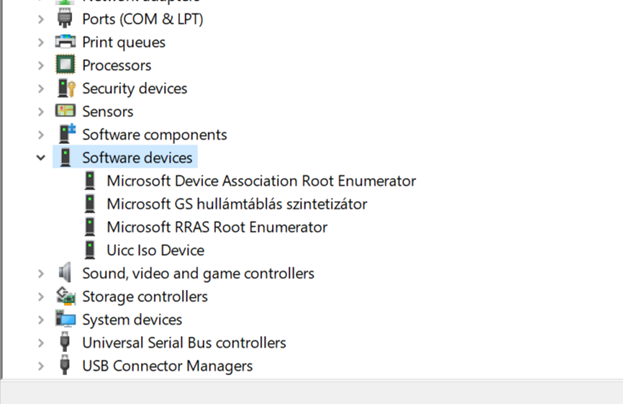
此裝置現在已在 Windows 中啟用為智慧卡裝置。使用者無法選取用於登入的永久使用智慧卡裝置。
Windows 會根據裝置在開啟電腦時初始化的順序,自動選取使用中智慧卡裝置。這可能會導致自動選取錯誤智慧卡裝置的情況,而在第一次嘗試登入時,使用 PIN 會失敗。智慧卡裝置隨後會再次自動切換,以便第二次嘗試登入成功。
Cause
此問題會影響使用 eSim 之 WWAN 卡的使用者。
在 Windows 10 (版本 1703 及更新版本) 和 Windows 11 (版本 21H2 及更新版本) 作業系統處理 eSIM 硬體時,會導致此問題。
Resolution
這是根據 Microsoft 的設計運作,會影響支援 eSIM 硬體的 WWAN 卡。您可以從裝置管理員停用 Uicc Iso 裝置 。
- 以滑鼠右鍵按一下 Windows 開始功能表,然後按一下裝置管理員。

- 從裝置管理員,展開軟體裝置。
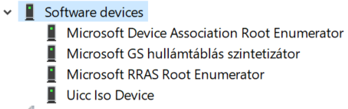
- 以滑鼠右鍵按一下 Uicc Iso 裝置,然後選取停用裝置。

Affected Products
Inspiron 5390, Inspiron 5391, Latitude 7220 Rugged Extreme Tablet, Latitude 5310 2-in-1, Latitude 5310, Latitude 5320, Latitude 7310, Latitude 7320, Latitude 7320 Detachable, Latitude 7330, Latitude 5410, Latitude 5411, Latitude 7410, Latitude 7420
, Latitude 7430, Latitude 9420, Latitude 9430, Latitude 3510, Latitude 5510, Latitude 5511, Latitude 7520, Latitude 7530, Latitude 9510, Latitude 9520, Latitude 5420, Precision 3551, Precision 3560
...
Article Properties
Article Number: 000200467
Article Type: Solution
Last Modified: 11 Mar 2025
Version: 4
Find answers to your questions from other Dell users
Support Services
Check if your device is covered by Support Services.