Installation des Intel Thunderbolt Controller-Treibers auf Systemen mit Intel Prozessoren der 12. Generation mit Windows 11 fehlgeschlagen
Summary: Ein Installationsfehler tritt mit dem Intel Thunderbolt Controller-Treiber auf einem Computer mit einem Intel Prozessor der 12. Generation und Windows 11 auf.
This article applies to
This article does not apply to
This article is not tied to any specific product.
Not all product versions are identified in this article.
Symptoms
Eine Fehlermeldung wird angezeigt, die besagt, dass ein Fehler bei der Treiberinstallation aufgetreten ist (Abbildung 1 [nur in englischer Sprache]).
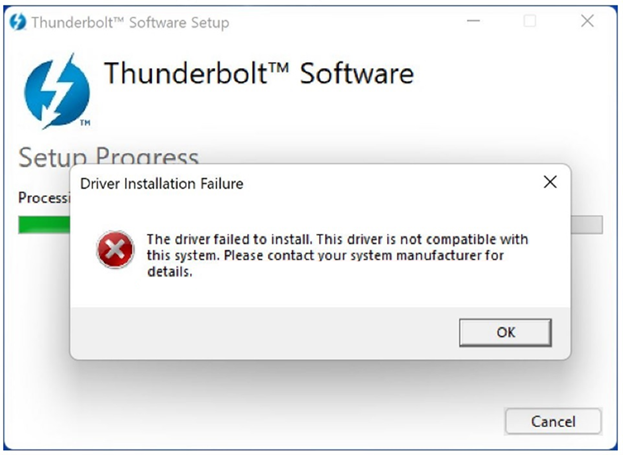
Abbildung 1: Meldung, dass Thunderbolt-Softwaretreiber nicht installiert werden konnte
Wenn die Anwendung "Thunderbolt Control Center" manuell aus dem Microsoft Store installiert wurde, listet sie auch keines der angeschlossenen Thunderbolt-Geräte auf. Die Controller-Treiberversion wird nicht im Thunderbolt Control Center angezeigt.
Betroffene Plattformen:
- Alienware X14
- Alienware M15 R7
- Alienware X15 R2
- Alienware X17 R2
- Dell G15 5520
- Dell G16 7620
- Inspiron 13 5320
- Inspiron 14 PLUS 7420
- Inspiron 14 5420
- Inspiron 16 5620
- Inspiron 16 PLUS 7620
- Inspiron 16 7620 2-in-1
- Latitude 5330
- Latitude 5531
- Latitude 7330
- Latitude 9330 2-in-1-System
- Latitude 5430
- Latitude 5431
- Latitude 7430
- Latitude 9430
- Latitude 5530
- Latitude 7530
- Precision 3470
- Precision 5470
- Precision 3570
- Precision 3571
- Precision 5570
- Vostro 5320
- Vostro 7620
- XPS 13 9315
- XPS 13 Plus 9320
- Dell Pro 13 Premium
Cause
Ein Computer mit einem Intel Prozessor der 12. Generation verfügt über integriertes Thunderbolt. Windows 11 enthält bereits den erforderlichen Treiber, damit ein Thunderbolt-Gerät ordnungsgemäß funktioniert.
Resolution
Klicken Sie auf Dell Computern mit Windows 11 im Abschnitt Zusätzliche Details auf der Treiberseite auf Wichtige Informationen. Es wird eine Liste der Dell Computer angezeigt, auf denen dieser Treiber nicht installiert werden muss, wenn das Betriebssystem des Computers Windows 11 ist.
Additional Information
Empfohlene Artikel
Hier sind einige empfohlene Artikel zu diesem Thema, die für Sie von Interesse sein könnten.
Affected Products
Alienware m15 R7, Alienware x14, Alienware x15 R2, Alienware x17 R2, Alienware x14, Dell Pro 13 Premium PA13250, Dell G15 5520, Inspiron 13 5320, Inspiron 14 5420, Inspiron 14 Plus 7420, Inspiron 16 5620, Inspiron 16 7620 2-in-1
, Inspiron 16 Plus 7620, Latitude 7330, Latitude 9330, Latitude 5431, Latitude 7430, Latitude 9430, Latitude 5530, Latitude 5531, Latitude 7530, Latitude 5430, Latitude E5430, Precision 3470, Precision 5470, Precision 3570, Precision 3571, Precision 5570, Vostro 5320, Vostro 7620, XPS 13 9315, XPS 13 Plus 9320
...
Article Properties
Article Number: 000201086
Article Type: Solution
Last Modified: 14 May 2026
Version: 8
Find answers to your questions from other Dell users
Support Services
Check if your device is covered by Support Services.