Installazione di Intel Thunderbolt Controller Driver non riuscita su un sistema con processori Intel di dodicesima generazione e Windows 11
Summary: Si verifica un errore di installazione con il driver del controller Intel Thunderbolt su un computer che utilizza un processore Intel di dodicesima generazione e Windows 11.
This article applies to
This article does not apply to
This article is not tied to any specific product.
Not all product versions are identified in this article.
Symptoms
Viene visualizzato un messaggio di errore che indica che si è verificato un errore di installazione del driver (Figura 1 [solo in inglese]).
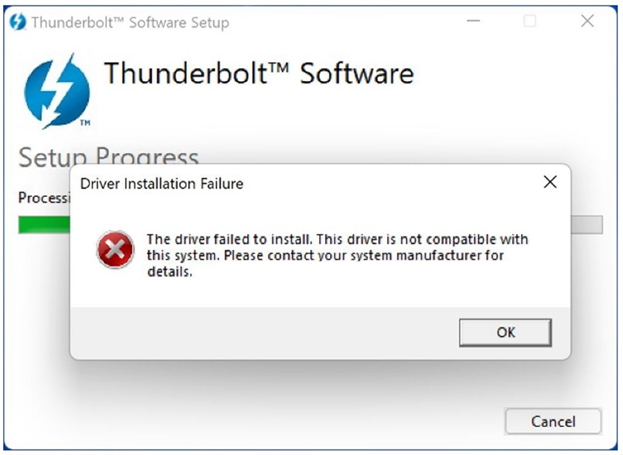
Figura 1. Messaggio di installazione del driver del software Thunderbolt non riuscita
Se l'applicazione Thunderbolt Control Center è stata installata manualmente da Microsoft Store, non viene elencato alcun dispositivo Thunderbolt collegato. La versione del driver del controller non viene visualizzata in Thunderbolt Control Center.
Piattaforme interessate:
- Alienware X14
- Alienware M15 R7
- Alienware X15 R2
- Alienware X17 R2
- Dell G15 5520
- Dell G16 7620
- Inspiron 13 5320
- Inspiron 14 Plus 7420
- Inspiron 14 5420
- Inspiron 16 5620
- Inspiron 16 Plus 7620
- Inspiron 16 7620 2-in-1
- Latitude 5330
- Latitude 5531
- Latitude 7330
- Latitude 9330 2-in-1
- Latitude 5430
- Latitude 5431
- Latitude 7430
- Latitude 9430
- Latitude 5530
- Latitude 7530
- Precision 3470
- Precision 5470
- Precision 3570
- Precision 3571
- Precision 5570
- Vostro 5320
- Vostro 7620
- XPS 13 9315
- XPS 13 Plus 9320
- Dell Pro 13 Premium
Cause
Un computer con processore Intel di dodicesima generazione è dotato di Thunderbolt integrato. Windows 11 contiene già il driver necessario per il corretto funzionamento di un dispositivo Thunderbolt.
Resolution
Sui computer Dell che eseguono Windows 11, cliccare su Informazioni importanti nella sezione Ulteriori dettagli della pagina del driver. Viene visualizzato un elenco di computer Dell per i quali non è necessario installare questo driver se il sistema operativo del computer è Windows 11.
Additional Information
Articoli consigliati
Di seguito sono riportati alcuni articoli consigliati correlati a questo argomento che potrebbero essere di interesse per l'utente.
Affected Products
Alienware m15 R7, Alienware x14, Alienware x15 R2, Alienware x17 R2, Alienware x14, Dell Pro 13 Premium PA13250, Dell G15 5520, Inspiron 13 5320, Inspiron 14 5420, Inspiron 14 Plus 7420, Inspiron 16 5620, Inspiron 16 7620 2-in-1
, Inspiron 16 Plus 7620, Latitude 7330, Latitude 9330, Latitude 5431, Latitude 7430, Latitude 9430, Latitude 5530, Latitude 5531, Latitude 7530, Latitude 5430, Latitude E5430, Precision 3470, Precision 5470, Precision 3570, Precision 3571, Precision 5570, Vostro 5320, Vostro 7620, XPS 13 9315, XPS 13 Plus 9320
...
Article Properties
Article Number: 000201086
Article Type: Solution
Last Modified: 14 May 2026
Version: 8
Find answers to your questions from other Dell users
Support Services
Check if your device is covered by Support Services.