RHEL: Instructions for setting up a local YUM repository in RHEL and How to collect an sosreport
Summary: In the Red Hat Enterprise Linux environment, the procedures outlined below guide on how to install an RPM package from an operating system ISO image and provides instructions on how to set up a local YUM repository if the machine is not registered with Red Hat. ...
This article applies to
This article does not apply to
This article is not tied to any specific product.
Not all product versions are identified in this article.
Instructions
Here the installed operating system version is Red Hat Enterprise Linux Server release 7.9.
We have mounted the RHEL 7.9 operating system ISO image through virtual media (Device Name - /dev/sr0) 
We are attempting to gather the sosreport from this node here. But we discovered that the sos package is not installed while using the command: sosreport.
After we noticed that the machine was not registered with Red Hat with an entitlement, we attempted to install the sos package using the YUM repository but were unsuccessful.
Kindly see https://access.redhat.com/solutions/3592
sos report and how to create one in Red Hat Enterprise Linux?)
Create the /root/DVD directory so that we can mount the operating system ISO image inside it.
The list of packages available on this operating system ISO image can then be found by going to the Packages directory as below.
# mkdir /root/DVD
# mount /dev/sr0 /root/DVD
# cd /root/DVD
# ll


We may list the required package by using command: ls -l | grep <package-name>
To install the RPM package, run the command: rpm -ivh <Package-name>
So, to install the sos RPM package we may run the command below.
# rpm -ivh sos*

The sosreport may have been generated and saved in the desired location, as we may discover below.
The steps below guide on how to set up a local YUM repository from an ISO image when the machine is not registered with Red Hat.
Create the local repo file named local.repo under /etc/yum.repos.d folder.
# cd /etc/yum.repos.d
# touch local.repo

Next use the vi editor to copy the following conditions into the local.repo file.
#vi local.repo
[Local]
name=Local DVD repo
baseurl=file:///root/DVD/
enabled=1
gpgcheck=0

Then run the below command.
# yum clean all
# yum repolist all
The local YUM repository may have been set up and enabled as shown below.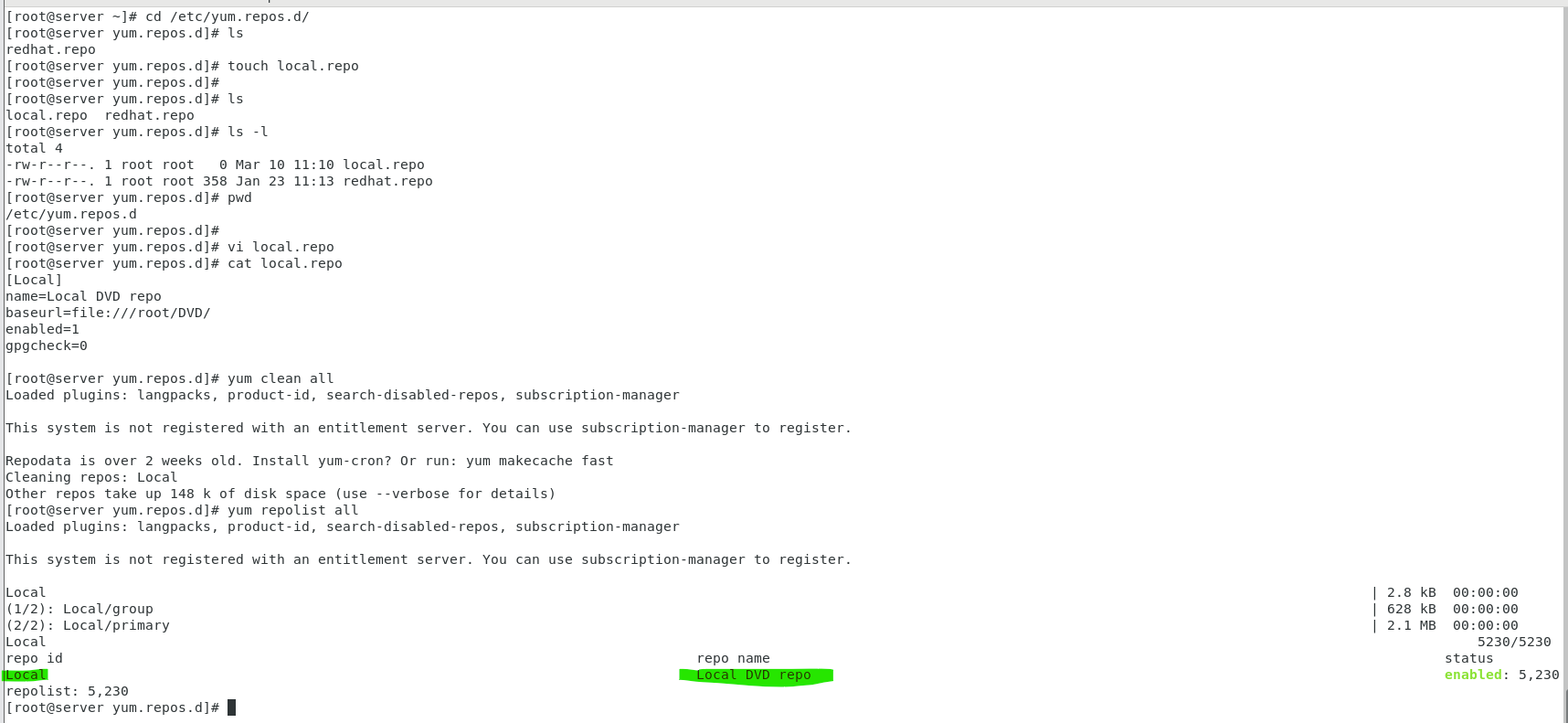
You can now use the YUM command to install the same sos package from the local repository we set up using the operating system ISO image.
By using the command rpm -e <Package-Name>, we remove any sos package that had previously been installed.
Afterwards, the command yum install <Package-Name> is used to perform the install.
To install the sos package, perform the command: yum install sos
Affected Products
Red Hat Enterprise Linux Version 7, Red Hat Enterprise Linux Version 9, Red Hat Enterprise Linux Version 8Article Properties
Article Number: 000211063
Article Type: How To
Last Modified: 08 Jul 2025
Version: 3
Find answers to your questions from other Dell users
Support Services
Check if your device is covered by Support Services.