PowerEdge:Windows 启动 SATA HDD 或 SDD 显示为可移动介质
Summary: 本文介绍了为什么 Windows 启动驱动器(承载 C:\ 卷)可能在 Windows 中显示为可移动介质,以及如何在必要时覆盖该行为。
This article applies to
This article does not apply to
This article is not tied to any specific product.
Not all product versions are identified in this article.
Symptoms
在 Windows 任务栏中,安装了作系统 (C:\) 的内部 SATA 磁盘(HDD 或 SSD)可能显示为“Removable Media”。
- 通知区域中将显示相应的图标,其中包含“安全卸下硬件并弹出介质”选项。
- 内部硬盘驱动器连接到启用了 AHCI 的集成 SATA 端口。
- 此行为在 Microsoft Windows 服务器和客户端作系统中可观察到。
- 这可能会进一步影响加载专门配置为处理可移动存储的组策略对象的系统的性能和/或可靠性。
Cause
系统 BIOS 固件将 Windows 启动 HDD/SDD 连接到的 SATA 端口标记为“外部”,导致内置 Microsoft作系统的 AHCI 驱动程序识别驱动器并将其装载为“可移动介质”。
Resolution
- 确保安装了最新版本的 BIOS 和 HDD/SDD 固件。这同样适用于公开行为的系统特定的芯片组和 AHCI 驱动程序。
- 或者,可以通过配置以下注册表项来覆盖作系统收件箱 AHCI 驱动程序在某些端口上显示磁盘的方式:
HKLM\SYSTEM\CurrentControlSet\Services\msahci\Controller0\Channelx\
在上面的路径中,末尾附近的“x”表示相关磁盘上的总线编号。可以通过查看设备管理器中的磁盘属性来获取总线编号(运行 DEVMGMT. > MSC 在磁盘驱动器下,标识必须由本机 AHCI 驱动程序 > 视为“内部”的 SATA 设备 右键单击它并选择“属性”,如下所示:
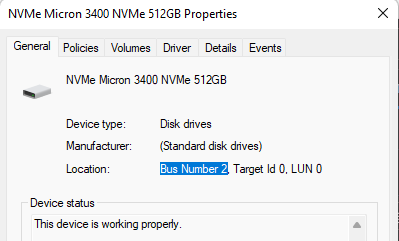
要覆盖作系统收件箱 AHCI 驱动程序显示磁盘的方式,请在提升的命令行中运行以下命令:
Reg.exe add “HKLM\SYSTEM\CurrentControlSet\Services\storahci\Parameters\Device” /f /v TreatAsInternalPort /t REG_MULTI_SZ /d x
(在上面的命令中,x对应于之前获取的总线号信息。
重新启动后,指定的磁盘不再列为可移动存储。
重新启动后,指定的磁盘不再列为可移动存储。
Additional Information

Affected Products
Microsoft Windows Server 2016, Microsoft Windows Server 2019, Microsoft Windows Server 2022Products
Modular Infrastructure, Rack Servers, Tower ServersArticle Properties
Article Number: 000221557
Article Type: Solution
Last Modified: 21 Nov 2025
Version: 3
Find answers to your questions from other Dell users
Support Services
Check if your device is covered by Support Services.