使用 USB GBE 乙太網路配接卡和 WinPe 版本 10.0.22000.1 時,網路無法運作
Summary: 使用 USB GBE 乙太網路配接卡時網路中斷連線的相關資訊。
This article applies to
This article does not apply to
This article is not tied to any specific product.
Not all product versions are identified in this article.
Symptoms
使用 USB GBE 乙太網路 (DA300、WD19 及其他非 Dell 配接卡) 時,客戶可能會回報 WinPE 11 網路問題。網路一開始會正確安裝,但 USB 配接卡在幾秒鐘後中斷連線,並出現「媒體中斷連線」訊息。
WinPE 版本:10.0.22000.1
驅動程式套件:WinPE11.0-Drivers-A01-28HG7.CAB
Cause
INF rtu53cx22x64sta.inf 1153.10.20.1104 不支援舊版 ADK (10.0.22000.1)。
Resolution
最新 ADK 版本
Dell 工程師建議您使用最新的 ADK 版本 (10.0.25398.1)。
因應措施:
預設會載入 rtu53cx22x64sta.inf (1153.10.20.1104) 驅動程式。如果將其移除,將載入另一個驅動程式 rtump64x64.inf 10.48.914.2021,並允許網路使用 USB GBE 乙太網路。
程序:
- 以滑鼠右鍵按一下「開始」,然後選取「裝置管理員」(圖 1)。
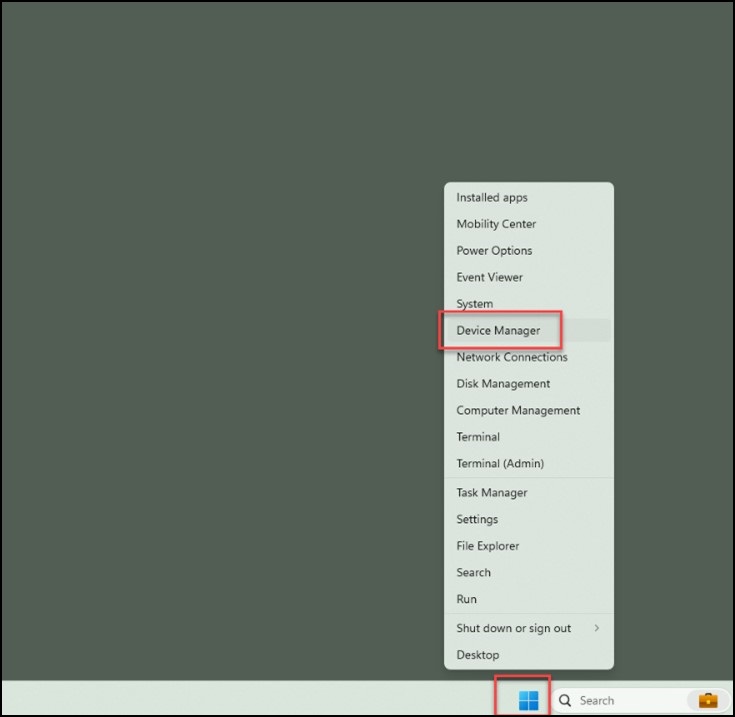
圖 1 - 選取「網路配接卡」的下拉式清單,然後開啟「Realtek USB GbE 系列控制器」(圖 2)。
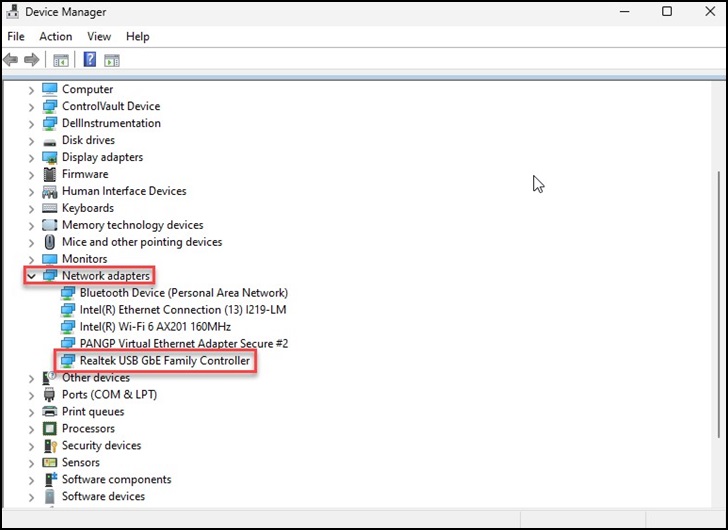
圖 2 - 按一下頂端的「驅動程式」標籤,檢查驅動程式版本,確認是否顯示「1153.10.20.1104」(圖 3)。
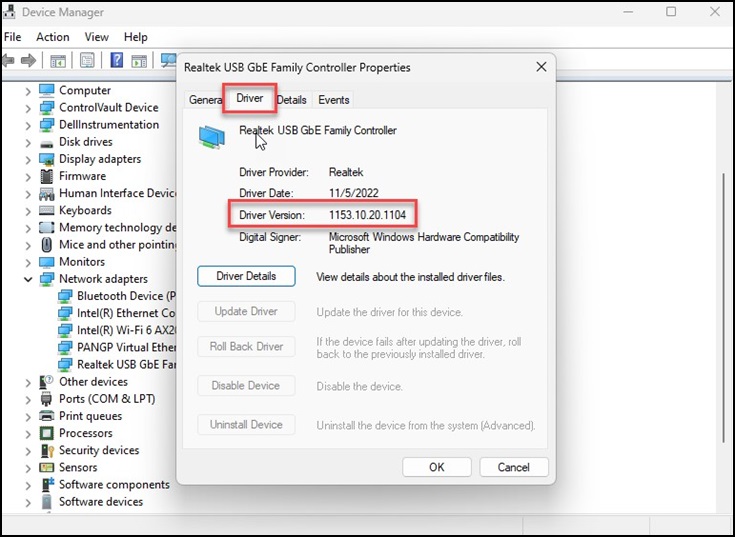
圖 3 - 如果您看到「1153.10.20.1104」,請選取「解除安裝裝置」,然後按一下「確定」(圖 4)。
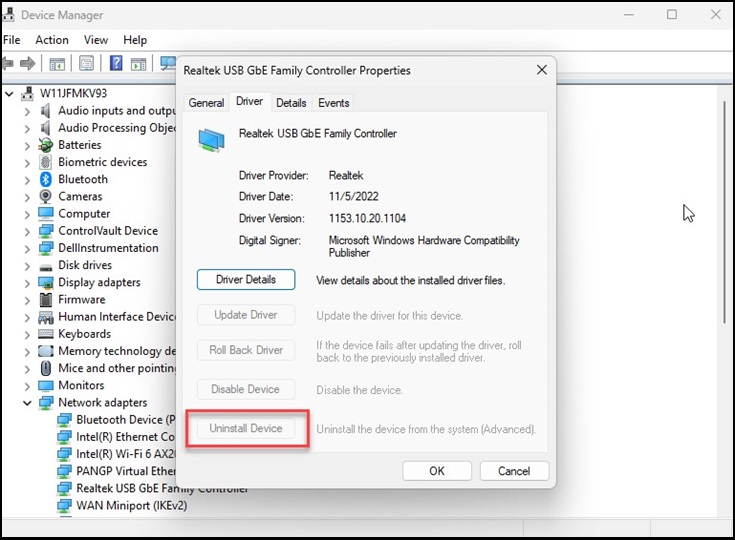
圖 4 - 重新啟動系統並重複步驟 1-3,確認版本現在顯示「10.48.914.2021」。
注意:Windows ADK 工具包被視為第三方應用程式,僅限於盡力而為的支援。
Additional Information
ADK 工具中的新增功能:ADK 工具中的新增功能
下載並安裝 Windows ADK:下載並安裝 Windows ADK
Affected Products
Dell Adapter - Dell USB-C Mobile Adapter - DA300, Dell Dock WD19Article Properties
Article Number: 000222732
Article Type: Solution
Last Modified: 24 Apr 2025
Version: 5
Find answers to your questions from other Dell users
Support Services
Check if your device is covered by Support Services.