从 Microsoft Store 下载时,Intune 无法部署 Dell Optimizer 戴尔智能调优软件版本 4.2.2
Summary: 有关 Intune 不部署 Dell Optimizer 戴尔智能调优软件版本 4.2.2(如果从 Microsoft Store 下载)的信息。
This article applies to
This article does not apply to
This article is not tied to any specific product.
Not all product versions are identified in this article.
Symptoms
应用程序没有有效的最新软件包版本错误
Intune 显示一条错误消息“所选应用没有有效的最新版本包版本”(图 1)。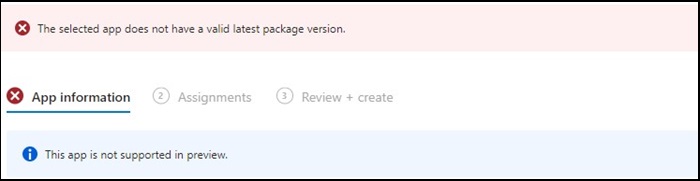
图1
提醒:仅在部分戴尔 Latitude、Precision、OptiPlex 和 Rugged PC 上提供。
Cause
Dell Optimizer 戴尔智能调优软件未通过 Intune 验证,该验证要求应用程序安装在所有硬件(戴尔和非戴尔)上。
Resolution
手动部署 Dell Optimizer 戴尔智能调优软件
要解决此问题,IT 管理员可以尝试以下作,通过 Intune 手动部署 Dell Optimizer 戴尔智能调优软件。
- 从 Dell.com 下载 Dell Optimizer 戴尔智能调优软件安装程序
- 请按照以下说明进行作:
- 使用以下命令安装软件:
Install command: Dell-Optimizer-Application_xxxxx_WIN_x.x.x.x_A00.EXE /passthrough /silent /InstallDotNet=true /FACTORY=TRUE

提醒:要卸载,请使用以下命令:
Uninstall command: Dell-Optimizer-Application_xxxxx_WIN_x.x.x.x_A00.EXE /passthrough /silent /remove
Affected Products
Alienware, Inspiron, OptiPlex, Vostro, XPS, G Series, G Series, Alienware, Inspiron, Latitude, Vostro, XPS, Fixed Workstations, Mobile WorkstationsArticle Properties
Article Number: 000224821
Article Type: Solution
Last Modified: 17 Jul 2025
Version: 7
Find answers to your questions from other Dell users
Support Services
Check if your device is covered by Support Services.