PowerFlex管理プラットフォーム - フォルダーにあるvCLSデータストアが原因で既存のリソース グループの追加に失敗する
Summary: PowerFlex Manager (PFxM)がvSphereフォルダーにあるvCLSデータストアを検出できないため、Add Existing Resource Group操作が失敗します。
This article applies to
This article does not apply to
This article is not tied to any specific product.
Not all product versions are identified in this article.
Symptoms
リソース グループの導入状態がエラーです。これは、リソース グループの導入(既存の追加または新規の導入)に失敗したことを意味します。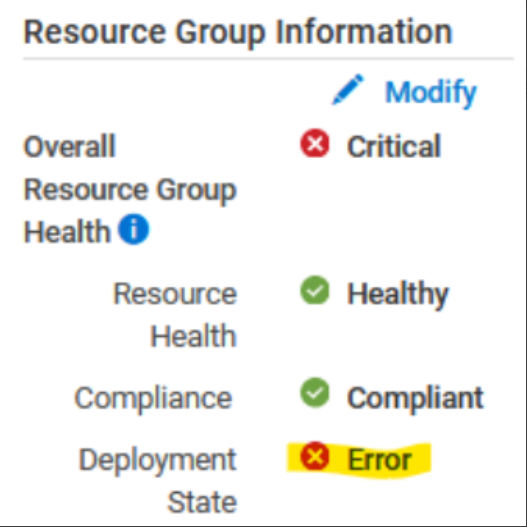
次のエラーは、vCenter/データセンターの一部ではないリソース グループ内のデータストアを示しています。
この問題を検証するには、thin-deployer ポッドに入り、 rackserver-<servicetag_123> <device_name>ディレクトリーにログインします。
-
thin-deployerポッドの出番です。
x=$(kubectl get pods -n powerflex|grep -i thin|awk '{print $1}'); kubectl exec -it -n powerflex $x -- bash -
<device_name>ディレクトリーを入力します。
cd /opt/Dell/ASM/device/<device_name>
-
確認する
rackserver-<servicetag_123>ログ - データストアが見つからなかったことを示します。Error: datastore object powerflex-TESTCLUSTER1-ds-2 not found Error: /Stage[main]/Asm::Resource_wrapper/Vc_vcls_datastore[TESTCLUSTER1]/ensure: change from 'absent' to 'present' failed: datastore object powerflex-TESTCLUSTER1-ds-2 not found
データストアは、vCenterインベントリー ファイル(inventory/rs-vc.boston.ee.com.json:
  {"name"=>"powerflex-TESTCLUSTER1-ds-2",
             "id"=>"datastore-120788",
             "type"=>"Datastore",
             "attributes"=>{"is_local"=>false, "free_space"=>12297699328, "mount_dir"=>"/vmfs/volumes/62e1db72-18264b5c-a653-b8599fc367db",
"volume_name"=>"powerflex-TESTCLUSTER1-ds-2", "capacity"=>15.75, "scsi_device_id"=>"eui.0be0ca503685ed0fea3112de00000004", "vendor"=>"EMC"},
             "children"=>[],
             "path"=>""},
問題
既存のリソース グループ/サービスを追加できません。
Cause
PFxMの制限により、vCenterフォルダー内にあるvCLSデータストアを表示できなくなります。
この問題は、PFxMがvCenter内のフォルダーを再帰的に検索できないために発生します。
Resolution
vSphereデータストア ビューから、リソース グループに関連づけられているvCLSデータストアをフォルダーからデータ センターに移動します。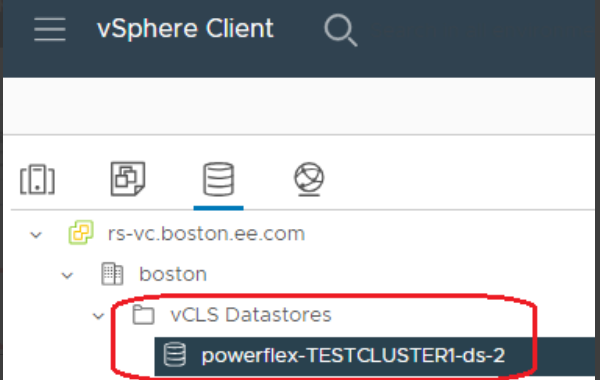
影響を受けるバージョン
PFMP 4.5.x
修正バージョン
PFMPの4.8
Affected Products
PowerFlex rack RCM SoftwareArticle Properties
Article Number: 000225335
Article Type: Solution
Last Modified: 25 Nov 2024
Version: 3
Find answers to your questions from other Dell users
Support Services
Check if your device is covered by Support Services.