PowerFlex 管理平台 - 新增現有資源群組失敗,因為 vCLS 資料存放區位於資料夾中
Summary: 新增現有資源群組作業失敗,因為 PowerFlex Manager (PFxM) 無法偵測到 vSphere 資料夾中的 vCLS 資料存放區。
This article applies to
This article does not apply to
This article is not tied to any specific product.
Not all product versions are identified in this article.
Symptoms
資源組的部署狀態為「錯誤」,這意味著資源組部署(添加現有或部署新)失敗。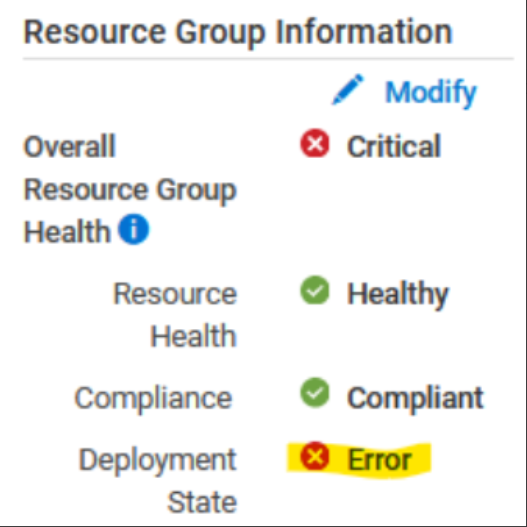
以下錯誤指出資源群組中的資料存放區不屬於 vCenter/資料中心。
若要驗證問題,請輸入精簡型部署程式 Pod,並檢視 rackserver-<servicetag_123> 登入 <device_name> 目錄:
-
進入精簡型部署程式 Pod:
x=$(kubectl get pods -n powerflex|grep -i thin|awk '{print $1}'); kubectl exec -it -n powerflex $x -- bash -
<輸入device_name>目錄:
cd /opt/Dell/ASM/device/<device_name>
-
深入瞭解
rackserver-<servicetag_123>記錄 - 表示找不到資料存放區:Error: datastore object powerflex-TESTCLUSTER1-ds-2 not found Error: /Stage[main]/Asm::Resource_wrapper/Vc_vcls_datastore[TESTCLUSTER1]/ensure: change from 'absent' to 'present' failed: datastore object powerflex-TESTCLUSTER1-ds-2 not found
資料存放區可能仍會顯示在 vCenter 清查檔案 - 清查/rs-vc.boston.ee.com.json:
  {"name"=>"powerflex-TESTCLUSTER1-ds-2",
             "id"=>"datastore-120788",
             "type"=>"Datastore",
             "attributes"=>{"is_local"=>false, "free_space"=>12297699328, "mount_dir"=>"/vmfs/volumes/62e1db72-18264b5c-a653-b8599fc367db",
"volume_name"=>"powerflex-TESTCLUSTER1-ds-2", "capacity"=>15.75, "scsi_device_id"=>"eui.0be0ca503685ed0fea3112de00000004", "vendor"=>"EMC"},
             "children"=>[],
             "path"=>""},
影響
無法新增現有的資源群組/服務。
Cause
PFxM 中的限制導致無法檢視 vCenter 資料夾中的 vCLS 資料存放區。
出現此問題是因為 PFxM 無法在 vCenter 中以遞迴方式搜尋資料夾。
Resolution
從 vSphere 資料儲存檢視中,將與資源群組關聯的 vCLS 資料存放區移出資料夾並移入資料中心: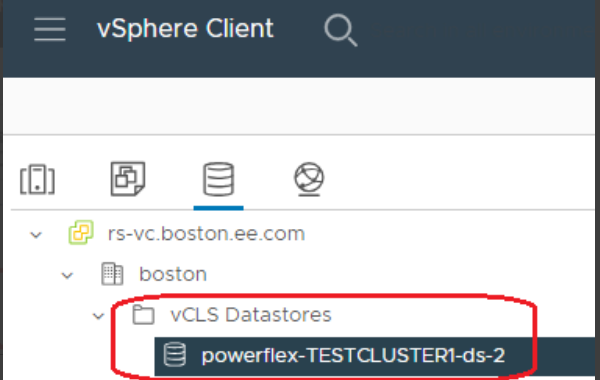
受影響的版本
PFMP 4.5.x
已修正問題的版本
PFMP 4.8
Affected Products
PowerFlex rack RCM SoftwareArticle Properties
Article Number: 000225335
Article Type: Solution
Last Modified: 25 Nov 2024
Version: 3
Find answers to your questions from other Dell users
Support Services
Check if your device is covered by Support Services.