I dispositivi Bluetooth associati non verranno elencati nella scheda Bluetooth ICPS
Summary: Informazioni su Intel Connectivity Performance Suite (ICPS) che non elenca alcuni dispositivi Bluetooth.
This article applies to
This article does not apply to
This article is not tied to any specific product.
Not all product versions are identified in this article.
Symptoms
Alcuni dispositivi Bluetooth non verranno visualizzati in ICPS, ma verranno visualizzati in Windows Bluetooth & Devices. I dispositivi Bluetooth a bassa potenza come la tastiera KB7120W Dell e il mouse Dell MS355 non verranno visualizzati in ICPS come esempio.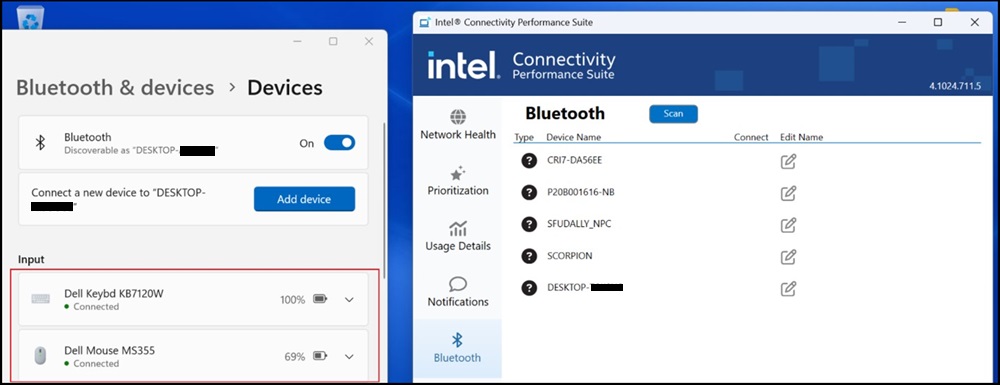
Cause
Si tratta di un problema noto della scheda Bluetooth ICPS.
Resolution
Intel Connectivity Performance Suite
Per risolvere questo problema, scaricare e installare la versione più recente di ICPS:
https://www.intel.com/content/www/us/en/download/738623/intel-connectivity-performance-suite-for-intel-wireless-products.html

Affected Products
Dell Pro Rugged 13 RA13250, Dell Pro Rugged 14 RB14250Article Properties
Article Number: 000233696
Article Type: Solution
Last Modified: 18 Nov 2025
Version: 3
Find answers to your questions from other Dell users
Support Services
Check if your device is covered by Support Services.