Sparowane urządzenia Bluetooth nie będą wymienione na karcie ICPS Bluetooth
Summary: Informacje na temat pakietu Intel Connectivity Performance Suite (ICPS), który nie wymienia niektórych urządzeń Bluetooth.
This article applies to
This article does not apply to
This article is not tied to any specific product.
Not all product versions are identified in this article.
Symptoms
Niektóre urządzenia Bluetooth nie będą wyświetlane w ICPS, ale pojawią się w sekcji Windows Bluetooth & Devices. Urządzenia Bluetooth o niskim poborze mocy, takie jak klawiatura Dell KB7120W i mysz Dell MS355, nie będą wyświetlane w ICPS jako przykład.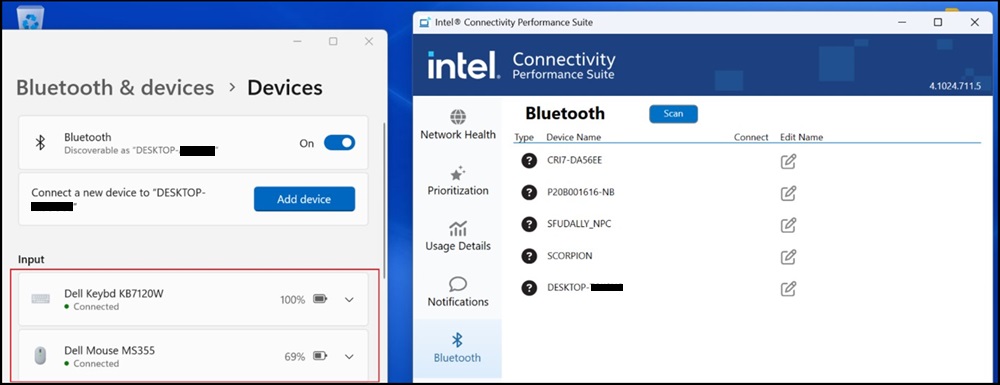
Cause
Jest to znany problem z kartą ICPS Bluetooth.
Resolution
Pakiet Intel Connectivity Performance
Aby rozwiązać ten problem, pobierz i zainstaluj najnowszą wersję ICPS:
https://www.intel.com/content/www/us/en/download/738623/intel-connectivity-performance-suite-for-intel-wireless-products.html

Affected Products
Dell Pro Rugged 13 RA13250, Dell Pro Rugged 14 RB14250Article Properties
Article Number: 000233696
Article Type: Solution
Last Modified: 18 Nov 2025
Version: 3
Find answers to your questions from other Dell users
Support Services
Check if your device is covered by Support Services.