Parkopplade Bluetooth-enheter visas inte på fliken ICPS Bluetooth
Summary: Information om att Intel Connectivity Performance Suite (ICPS) inte listar vissa Bluetooth-enheter.
This article applies to
This article does not apply to
This article is not tied to any specific product.
Not all product versions are identified in this article.
Symptoms
Vissa Bluetooth-enheter visas inte i ICPS, men i Windows Bluetooth och enheter. Bluetooth-enheter med låg effekt, som Dell KB7120W-tangentbordet och Dell MS355-musen, visas inte i ICPS som exempel.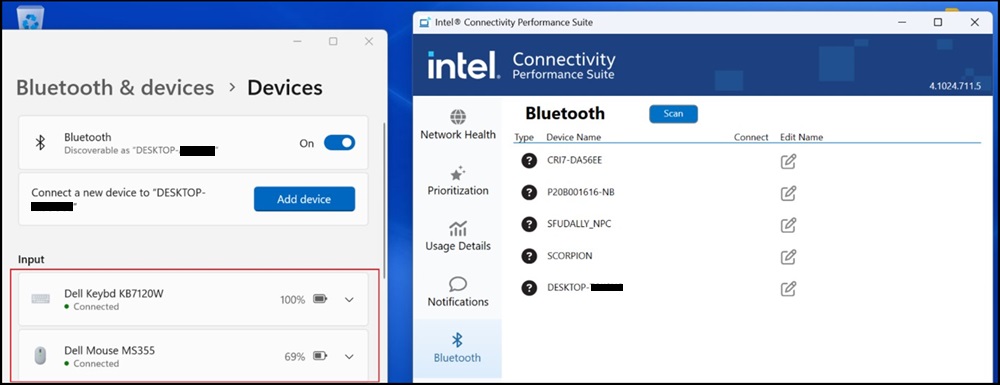
Cause
Det här är ett känt problem med ICPS Bluetooth-fliken.
Resolution
Intel Connectivity Performance Suite
Lös problemet genom att hämta och installera den senaste versionen av ICPS:
https://www.intel.com/content/www/us/en/download/738623/intel-connectivity-performance-suite-for-intel-wireless-products.html

Affected Products
Dell Pro Rugged 13 RA13250, Dell Pro Rugged 14 RB14250Article Properties
Article Number: 000233696
Article Type: Solution
Last Modified: 18 Nov 2025
Version: 3
Find answers to your questions from other Dell users
Support Services
Check if your device is covered by Support Services.