解決錄音中的麥克風失真或間歇性聲音
Summary: 本文提供 Latitude 5455 和 Inspiron 14 5441 使用內建麥克風錄製時,發生聲音失真或間歇性無聲音的相關資訊。
This article applies to
This article does not apply to
This article is not tied to any specific product.
Not all product versions are identified in this article.
Symptoms
將 音訊強化 設定變更為 Microsoft Windows Studio 語音對焦時,使用內建麥克風錄製的音訊有雜訊或無音訊。
將設置更改回預設設置 設備預設效果 沒有問題。
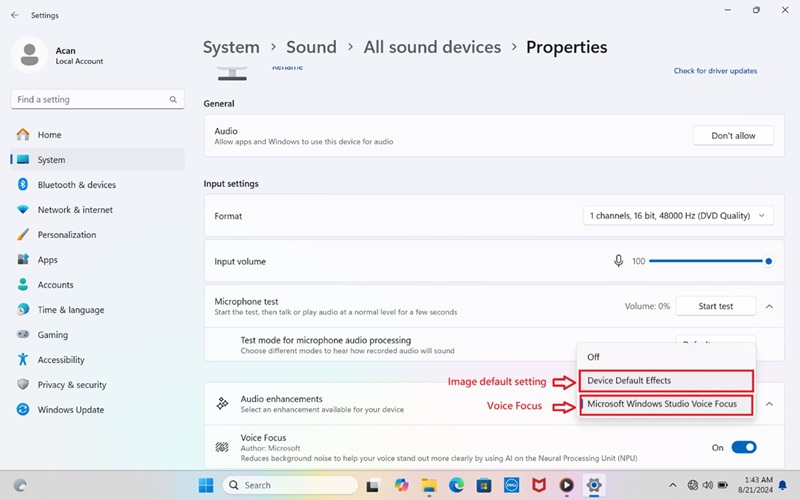
(圖 1 - 聲音屬性)
受影響的平台:
- Latitude 5455
- Inspiron 14 5441
Cause
Windows Studio 語音對焦Microsoft增益設定太高。
Resolution
更新至 Realtek High Definition Audio 驅動程式 1.0.4085.5900 版 或更新版本可解決問題。若要下載和安裝驅動程式,請參閱 如何下載和安裝 Dell 驅動程式。
Affected Products
Inspiron 14 5441, Latitude 5455Article Properties
Article Number: 000237147
Article Type: Solution
Last Modified: 24 Apr 2025
Version: 3
Find answers to your questions from other Dell users
Support Services
Check if your device is covered by Support Services.