録音時のマイクの歪みや断続的な音を解決します
Summary: この記事では、Latitude 5455およびInspiron 14 5441で、オンボード マイクを使用して録音したときに音の歪みが発生したり、断続的に音が出なくなったりすることについて説明します。
This article applies to
This article does not apply to
This article is not tied to any specific product.
Not all product versions are identified in this article.
Symptoms
[オーディオ拡張機能]設定をMicrosoft Windows Studio Voice Focusに変更すると、オンボード マイクを使用して録音されたオーディオの音が歪むか、音が出ません。
設定をデフォルト設定の Device Default Effects に戻しても問題ありません。
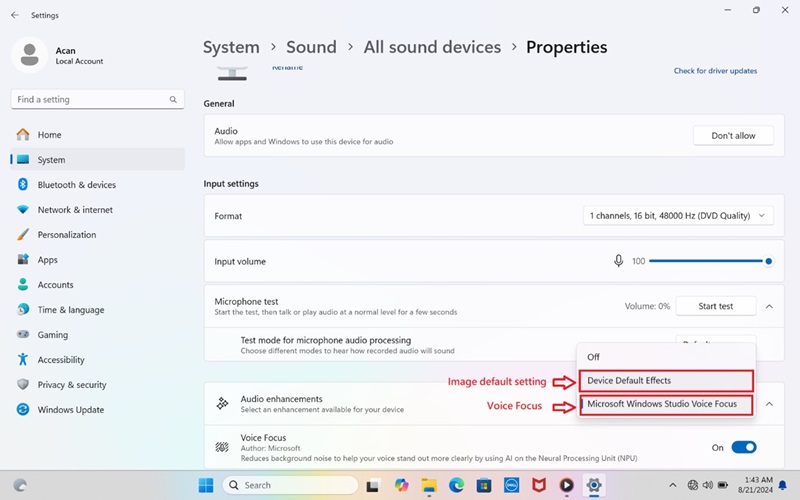
(図1 - サウンドのプロパティ)
影響を受けるプラットフォーム:
- Latitude 5455
- Inspiron 14 5441
Cause
Microsoft Windows Studio Voice Focusのゲイン設定が高すぎます。
Resolution
Realtekハイ デフィニション オーディオ ドライバー バージョン1.0.4085.5900以降にアップデートすると、この問題は解決します。ドライバーをダウンロードしてインストールするには、「 Dellドライバーをダウンロードしてインストールする方法」を参照してください。
Affected Products
Inspiron 14 5441, Latitude 5455Article Properties
Article Number: 000237147
Article Type: Solution
Last Modified: 24 Apr 2025
Version: 3
Find answers to your questions from other Dell users
Support Services
Check if your device is covered by Support Services.