Løs mikrofonforvrengning eller periodisk lyd i opptak
Summary: Artikkelen inneholder informasjon om at Latitude 5455 og Inspiron 14 5441 møter lydforvrengning eller periodevis ingen lyd ved opptak med en innebygd mikrofon.
This article applies to
This article does not apply to
This article is not tied to any specific product.
Not all product versions are identified in this article.
Symptoms
Hvis du endrer innstillingene for lydforbedringer til Microsoft Windows Studio Voice Focus, har lyden som tas opp med en innebygd mikrofon, forvrengt lyd eller ingen lyd.
Det har ikke noe problem å endre innstillingen tilbake til standardinnstillingen Device Default Effects .
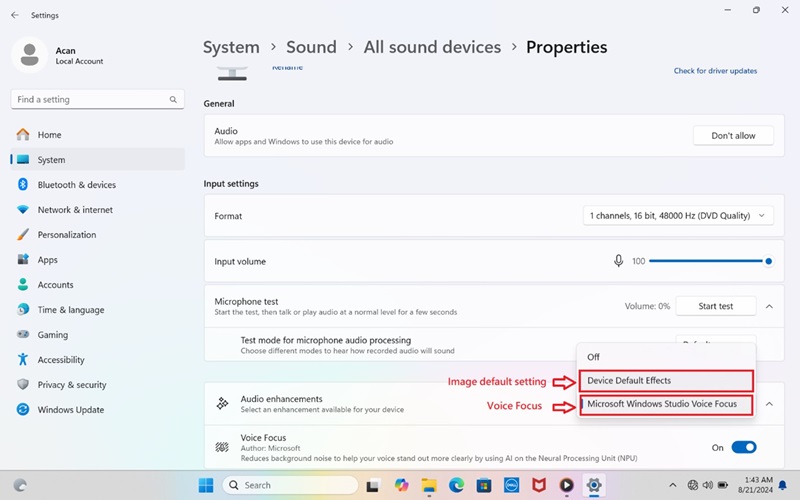
(Figur 1 - Lydegenskaper)
Berørte plattformer:
- Latitude 5455
- Inspiron 14 5441
Cause
Forsterkningsinnstillingen for Microsoft Windows Studio Voice Focus er for høy.
Resolution
Oppdatering til Realtek High Definition Audio Driver versjon 1.0.4085.5900 eller nyere løser problemet. Hvis du vil laste ned og installere driveren, kan du se Laste ned og installere Dell-drivere.
Affected Products
Inspiron 14 5441, Latitude 5455Article Properties
Article Number: 000237147
Article Type: Solution
Last Modified: 24 Apr 2025
Version: 3
Find answers to your questions from other Dell users
Support Services
Check if your device is covered by Support Services.