Smart Charging is Enabled by Default on Inspiron, Latitude, and XPS Laptops with a Qualcomm Processor
Summary: This article provides information about smart charging enabled by default on Inspiron, Latitude, and XPS laptops with a Qualcomm processor.
This article applies to
This article does not apply to
This article is not tied to any specific product.
Not all product versions are identified in this article.
Symptoms
The smart charging is enabled by default on a Dell laptop with a Qualcomm processor running Windows 11. The battery icon has a heart mark added when the battery is 100%, meaning the smart charging is effective.
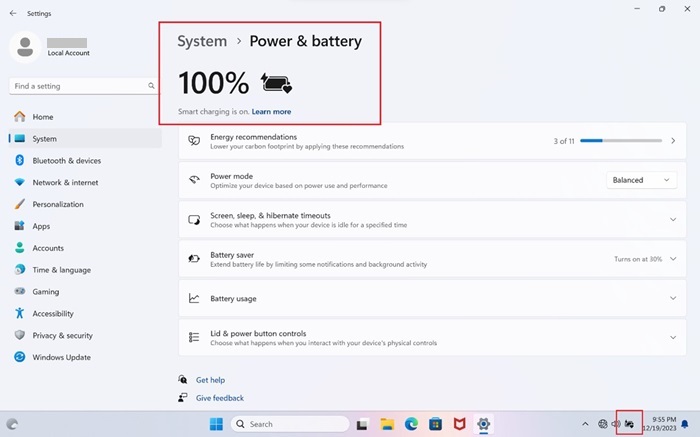
The max charging voltage is reduced to improve battery health condition when the device is in smart charging mode.
Affected Platforms:
- Inspiron 14 5441
- Inspiron 14 Plus 7441
- Latitude 5455
- Latitude 7455
- XPS 13 9345
Cause
This is working as designed.
Resolution
This is working as designed for a Dell laptop with a Qualcomm processor running Windows 11.
Affected Products
Inspiron 14 5441, Inspiron 14 Plus 7441, Latitude 5455, Latitude 7455, XPS 13 9345Article Properties
Article Number: 000261712
Article Type: Solution
Last Modified: 24 Apr 2025
Version: 3
Find answers to your questions from other Dell users
Support Services
Check if your device is covered by Support Services.