NetWorker: How to Import or Replace Certificate Authority Signed Certificates for NMC
Summary: These instructions describe how to replace the default NetWorker self-signed certificate with a CA-signed certificate on a NetWorker Management Console (NMC) server.
This article applies to
This article does not apply to
This article is not tied to any specific product.
Not all product versions are identified in this article.
Instructions
These instructions describe how to replace the default NetWorker self-signed certificate with a CA-signed certificate for the NetWorker Management Console (NMC). This KB provides instructions for both Windows and Linux NMC servers.
The process for replacing the NetWorker server authentication service (AUTHC) and NetWorker Web User Interface (NWUI) self-signed certificates with CA-signed ones are detailed in the following operating system-specific articles:
- NetWorker: How to Import or Replace Certificate Authority Signed Certificates for "AUTHC" and "NWUI" (Linux)
- NetWorker: How to Import or Replace Certificate Authority Signed Certificates for "AUTHC" and "NWUI" (Windows)
Certificates Involved:
-
<server>.csr: NetWorker Management Console Server certificate signing request -
<server>.key: NetWorker Management Console Server private key -
<server>.crt: NetWorker Management Console Server CA-signed certificate -
<CA>.crt: CA root certificate -
<ICA>.crt: CA intermediate certificate (optional if it is available)
NOTE: Where <server> is the shortname of the NMC server.
Before you start:
This process uses the OpenSSL utility. This utility is provided by default on Linux operating systems; however, is not included on Windows systems. Consult with the system administrator regarding installing OpenSSL. The required version of OpenSSL differs depending on the NetWorker version installed.
- NetWorker 19.9 through 19.11 require openssl version 1.1.1n
- NetWorker 19.12.0.0 (Linux only) supports openssl version 3.0.14
- NetWorker 19.12.0.2 (Windows only) supports openssl version 3.0.14
WARNING: If the wrong version of OpenSSL is used, the NMC's GSTD process fails to start NetWorker: NMC GST service starts then immediately shuts down after replacing cakey.pem.
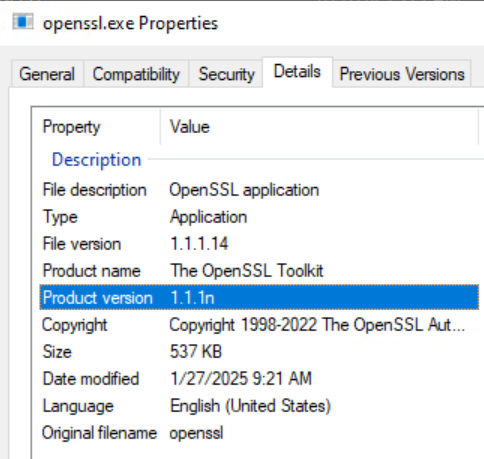
The OpenSSL version can be identified following:
Linux:
# openssl versionWindows:
- From Windows File Explorer, go to the openssl.exe location. This path can differ depending on how OpenSSL was installed.
- Open the openssl.exe file and go to the Details tab. The Product Version field details the OpenSSL version:
Alternatively if the openssl.exe file path is part of the system PATH variable you can run the `openssl version` command from and Administrative command prompt. If the directory containing openssl.exe is not part of the system PATH, change directory (cd) to the directory containing openssl.exe.
Generate a private key and certificate signing request (CSR) file to provide to your CA.
- On the NMC server, use the OpenSSL command-line utility to create the NetWorker server private key file (
<server>.key) and CSR file (<server>.csr).
Linux:
# openssl req -new -newkey rsa:4096 -nodes -out /tmp/<server>.csr -keyout /tmp/<server>.key
Windows:
set openssl="<Full system path to the openssl.exe file>"
%openssl% req -new -newkey rsa:4096 -nodes -out "C:\tmp\<server>.csr" -keyout "C:\tmp\<server>.key"
The CSR and key files can be placed in a location of your choosing if
C:\tmp does not exist.
- Send the CSR file (
<server>.csr) to the CA to generate the CA-signed certificate file (<server>.crt). The CA should provide the CA-signed certificate file (<server>.crt), the root certificate (<CA>.crt), and any intermediate CA certificates (<ICA>.crt).
Linux NetWorker Management Console (NMC) Servers:
- Get the CA signed certificates in either individual key files or a single file in PFX format.
- If the CA signed certificates are in a single PFX file, the private key and CA signed certificate can be extracted as with OpenSSL tool (Windows may not have OpenSSL installed, it can be installed separately).
NOTE: When following this process, ensure that you replace the
.crt and .key files with the full file path, including the file name of your certificate and key files accordingly.
- Extract the private key and CA signed certificate from the PFX file.
Private key:
# openssl pkcs12 -in <file>.pfx -out <server>.key -nodes -nocerts
CA cert:
# openssl pkcs12 -in <file>.pfx -out <server>.crt -nokeys
-
-
- Verify the integrity of the
server.keyandserver.crt.
- Verify the integrity of the
-
NOTE: Ensure that the output shows the same checksum hash from these two outputs. If they are different, there is an issue. If they are the same, go to next step.
Private Key:
# openssl pkey -in <server>.key -pubout -outform pem | sha256sum
CA cert:
# openssl x509 -in <server>.crt -pubkey -noout -outform pem | sha256sum
-
-
- Convert Private Key, CA signed server certificate, root CA (and any intermediate certificates) to PEM format.
-
Private Key:
# openssl rsa -in <server>.key -outform pem -out server.key.pem
CA signed server cert:
# openssl x509 -in <server>.crt -outform pem -out server.crt.pem
Root CA certificate:
# openssl x509 -in CA.crt -outform pem -out CA.crt.pem
Intermediate CA certificate (if available):
# openssl x509 -in ICA.crt -outform pem -out ICA.crt.pem
- Combine the
server.key.pem, rootCA.crt, Intermediate cert (if applicable), and signed server certificate into thecakey.pemfile for NMC:
# cat server.key.pem CA.crt.pem ICA.crt.pem server.crt.pem > cakey.pem
- Shut down the NMC server's
gstservice:
# systemctl stop gst
- Make a copy of the existing
cakey.pemfile, then replace the default file with the file created in step 2, D.
# cp /opt/lgtonmc/etc/cakey.pem /opt/lgtonmc/etc/cakey.pem_orig
# cp cakey.pem /opt/lgtonmc/etc/cakey.pem
NOTE: The
cakey.pem file corresponds to port 9001. Replacing this file with the combined file created in step 2,D replaces the self-signed certificate with the CA signed one.
- Make a copy of the NMC server's
server.crtandserver.keyfiles, then replace the original files with the signedserver.crtandserver.key:
# cp /opt/lgtonmc/apache/conf/server.crt /opt/lgtonmc/apache/conf/server.crt_orig
# cp <server>.crt  /opt/lgtonmc/apache/conf/server.crt
# cp /opt/lgtonmc/apache/conf/server.key /opt/lgtonmc/apache/conf/server.key_orig
# cp <server>.key /opt/lgtonmc/apache/conf/server.key
NOTE: Replacing the above files correspond to port 9000. After replacing the above files, the self-signed certificate for port 9000 is replaced with the CA-signed certificate.
- Start the NMC server's
gstservice:
# systemctl start gst
- Monitor the NMC server's
/opt/lgtonmc/logs/gstd.rawfor any errors.
NetWorker: How to use nsr_render_log to render a .raw log file
NOTE: You can revert to the backup copies of any issues are observed. Using the copy command to overwrite the originals ensures that the files retain the correct ownership and permissions. These files must be owned by the default NMC service account (
nsrnmc) with 600 permissions.
Verification:
When the NMC server's gst service is running, run the following on the NMC server:
openssl s_client -connect localhost:9001 -showcerts 2>/dev/null </dev/null
openssl s_client -connect localhost:9000 -showcerts 2>/dev/null </dev/null
Example:
nve:~ # openssl s_client -connect localhost:9001 -showcerts 2>/dev/null </dev/null
CONNECTED(00000003)
---
Certificate chain
 0 s:/C=CA/ST=Ontario/L=Toronto/O=Dell Technologies/OU=DPD/CN=nve.networker.lan
   i:/C=CA/ST=Ontario/L=Toronto/O=Dell Technologies/OU=DPD/CN=dc.networker.lan
...
...

nve:~ # openssl s_client -connect localhost:9000 -showcerts 2>/dev/null </dev/null
CONNECTED(00000003)
---
Certificate chain
 0 s:/C=CA/ST=Ontario/L=Toronto/O=Dell Technologies/OU=DPD/CN=nve.networker.lan
   i:/C=CA/ST=Ontario/L=Toronto/O=Dell Technologies/OU=DPD/CN=dc.networker.lan
...
...
nve:~ #
Windows NetWorker Management Console (NMC) Servers:
- Get the CA signed certificates in either individual key files or a single file in PFX format.
- If the CA signed certificates are in a single PFX file, the private key and CA signed certificate can be extracted as with OpenSSL tool (Windows does not typically have OpenSSL installed, it can be installed separately).
NOTE: When following this process, ensure that you replace the
.crt and .key files with the full file path, including the file name of your certificate and key files accordingly.
- Extract the private key and CA signed certificate from the PFX file.
Private key:
%openssl% pkcs12 -in <file>.pfx -out <server>.key -nodes -nocerts
CA cert:
%openssl% pkcs12 -in <file>.pfx -out <server>.crt -nokeys
-
-
- Verify the integrity of the
server.keyandserver.crt.
- Verify the integrity of the
-
NOTE: Ensure that the output shows the same checksum hash from these two outputs. If they are different, there is an issue. If they are the same, go to next step.
Private Key:
%openssl% pkey -in <server>.key -pubout -outform pem | %openssl% dgst -sha256
CA cert:
%openssl% x509 -in <server>.crt -pubkey -noout -outform pem | %openssl% dgst -sha256
-
-
- Convert Private Key, CA signed server certificate, root CA (and any intermediate certificates) to PEM format.
-
Private Key:
%openssl% rsa -in <server>.key -outform pem -out C:\tmp\server.key.pem
CA signed server cert:
%openssl% x509 -in <server>.crt -outform pem -out C:\tmp\server.crt.pem
- Combine the
server.key.pemandsever.crt.peminto thecakey.pemfile for NMC. It is recommended to use the following PowerShell command for this:
PS C:\tmp> Get-Content server.key.pem,server.crt.pem | Out-File cakey.pem -Encoding ascii
NOTE: If
-Encoding ascii is not set, the following issue may be observed: NetWorker: Windows NMC server fails to start GSTD service after replacing certificates
- Shut down the NMC server's
gstservice:
net stop gstd
- Make a copy of the original
cakey.pem, then place the combined CA signedcakey.pemin its place:
copy "C:\Program Files\EMC NetWorker\Management\GST\etc\cakey.pem" "C:\Program Files\EMC NetWorker\Management\GST\etc\cakey.pem_orig"
copy C:\tmp\cakey.pem "C:\Program Files\EMC NetWorker\Management\GST\etc\cakey.pem"
NOTE: You are prompted to overwrite the original. Overwrite the certificate as there is a copy of the original. Overwriting the original ensures that file ownership and permissions are retained. The
cakey.pem file corresponds to port 9001. Replacing this file with the combined file created in step 2,D replaces the self-signed certificate with the CA signed one.
- Make a copy of the NMC server's
server.crtandserver.keyfiles, then replace the original files with the signedserver.crtandserver.key:
copy "C:\Program Files\EMC NetWorker\Management\GST\apache\conf\server.crt" "C:\Program Files\EMC NetWorker\Management\GST\apache\conf\server.crt_orig"
copy "C:\Program Files\EMC NetWorker\Management\GST\apache\conf\server.key" "C:\Program Files\EMC NetWorker\Management\GST\apache\conf\server.key_orig"
copy <server>.crt "C:\Program Files\EMC NetWorker\Management\GST\apache\conf\server.crt"
copy <server>.key "C:\Program Files\EMC NetWorker\Management\GST\apache\conf\server.key"
NOTE: Replacing the above files correspond to port 9000. After replacing the above files, the self-signed certificate for port 9000 is replaced with the CA-signed certificate.
- Start the NMC server's
gstservice:
net start gstd
- Monitor the NMC server's
C:\Program Files\EMC NetWorker\Management\GST\logs\gstd.rawfor any errors.
NetWorker: How to use nsr_render_log to render a .raw log file
NOTE: You can revert to the backup copies of any issues are observed. Using the copy command to overwrite the originals ensures that the files retain the correct ownership and permissions. These files must be owned by the default NMC service account (
nsrnmc) with 600 permissions.
Verification:
When the NMC server's gst service is running, run the following from PowerShell on the NMC server, replacing the PORT. Run once for port 9000 and once for port 9001.
param(
    [string]$Server = "localhost",
    [int]$Port = PORT
)

$tcp = [System.Net.Sockets.TcpClient]::new()
$tcp.Connect($Server, $Port)

# Accept any certificate so we can inspect it (this is inspection only)
$ssl = [System.Net.Security.SslStream]::new(
    $tcp.GetStream(),
    $false,
    { param($sender, $cert, $chain, $errors) $true }
)

try {
    # SNI/target host is the $Server value
    $ssl.AuthenticateAsClient($Server)

    $remoteCert = [System.Security.Cryptography.X509Certificates.X509Certificate2]::new($ssl.RemoteCertificate)

    # Some keys use CNG and PublicKey.Key can be $null; fall back safely
    $keySize = try { $remoteCert.PublicKey.Key.KeySize } catch { $null }
    if (-not $keySize) { $keySize = ($remoteCert.PublicKey.EncodedKeyValue.RawData.Length * 8) }

    "=== Certificate (from $($Server):$Port) ==="
    "Subject                 : $($remoteCert.Subject)"
    "Issuer                  : $($remoteCert.Issuer)"
    "NotBefore               : $($remoteCert.NotBefore)"
    "NotAfter                : $($remoteCert.NotAfter)"
    "Public Key              : $($remoteCert.PublicKey.Oid.FriendlyName) ($keySize-bit)"
    "Signature Algorithm     : $($remoteCert.SignatureAlgorithm.FriendlyName)"
}
finally {
    $ssl.Dispose()
    $tcp.Dispose()
}
Example:
PS C:\Users\Administrator.NETWORKER> param(
>>     [string]$Server = "localhost",
>>     [int]$Port = 9001
>> )
PS C:\Users\Administrator.NETWORKER>
PS C:\Users\Administrator.NETWORKER> $tcp = [System.Net.Sockets.TcpClient]::new()
PS C:\Users\Administrator.NETWORKER> $tcp.Connect($Server, $Port)
PS C:\Users\Administrator.NETWORKER>
PS C:\Users\Administrator.NETWORKER> # Accept any certificate so we can inspect it (this is inspection only)
PS C:\Users\Administrator.NETWORKER> $ssl = [System.Net.Security.SslStream]::new(
>>     $tcp.GetStream(),
>>     $false,
>>     { param($sender, $cert, $chain, $errors) $true }
>> )
PS C:\Users\Administrator.NETWORKER>
PS C:\Users\Administrator.NETWORKER> try {
>>     # SNI/target host is the $Server value
>>     $ssl.AuthenticateAsClient($Server)
>>
>>     $remoteCert = [System.Security.Cryptography.X509Certificates.X509Certificate2]::new($ssl.RemoteCertificate)
>>
>>     # Some keys use CNG and PublicKey.Key can be $null; fall back safely
>>     $keySize = try { $remoteCert.PublicKey.Key.KeySize } catch { $null }
>>     if (-not $keySize) { $keySize = ($remoteCert.PublicKey.EncodedKeyValue.RawData.Length * 8) }
>>
>>     "=== Certificate (from $($Server):$Port) ==="
>>     "Subject                 : $($remoteCert.Subject)"
>>     "Issuer                  : $($remoteCert.Issuer)"
>>     "NotBefore               : $($remoteCert.NotBefore)"
>>     "NotAfter                : $($remoteCert.NotAfter)"
>>     "Public Key              : $($remoteCert.PublicKey.Oid.FriendlyName) ($keySize-bit)"
>>     "Signature Algorithm     : $($remoteCert.SignatureAlgorithm.FriendlyName)"
>> }
>> finally {
>>     $ssl.Dispose()
>>     $tcp.Dispose()
>> }
=== Certificate (from localhost:9001) ===
Subject                 : CN=win-srvr02.networker.lan, OU=DPD, O=Dell Technologies, L=Toronto, S=Ontario, C=CA
Issuer                  : CN=dc.networker.lan, OU=DPD, O=Dell Technologies, L=Toronto, S=Ontario, C=CA
NotBefore               : 03/09/2026 15:42:43
NotAfter                : 06/11/2028 15:42:43
Public Key              : RSA (2048-bit)
Signature Algorithm     : sha256RSA

PS C:\Users\Administrator.NETWORKER> param(
>>     [string]$Server = "localhost",
>>     [int]$Port = 9000
>> )
PS C:\Users\Administrator.NETWORKER>
PS C:\Users\Administrator.NETWORKER> $tcp = [System.Net.Sockets.TcpClient]::new()
PS C:\Users\Administrator.NETWORKER> $tcp.Connect($Server, $Port)
PS C:\Users\Administrator.NETWORKER>
PS C:\Users\Administrator.NETWORKER> # Accept any certificate so we can inspect it (this is inspection only)
PS C:\Users\Administrator.NETWORKER> $ssl = [System.Net.Security.SslStream]::new(
>>     $tcp.GetStream(),
>>     $false,
>>     { param($sender, $cert, $chain, $errors) $true }
>> )
PS C:\Users\Administrator.NETWORKER>
PS C:\Users\Administrator.NETWORKER> try {
>>     # SNI/target host is the $Server value
>>     $ssl.AuthenticateAsClient($Server)
>>
>>     $remoteCert = [System.Security.Cryptography.X509Certificates.X509Certificate2]::new($ssl.RemoteCertificate)
>>
>>     # Some keys use CNG and PublicKey.Key can be $null; fall back safely
>>     $keySize = try { $remoteCert.PublicKey.Key.KeySize } catch { $null }
>>     if (-not $keySize) { $keySize = ($remoteCert.PublicKey.EncodedKeyValue.RawData.Length * 8) }
>>
>>     "=== Certificate (from $($Server):$Port) ==="
>>     "Subject                 : $($remoteCert.Subject)"
>>     "Issuer                  : $($remoteCert.Issuer)"
>>     "NotBefore               : $($remoteCert.NotBefore)"
>>     "NotAfter                : $($remoteCert.NotAfter)"
>>     "Public Key              : $($remoteCert.PublicKey.Oid.FriendlyName) ($keySize-bit)"
>>     "Signature Algorithm     : $($remoteCert.SignatureAlgorithm.FriendlyName)"
>> }
>> finally {
>>     $ssl.Dispose()
>>     $tcp.Dispose()
>> }
=== Certificate (from localhost:9000) ===
Subject                 : CN=win-srvr02.networker.lan, OU=DPD, O=Dell Technologies, L=Toronto, S=Ontario, C=CA
Issuer                  : CN=dc.networker.lan, OU=DPD, O=Dell Technologies, L=Toronto, S=Ontario, C=CA
NotBefore               : 03/09/2026 15:42:43
NotAfter                : 06/11/2028 15:42:43
Public Key              : RSA (2048-bit)
Signature Algorithm     : sha256RSA
Additional Information
Even after the NMC's self-signed certificate has been replaced with a CA signed certificate, you may see the following warning during connection to an NMC server from the NMC launcher:
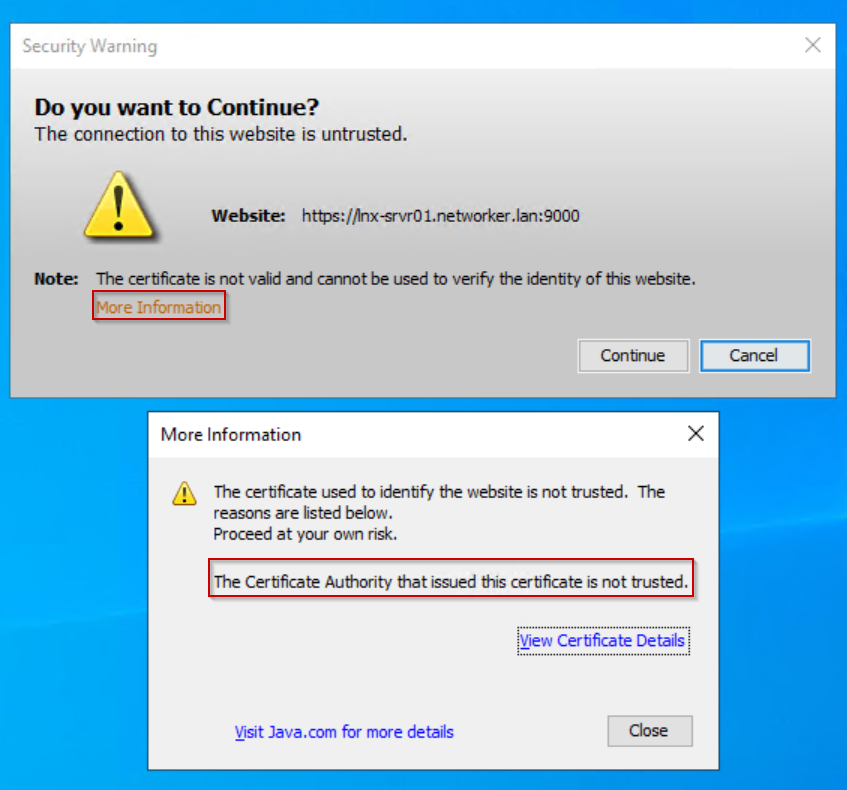
Click "View Certificate Details." The certificate details validate that the CA signed certificate is used.
The warning is appearing because the signed certificate is missing from the NMC client's Trusted Root Certificates.
NOTE: An NMC client is any host used to access the NMC.
This warning can be ignored; optionally, the NMC server's CA signed certificate can also import into the NMC client's Trusted Root Certificates:
- Put the NMC server's CA signed certificate (
<server>.crt) on the NMC client host in a folder of your choosing. - Open the CA signed certificate properties.
- Click Install Certificate.
- Select Local Machine.
- Select Place all certificates in the following store.
- Click Browse.
- Select Trusted Root Certification Authorities, then click OK.
- Click Next.
- Click Finish.
- A message appears stating if the import failed or was successful, click OK.
- On the CA signed certificate properties, click OK.
During the next NMC launch, the Security Warning does not appear.
Affected Products
NetWorker, NetWorker Management ConsoleProducts
NetWorker FamilyArticle Properties
Article Number: 000269947
Article Type: How To
Last Modified: 10 Mar 2026
Version: 9
Find answers to your questions from other Dell users
Support Services
Check if your device is covered by Support Services.