連接至擴充基座的 Dell Pro 14 Plus PB14255無法在家用電腦的 SupportAssist 中顯示正確的顯示器名稱
Summary: 使用 DisplayPort 時,連接至擴充基座的 Dell Pro 14 Plus PB14255可能無法在家用電腦專用的 SupportAssist 中顯示正確的顯示器裝置名稱。
This article applies to
This article does not apply to
This article is not tied to any specific product.
Not all product versions are identified in this article.
Symptoms
連接至受影響擴充基座的 Dell Pro 14 Plus PB14255,可能會將顯示器顯示為 通用:USB 2.1 集線器。家用電腦專用的 SupportAssist 4.6.x 和 4.8.x 版無法顯示顯示器的正確裝置名稱。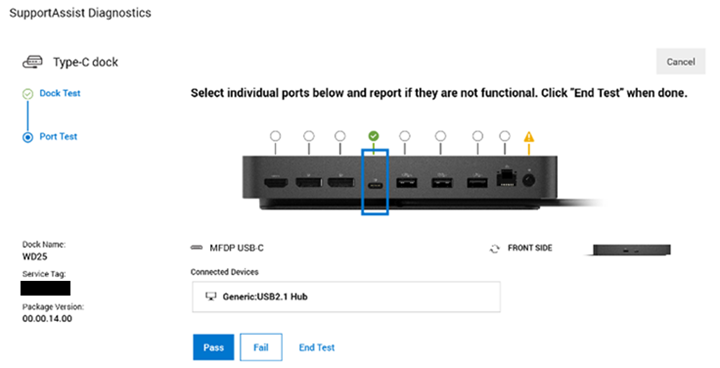
受影響的平台:
- Dell Pro 14 Plus PB14255
受影響的擴充基座:
- Dell 擴充基座 - WD19S
- Dell 擴充基座 WD19
- Dell 效能擴充基座 - WD19DC
- Dell 效能擴充基座 - WD19DCS
- Dell Pro 擴充基座 WD25
- Dell Pro 擴充基座 WD25Z
- Dell Pro 智慧擴充基座 SD25
- Dell Pro Thunderbolt 4 擴充基座 WD25TB4
- Dell Pro Thunderbolt 4 智慧型擴充基座 SD25TB4
- Dell Thunderbolt 擴充基座 - WD19TB
- Dell Thunderbolt 擴充基座 - WD19TBS
受影響的軟體:
- 適用於家用電腦的 SupportAssist (版本 4.6.x 和 4.8.x)
Cause
在 DisplayPort 模式中,無法從多串流傳輸 (MST) 晶片收到正確的資料。
Resolution
工程部門正在開發修正程式,即將在家用電腦專用的 SupportAssist 4.10 版及更新版本中發佈。SupportAssist 4.10 版預計於 2025 年 9 月或 10 月發佈。
Affected Products
Dell Pro 14 Plus PB14255, SupportAssist for Home PCs, Dell Dock WD19, Dell Performance Dock - WD19DC, Dell Performance Dock – WD19DCS, Dell Dock – WD19S, Dell Thunderbolt Dock - WD19TB, Dell Thunderbolt Dock – WD19TBSArticle Properties
Article Number: 000303943
Article Type: Solution
Last Modified: 15 Sept 2025
Version: 3
Find answers to your questions from other Dell users
Support Services
Check if your device is covered by Support Services.