VxRail: After updating the NVIDIA driver, several hosts became unresponsive in vCenter.
Summary: After updating the NVIDIA driver, several hosts became unresponsive in vCenter.
This article applies to
This article does not apply to
This article is not tied to any specific product.
Not all product versions are identified in this article.
Symptoms
After upgrading to 8.0.322 and NVIDIA A40 driver 15.0 (525.60.12), multiple hosts intermittently became unresponsive in vCenter.
Unable to SSH and the DCUI page is also unresponsive, and the only option is to reboot the node.
Host events in vCenter: Ramdisk "var" is full. Therefore, the file /var/run/vmware-hostd-ticket/xxxxxxxx-xxxx-xxxx-xxxx-xxxxxxxxxxxx cannot be written.
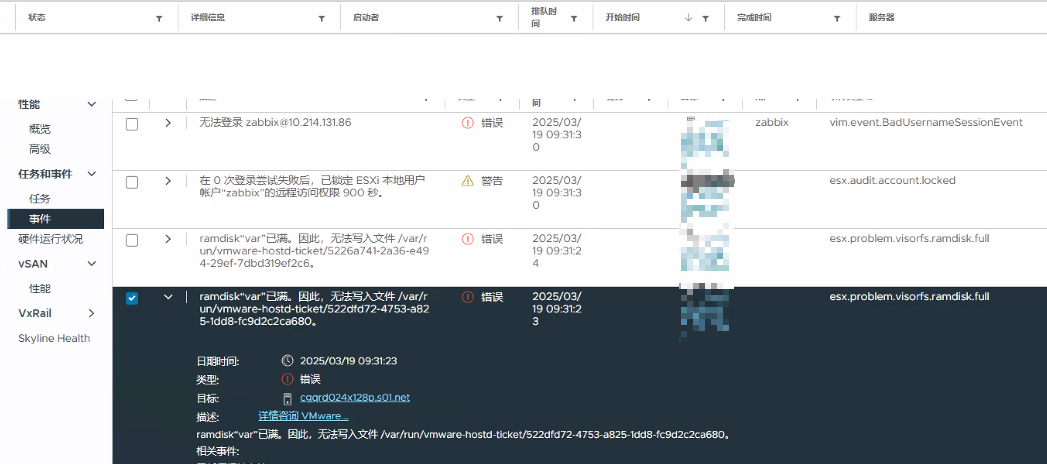
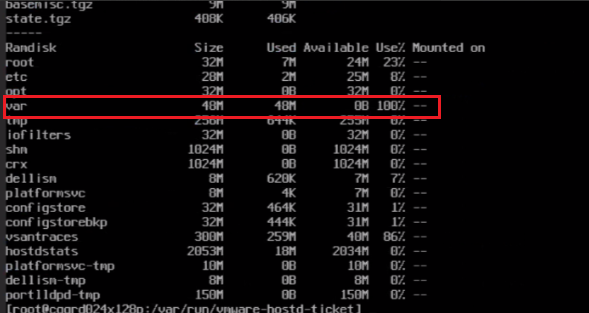
Run "vdf -h" to view the ramdisk partition.
/var space is full, and the host is becoming unresponsive.
[root@node:~] find /var -type f -mmin -1 -exec ls -lh {} +       ---------Repeat this command to find continuously updated files

-rw-r--r--    1 root     root      404.0K Mar 19 06:01 /var/lib/vmware/configstore/backup/current-store-1

-rw-r--r--    1 root     root       12.0K Mar 19 06:01 /var/lib/vmware/configstore/backup/datafile-store

-rw-------    1 root     root           4 Mar 19 06:02 /var/lib/vmware/hostd/events/host.idx

-rw-------    1 root     root       14.9M Mar 19 06:02 /var/lib/vmware/hostd/stats/hostAgentStats-20.stats

-rw-------    1 root     root      529.1K Mar 19 05:59 /var/lib/vmware/hostd/stats/hostAgentStats.idMap

-rw-r--r--    1 root     root           0 Mar 19 06:01 /var/lock/bootbank/7959ecba-9c45cfd8-2eb5-2547f7bdd43d

-rw-r--r--    1 root     root      104.0K Mar 19 05:59 /var/log/configRP.log

-rw-r--r--    1 root     root          41 Mar 19 05:59 /var/log/drivervm-init.log

-rw-r--r--    1 root     root      170.1K Mar 19 05:59 /var/log/nv-hostengine.log  ------- nv-hostengine.log is suspicious compared to lab
Cause
vmkernal.log:
2025-03-18T11:13:30.837Z In(182) vmkernel: cpu0:2101362)Admission failure in path: host/system/visorfs/ramdisks/var:var
2025-03-18T11:13:30.837Z In(182) vmkernel: cpu0:2101362)var (276) requires 4 KB, asked 4 KB from var (275) which has 49152 KB occupied and 0 KB available.
2025-03-18T11:13:30.837Z In(182) vmkernel: cpu0:2101362)Admission failure in path: host/system/visorfs/ramdisks/var:var
2025-03-18T11:13:30.837Z In(182) vmkernel: cpu0:2101362)var (276) requires 4 KB, asked 4 KB from var (275) which has 49152 KB occupied and 0 KB available.
2025-03-18T11:13:30.837Z Wa(180) vmkwarning: cpu0:2101362)WARNING: VisorFSRam: 220: Cannot extend visorfs file /var/log/nv-hostengine.log because its ramdisk (var) is full.
/var/log/nv-hostengine.log:

2025-03-19 14:04:55.308 ERROR [2101996:2101996] Got error 2 from pthread_setname_np with name cache_mgr_event [/workspaces/dcgm-project-ondemand@4/common/DcgmThread/DcgmThread.cpp:105] [DcgmThread::Start]

2025-03-19 14:04:55.308 ERROR [2101996:2101996] Failed to load module 1 - dlopen(libdcgmmodulenvswitch.so.2) returned: libdcgmmodulenvswitch.so.2: cannot open shared object file: No such file or directory [/workspaces/dcgm-project-ondemand@4/dcgmlib/src/DcgmHostEngineHandler.cpp:3634] [DcgmHostEngineHandler::LoadModule]

2025-03-19 14:04:55.308 ERROR [2101996:2101996] ProcessModuleCommand of DCGM_NVSWITCH_SR_GET_SWITCH_IDS returned This request is serviced by a module of DCGM that is not currently loaded [/workspaces/dcgm-project-ondemand@4/dcgmlib/src/DcgmHostEngineHandler.cpp:610] [DcgmHostEngineHandler::GetAllEntitiesOfEntityGroup]

2025-03-19 14:04:55.309 ERROR [2101996:2101996] Got error 2 from pthread_setname_np with name cache_mgr_main [/workspaces/dcgm-project-ondemand@4/common/DcgmThread/DcgmThread.cpp:105] [DcgmThread::Start]

2025-03-19 14:04:55.310 ERROR [2101996:2101996] Got error 2 from pthread_setname_np with name dcgm_ipc [/workspaces/dcgm-project-ondemand@4/common/DcgmThread/DcgmThread.cpp:105] [DcgmThread::Start]

2025-03-19 14:06:55.523 ERROR [2101996:2102011] nvmlVgpuInstanceGetLicenseInfo_v2 for vgpuId 3251634371 failed with error: (9) Driver Not Loaded [/workspaces/dcgm-project-ondemand@4/dcgmlib/src/DcgmCacheManager.cpp:7676] [DcgmCacheManager::BufferOrCacheLatestVgpuValue]

2025-03-19 14:06:56.523 ERROR [2101996:2102011] nvmlVgpuInstanceGetLicenseInfo_v2 for vgpuId 3251634371 failed with error: (9) Driver Not Loaded [/workspaces/dcgm-project-ondemand@4/dcgmlib/src/DcgmCacheManager.cpp:7676] [DcgmCacheManager::BufferOrCacheLatestVgpuValue]

2025-03-19 14:06:57.523 ERROR [2101996:2102011] nvmlVgpuInstanceGetLicenseInfo_v2 for vgpuId 3251634371 failed with error: (9) Driver Not Loaded [/workspaces/dcgm-project-ondemand@4/dcgmlib/src/DcgmCacheManager.cpp:7676] [DcgmCacheManager::BufferOrCacheLatestVgpuValue]
The /var/log/nv-hostengine.log file logs 2–3 lines per second, quickly filling the ESXi /var partition, which has a default limit of 48 MB.
Logs show the NVIDIA driver error filled the "var" ramdisk, causing ESXi to become unresponsive.
Check nv-hostengine.log, and the error matched with NVIDIA KB:
Check the smi version is 525.60.12, mapped the vGPU version 15.0.
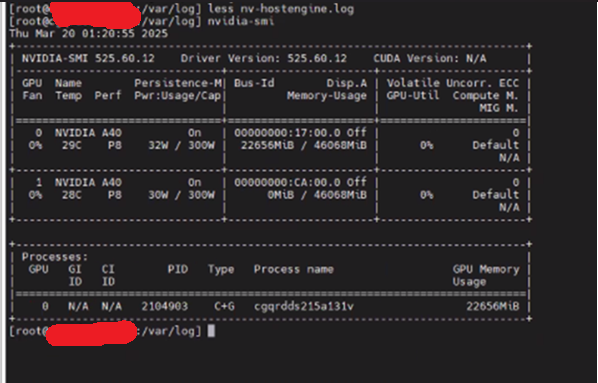
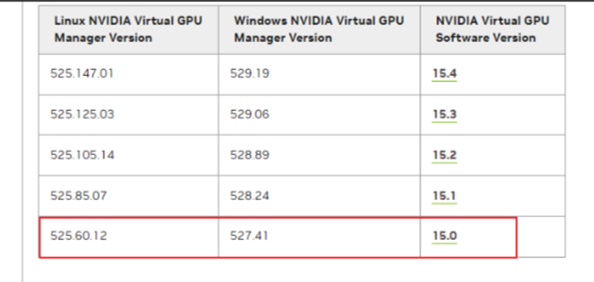
NVIDIA Driver version: https://docs.nvidia.com/vgpu/index.html#driver-versions
Resolution
Reboot the host; nv-hostenginer.log is cleaned and regenerated again. Until the /var is full, the host is unresponsive again.
The problem is a known issue of the driver version 15.0.
The fix is available in vGPU 15.1. The vGPU version 15.1/15.2 is in NVAIE 3.1.
Workaround
Disable the nv-hostengine logging with the following command:
nv-hostengine -t ---------This step should be performed again on host reboots.
After updating the GPU driver to version 15.1, the nv-hostengine.log file is no longer generated. ESXi has been running normally after a week of monitoring.
Affected Products
VxRailArticle Properties
Article Number: 000305677
Article Type: Solution
Last Modified: 09 Apr 2025
Version: 1
Find answers to your questions from other Dell users
Support Services
Check if your device is covered by Support Services.