Data Domain: AWS deployed DDVE: Upgrade precheck failed with Error: Current instance type is M4
Summary: AWS deployed DDVE: Upgrade precheck failed with Error: Current instance type is M4
This article applies to
This article does not apply to
This article is not tied to any specific product.
Not all product versions are identified in this article.
Symptoms
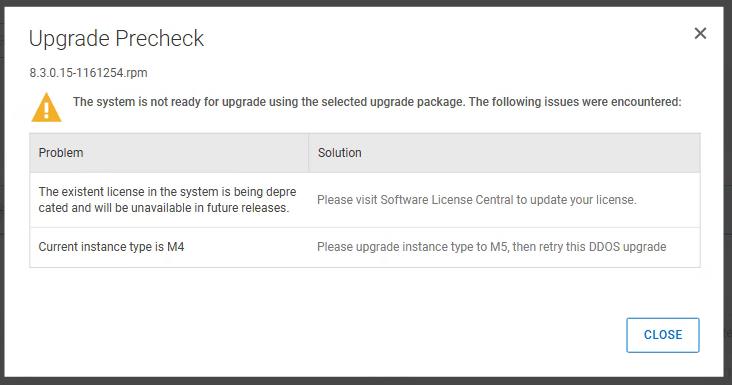
When upgrading a DDVE, prechecks may fail with the below error:
"Current instance type is M4"
Cause
This is because the current instance type is M4. This should be updated to instance type M5/M6i. To benefit from performance improvements, you can upgrade an M4 instance type to the next generation M5/M6i instance type.
Prerequisites:
Ensure that you have DDOS 7.2 or later installed. If you have DDOS versions earlier than 7.2, ensure that you upgrade to 7.2 or later. See Upgrading the DD Systems using DD System Manager section of the DDOS Administration Guide.
NOTE:
● The M6i instance type is supported from DDOS version 7.11. The M5 instance type is supported from DDOS version 7.2.
● From DDOS version 7.13 onwards, the M4 instance type is not supported. If your Dell APEX Protection Storage is running on M4 instance type, the upgrade process terminates when you try to directly upgrade to DDOS versions 7.13 or later. In this scenario, do the following as applicable:
○ If your DDOS version is earlier than 7.7 , it is recommended that you upgrade to version 7.7 first. After upgrading to version 7.7, upgrade the instance type to M5, and then upgrade the DDOS to version 7.13 or later. Optionally, you can upgrade the instance type to M6i.
○ If your DDOS version is 7.7 or later but earlier than 7.11, it is recommended that you upgrade the instance type to M5 , and then upgrade the DDOS version to 7.13 or later. Optionally you can upgrade the instance type to M6i.
○ If your current DDOS version is 7.11 or later, it is recommended that you first upgrade the instance type to M5 or M6i, then upgrade the DDOS version to 7.13 or later.
● If the Dell APEX Protection Storage was initially deployed with marketplace Amazon Machine Image (AMI) corresponding to DDOS version earlier than 6.2, that Dell APEX Protection Storage AMI does support the M5 instance. For such Dell APEX Protection Storage instances, even if DDOS is upgraded to version 7.2 or later, it is not possible to change the instance type from M4 to M5 as the original AMI does not support M5. In this scenario, do the following as applicable:
○ If your current DDOS version is earlier than 6.2, upgrade DDOS to version 6.2 first, and then upgrade from version 6.2 to version 7.7.
○ If the current DDOS version is between versions 6.2 and 7.6, upgrade Dell APEX Protection Storage to 7.7. After DDOS upgrade, perform the system headswap procedure to upgrade the Dell APEX Protection Storage AMI to version 7.7 . After completing the headswap procedure, upgrade instance type to M5. Once you complete this upgrade procedure, you can upgrade DDOS to version 7.13 or later.
Resolution
1. To ensure a clean file system shutdown, run the #system poweroff command.
2. From the AWS management console, change the instance type to one with the same or higher capacity.
Table: Instance type and capacity
| Capacity (TB) | Number of vCPU , memory (GiB) | M4 instance type | M5 instance type | M6i instance type |
| 16 | 4, 16 | m4.xlarge | m5.xlarge | m6i.xlarge |
| 32 | 8, 32 | m4.2xlarge | m5.2xlarge | m6i.2xlarge |
| 96 | 16, 64 | m4.4xlarge | m5.4xlarge | m6i.4xlarge |
| 256 | 32, 128 | N/A | m5.8xlarge | m6i.8xlarge |
NOTE: Alternatively, you can change the instance type with this command (commands/changes needs to be done on AWS console):
aws ec2 modify-instance-attribute --instance-id <instance-id> --instance-type "{\"Value\": \"<M5 instance type> or <M6i instance type>\"}"
For example:
aws ec2 modify-instance-attribute --instance-id i-03abf8df1da1bf061 --instance-type "{\"Value\": \"m5.4xlarge\"}"
3. If you are upgrading from M4 to M5/M6i instance type, enable the ena attribute by using this AWS command:
aws ec2 modify-instance-attribute --instance-id <instance_id> --ena-support
4. To verify that ena support is enabled for the instance, run this AWS command:
aws ec2 describe-instances --instance-ids <instance_id> --query "Reservations[ ].Instances[ ].EnaSupport"
5. From the AWS management console, power on the Dell APEX Protection Storage.
6. On the Dell APEX Protection Storage, verify that the system is up.
After an instance upgrade, it may take some time for the file system to become available due to metadata processing related with rebuilding the index. Run the filesys status command to monitor the progress and verify that the file system status is enabled and running.
7. To confirm that the instance type is an M5 instance type, run the system vresource show current command to confirm the instance type.
Affected Products
Data Domain Virtual EditionArticle Properties
Article Number: 000305989
Article Type: Solution
Last Modified: 09 Apr 2025
Version: 1
Find answers to your questions from other Dell users
Support Services
Check if your device is covered by Support Services.