Windows Night Light Support for External Monitors on an ARM Computer
Summary: Learn about support for Windows Night Light on an external monitor with a Dell ARM-based (Qualcomm) computer.
This article applies to
This article does not apply to
This article is not tied to any specific product.
Not all product versions are identified in this article.
Symptoms
Windows Night Light is a feature that reduces blue light emitted by your display, especially during the evening. This can help improve eye comfort and potentially aid in sleep. You can enable and customize Night Light in Windows 10 and 11 through the Settings app (under System and Display options).
When a Dell ARM-based (Qualcomm) computer is connected to an external monitor and Windows Night Light is enabled for the external monitor, there may be no change seen on the external monitor. Windows Night Light still works on the laptop’s screen when this occurs.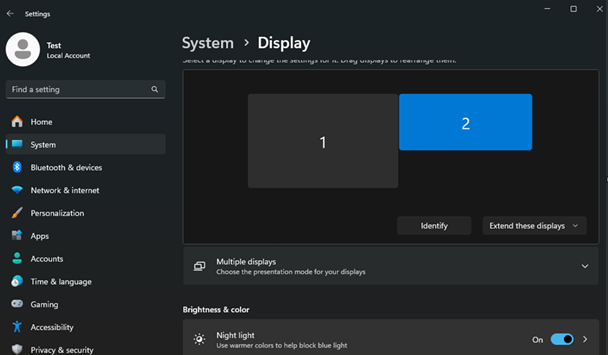
Affected Platforms:
- Inspiron 14 5441
- Inspiron 14 Plus 7441
- Latitude 5455
- Latitude 7455
- XPS 13 9345
Cause
A limitation of the Qualcomm Oryon chipset causes this.
Resolution
This is a limitation of the Qualcomm Oryon chipset. Dell does not plan to support this feature within the current Dell ARM platforms. This feature is expected to be available with the next generation of ARM computers.
The Windows Night Light feature works only with the laptop’s LCD screen.
Workaround:
Dell monitors can use Dell Display and Peripheral Manager to adjust color presets. For more information about the Dell Display and Peripheral Manager application, refer to Dell Display and Peripheral Manager for Windows. To download Dell Display and Peripheral Manager, go to Support for Dell Display and Peripheral Manager - Drivers & Downloads.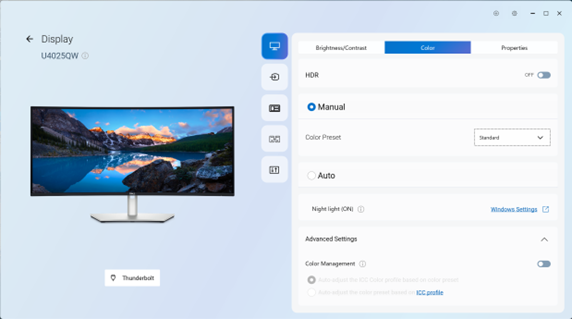
Note: Dell LCD panels have implemented blue light emission reduction.
Affected Products
Inspiron 14 5441, Inspiron 14 Plus 7441, Latitude 5455, Latitude 7455, XPS 13 9345Article Properties
Article Number: 000323182
Article Type: Solution
Last Modified: 15 Sept 2025
Version: 2
Find answers to your questions from other Dell users
Support Services
Check if your device is covered by Support Services.