Aktivní pero Dell není uvedeno v nástroji Dell Display and Peripheral Manager
Summary: Tento článek obsahuje informace o chybějící možnosti aktivního pera Dell v nástroji Dell Display and Peripheral Manager (DDPM).
This article applies to
This article does not apply to
This article is not tied to any specific product.
Not all product versions are identified in this article.
Symptoms
Dotčené produkty:
- Aktivní pero Dell Pro Premium PN5122W
- Aktivní pero Dell Pro Premium PN7522W
Dotčené platformy:
- Dell 14 Plus DB14250
- Dell 16 Plus DB16250
- Dell 14 Plus 2 v 1 DB04250
- Dell 16 Plus 2 v 1 DB06250
- Dell 14 Plus 2 v 1 DB04255
- Inspiron 14 7440 2 v 1
- Inspiron 14 7445 2v1
- Inspiron 14 7430 2 v 1
- Inspiron 16 7630 2 v 1
- Inspiron 14 7435 2v1
- Inspiron 16 7635 2v1
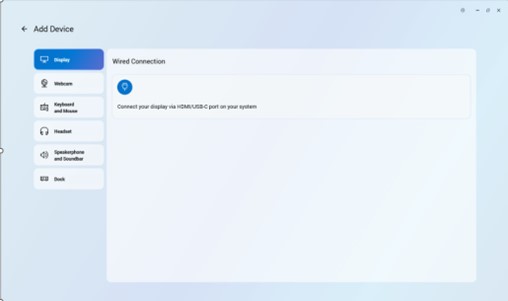
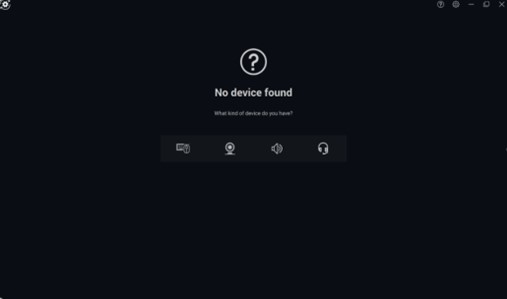
Do aplikace Dell Peripheral Manager nelze přidat aktivní pero Dell, protože chybí ikona pera.
Cause
Problém související s ovladačem
Resolution
Technické oddělení pracuje na opravě, která bude vydána v nástroji DDPM a díky níž nebude nutné instalovat ovladač pera Dell Active Pen samostatně. Aktualizace nástroje DDPM bude zveřejněna na stránce podpory počítače, jakmile bude k dispozici. Datum vydání je únor 2026.
Problém vyřeší aktualizace ovladače pera Dell Active Pen na verzi A00-00 nebo novější . Pokyny ke stažení a instalaci ovladače najdete v článku Jak stáhnout a nainstalovat ovladače Dell .
Affected Products
Dell Pro Plus Active Pen PN5122W, Dell Pro Premium Active Pen PN7522W, Dell 14 Plus 2-in-1 DB04250, Dell 14 Plus 2-in-1 DB04255, Dell 16 Plus 2-in-1 DB06250, Dell 14 Plus DB14250, Dell 16 Plus DB16250, Inspiron 14 7430 2-in-1, Inspiron 14 7435 2-in-1
, Inspiron 14 7440 2-in-1, Inspiron 14 7445 2-in-1, Inspiron 16 7630 2-in-1, Inspiron 16 7635 2-in-1
...
Article Properties
Article Number: 000325971
Article Type: Solution
Last Modified: 24 Sept 2025
Version: 5
Find answers to your questions from other Dell users
Support Services
Check if your device is covered by Support Services.