Dellアクティブ ペンがDell Display and Peripheral Managerに表示されない
Summary: この記事では、Dell Display & Peripheral Manager (DDPM)でDellアクティブ ペン オプションが見つからないことについて説明します。
This article applies to
This article does not apply to
This article is not tied to any specific product.
Not all product versions are identified in this article.
Symptoms
対象製品:
- Dell Proプレミアム アクティブ ペン PN5122W
- Dell Proプレミアム アクティブ ペン PN7522W
影響を受けるプラットフォーム:
- Dell 14 Plus DB14250
- Dell 16 Plus DB16250
- Dell 14 Plus 2-in-1 DB04250
- Dell 16 Plus 2-in-1 DB06250
- Dell 14 Plus 2-in-1 DB04255
- Inspiron 14 7440 2-in-1
- Inspiron 14 7445 2-in-1
- Inspiron 14 7430 2-in-1
- Inspiron 16 7630 2-in-1
- Inspiron 14 7435 2-in-1
- Inspiron 16 7635 2-in-1
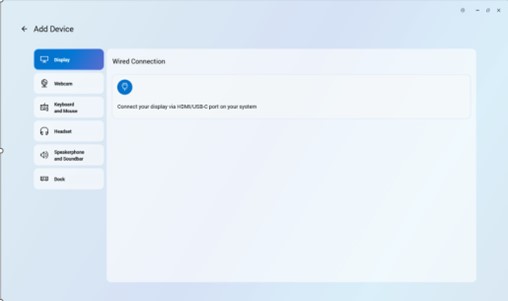
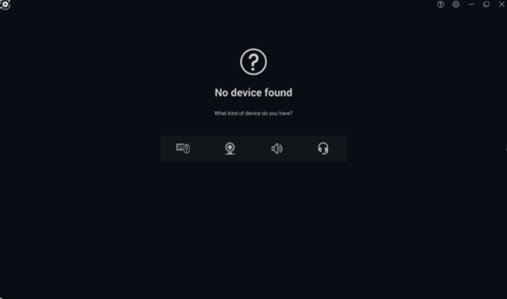
ペン アイコンがないため、 Dellアクティブ ペン を Dell Peripheral Manager アプリケーションに追加できません。
Cause
ドライバー関連の問題
Resolution
エンジニアリング部門は、Dellアクティブ ペン ドライバーを個別にインストールする必要をなくす、DDPMでリリースされる修正に取り組んでいます。DDPMのアップデートが利用可能になると、コンピューターのサポート ページに掲載されます。リリースのETAは2026年2月です。
PCの Dellアクティブ ペン用ドライバーをバージョンA00-00以降に アップデートすると、問題が解決します。ドライバーのダウンロードとインストールの手順については、「 Dellドライバーをダウンロードしてインストール する方法」を参照してください。
Affected Products
Dell Pro Plus Active Pen PN5122W, Dell Pro Premium Active Pen PN7522W, Dell 14 Plus 2-in-1 DB04250, Dell 14 Plus 2-in-1 DB04255, Dell 16 Plus 2-in-1 DB06250, Dell 14 Plus DB14250, Dell 16 Plus DB16250, Inspiron 14 7430 2-in-1, Inspiron 14 7435 2-in-1
, Inspiron 14 7440 2-in-1, Inspiron 14 7445 2-in-1, Inspiron 16 7630 2-in-1, Inspiron 16 7635 2-in-1
...
Article Properties
Article Number: 000325971
Article Type: Solution
Last Modified: 24 Sept 2025
Version: 5
Find answers to your questions from other Dell users
Support Services
Check if your device is covered by Support Services.