Dell Active Pen ist nicht im Dell Display und Peripheral Manager aufgeführt
Summary: Dieser Artikel enthält Informationen über die fehlende Option Dell Active Pen im Dell Display and Peripheral Manager (DDPM).
This article applies to
This article does not apply to
This article is not tied to any specific product.
Not all product versions are identified in this article.
Symptoms
Betroffene Produkte:
- Aktiver Dell Pro Premium-Stift PN5122W
- Aktiver Dell Pro Premium-Stift PN7522W
Betroffene Plattformen:
- Dell 14 Plus DB14250
- Dell 16 Plus DB16250
- Dell 14 Plus 2-in-1-DB04250
- Dell 16 Plus 2-in-1-DB06250
- Dell 14 Plus 2-in-1-DB04255
- Inspiron 14 7440 2-in-1-System
- Inspiron 14 7445 2-in-1-System
- Inspiron 14 7430 2-in-1-System
- Inspiron 16 7630 2-in-1-System
- Inspiron 14 7435 2-in-1-System
- Inspiron 16 7635 2-in-1-System
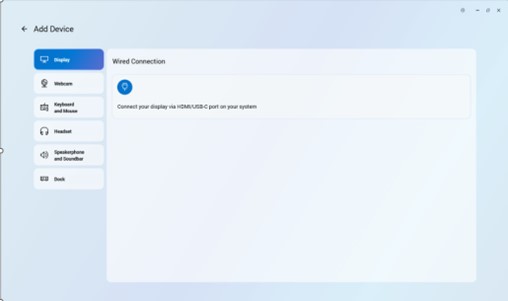
Ein aktiver Dell Stift kann nicht zur Anwendung Dell Peripheral Manager hinzugefügt werden, weil das Stiftsymbol fehlt.

Cause
Treiberproblem
Resolution
Die Entwicklungsabteilung arbeitet an einer Korrektur, die in DDPM veröffentlicht werden soll und die eine separate Installation des Dell Active Pen-Treibers überflüssig macht. Das Update für DDPM wird auf der Supportseite des Computers veröffentlicht, sobald es verfügbar ist. ETA für die Veröffentlichung ist Februar 2026.
Das Aktualisieren des Dell Active Pen-Treibers auf Version A00-00 oder höher auf dem Computer löst das Problem. Anweisungen zum Herunterladen und Installieren von Treibern finden Sie unter Herunterladen und Installieren von Dell Treibern .
Affected Products
Dell Pro Plus Active Pen PN5122W, Dell Pro Premium Active Pen PN7522W, Dell 14 Plus 2-in-1 DB04250, Dell 14 Plus 2-in-1 DB04255, Dell 16 Plus 2-in-1 DB06250, Dell 14 Plus DB14250, Dell 16 Plus DB16250, Inspiron 14 7430 2-in-1, Inspiron 14 7435 2-in-1
, Inspiron 14 7440 2-in-1, Inspiron 14 7445 2-in-1, Inspiron 16 7630 2-in-1, Inspiron 16 7635 2-in-1
...
Article Properties
Article Number: 000325971
Article Type: Solution
Last Modified: 24 Sept 2025
Version: 5
Find answers to your questions from other Dell users
Support Services
Check if your device is covered by Support Services.