Score du bilan de santé PowerProtect affecté par la résolution DNS
Summary: L’appliance PowerProtect Data Manager a été déployée avec les détails de l’environnement initial. Le bilan de santé indique une défaillance de composant, indiquant qu’il y a eu un problème de configuration du serveur de noms de domaine (DNS). Il y a une faute de frappe et les paramètres réseau par défaut peuvent ne pas être mis à jour. ...
This article applies to
This article does not apply to
This article is not tied to any specific product.
Not all product versions are identified in this article.
Symptoms
La page Default Network settings affiche les éléments suivants :
The DNS Servers below cannot resolve the domain name of the virtual machine to the specific IP address.
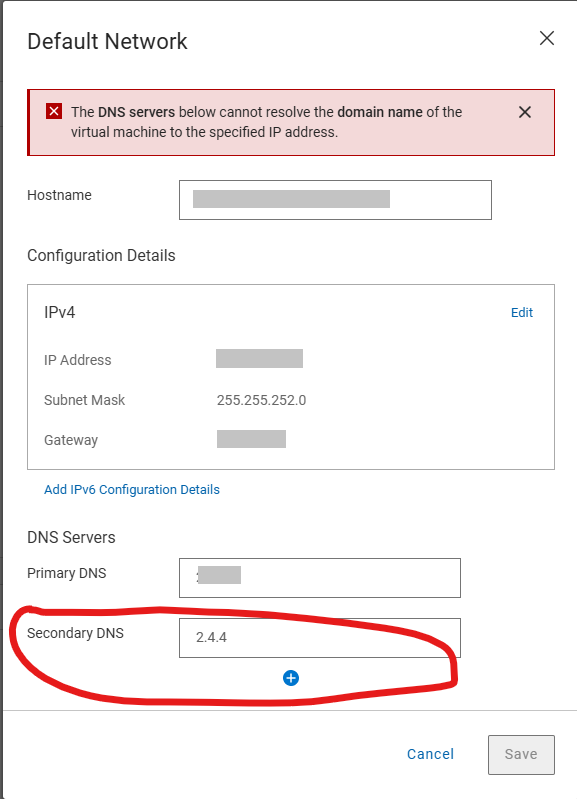
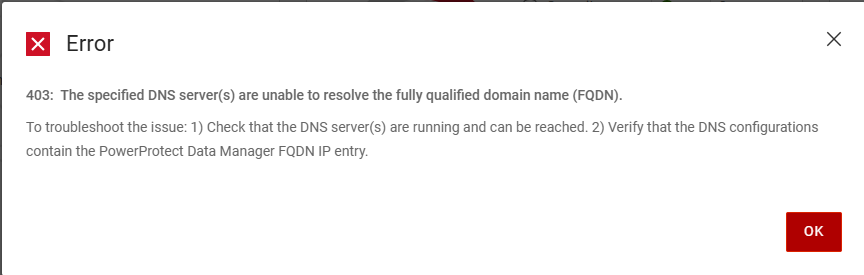
L’erreur suivante est générée lors de la tentative d’enregistrement des détails du serveur DNS corrects sur la page Paramètres réseau par défaut
Error
403: The specific DNS server(s) are unable to resolve the fully qualified domain name (FQDN).
To troubleshoot the issue: 1)Check that the DNS server(s) are running and can be reached. 2) Verify that the DNS configurations contain the PowerProtect Data manager FQDN IP entry.
Le /var/log/brs/sysmgr/sysmgr-health-check.log Montre:
YYYY-MM-DD HH:MM:SS INFO [] [Health-Check] [][][][TRACE_ID:bbd731535f2a4450][] [c.e.b.s.s.h.CDRSHealthCheck.check(72)] -  Start CDRS health check
YYYY-MM-DD HH:MM:SS INFO [] [Health-Check] [][][][TRACE_ID:bbd731535f2a4450][] [c.e.b.s.s.h.CDRSHealthCheck.check(77)] -  CDRA is not enabled, will not perform CDRS health check.
YYYY-MM-DD HH:MM:SS INFO [] [Health-Check] [][][][TRACE_ID:bbd731535f2a4450][] [c.e.b.s.s.h.CDRSHealthCheck.check(97)] -  End CDRS health check
YYYY-MM-DD HH:MM:SS INFO [] [Health-Check] [][][][TRACE_ID:bbd731535f2a4450][] [c.e.b.s.s.h.DiskHealthCheck.check(61)] -  Start disk health check
YYYY-MM-DD HH:MM:SS INFO [] [Health-Check] [][][][TRACE_ID:bbd731535f2a4450][] [c.e.b.s.s.h.ESSettingsHealthCheck.check(40)] -  Start ES settings health check.
YYYY-MM-DD HH:MM:SS INFO [] [Health-Check] [][][][TRACE_ID:bbd731535f2a4450][] [c.e.b.s.s.h.DumpHealthCheck.check(45)] -  Start dump health check
YYYY-MM-DD HH:MM:SS INFO [] [Health-Check] [][][][TRACE_ID:bbd731535f2a4450][] [c.e.b.s.s.h.MemoryHealthCheck.check(73)] -  Start memory health check
YYYY-MM-DD HH:MM:SS INFO [] [Health-Check] [][][][TRACE_ID:bbd731535f2a4450][] [c.e.b.s.s.h.ESSettingsHealthCheck.check(42)] -  ES settings health check finished.
YYYY-MM-DD HH:MM:SS INFO [] [Health-Check] [][][][TRACE_ID:bbd731535f2a4450][] [c.e.b.s.s.h.OsAccountHealthCheck.check(70)] -  Start Os account health check
YYYY-MM-DD HH:MM:SS INFO [] [Health-Check] [][][][TRACE_ID:bbd731535f2a4450][] [c.e.b.s.s.h.NTPHealthCheck.check(62)] -  Start NTP Servers health check.
YYYY-MM-DD HH:MM:SS INFO [] [Health-Check] [][][][TRACE_ID:bbd731535f2a4450][] [c.e.b.s.s.h.ReportingHealthCheck.check(67)] -  Start Reporting health check
YYYY-MM-DD HH:MM:SS INFO [] [Health-Check] [][][][TRACE_ID:bbd731535f2a4450][] [c.e.b.s.s.h.DNSHealthCheck.check(57)] -  Start DNS Servers health check.
YYYY-MM-DD HH:MM:SS INFO [] [Health-Check] [][][][TRACE_ID:bbd731535f2a4450][] [c.e.b.s.s.h.SearchClusterHealthCheck.check(69)] -  Start Search Cluster health check
YYYY-MM-DD HH:MM:SS INFO [] [Health-Check] [][][][TRACE_ID:bbd731535f2a4450][] [c.d.p.c.c.h.e.s.i.ESCatalogHealthCheck.check(51)] -  Start ES Catalog cluster health check.
YYYY-MM-DD HH:MM:SS INFO [] [Health-Check] [][][][TRACE_ID:bbd731535f2a4450][] [c.d.p.c.c.h.e.d.ESHealthCheckDao.checkESShardsHealth(43)] -  es connection port is 14300
YYYY-MM-DD HH:MM:SS INFO [] [Health-Check] [][][][TRACE_ID:bbd731535f2a4450][] [c.d.p.c.c.h.e.s.i.ESCatalogInspector.inspect(54)] -  The cluster status is green
YYYY-MM-DD HH:MM:SS INFO [] [Health-Check] [][][][TRACE_ID:bbd731535f2a4450][] [c.d.p.c.c.h.e.s.i.ESCatalogHealthCheck.check(53)] -  ES Catalog cluster health check finished.
YYYY-MM-DD HH:MM:SS INFO [] [Health-Check] [][][][TRACE_ID:bbd731535f2a4450][] [c.e.b.s.s.h.DumpHealthCheck.check(59)] -  End dump health check
YYYY-MM-DD HH:MM:SS INFO [] [Health-Check] [][][][TRACE_ID:bbd731535f2a4450][] [c.e.b.s.s.h.ReportingHealthCheck.check(90)] -  End Reporting health check
YYYY-MM-DD HH:MM:SS INFO [] [Health-Check] [][][][TRACE_ID:bbd731535f2a4450][] [c.e.b.s.s.h.SearchClusterHealthCheck.check(97)] -  End Search Cluster health check
YYYY-MM-DD HH:MM:SS INFO [] [Health-Check] [][][][TRACE_ID:bbd731535f2a4450][] [c.e.b.s.s.h.OsAccountHealthCheck.check(89)] -  End Os account health check
YYYY-MM-DD HH:MM:SS INFO [] [Health-Check] [][][][TRACE_ID:bbd731535f2a4450][] [c.e.b.s.s.h.MemoryHealthCheck.check(112)] -  End memory health check
YYYY-MM-DD HH:MM:SS INFO [] [Health-Check] [][][][TRACE_ID:bbd731535f2a4450][] [c.e.b.s.s.h.DNSHealthCheck.check(81)] -  Cannot resolve the host my-ppdm.my-domain.com with dns server XXX.XXX.XXX.XXX.
YYYY-MM-DD HH:MM:SS INFO [] [Health-Check] [][][][TRACE_ID:bbd731535f2a4450][] [c.e.b.s.s.h.DNSHealthCheck.check(81)] -  Cannot resolve the host my-ppdm.my-domain.com with dns server XXX.XXX.XXX.
YYYY-MM-DD HH:MM:SS INFO [] [Health-Check] [][][][TRACE_ID:bbd731535f2a4450][] [c.e.b.s.s.h.DNSHealthCheck.check(84)] -  End DNS Servers health check.
YYYY-MM-DD HH:MM:SS INFO [] [Health-Check] [][][][TRACE_ID:bbd731535f2a4450][] [c.e.b.s.s.h.DiskHealthCheck.check(82)] -  End disk health check
YYYY-MM-DD HH:MM:SS INFO [] [Health-Check] [][][][TRACE_ID:bbd731535f2a4450][] [c.e.b.s.s.h.NTPHealthCheck.isNTPServersValid(93)] -  Specified ntp server is valid my-timeserver.my-domain.com
YYYY-MM-DD HH:MM:SS INFO [] [Health-Check] [][][][TRACE_ID:bbd731535f2a4450][] [c.e.b.s.s.h.NTPHealthCheck.check(75)] -  End NTP Servers health check.
YYYY-MM-DD HH:MM:SS INFO [] [Health-Check-Request] [][][][TRACE_ID:bbd731535f2a4450][] [c.d.p.c.c.h.s.i.HealthAlertService.handleResult(52)] -  health check total 11, success 10, failed 1
YYYY-MM-DD HH:MM:SS INFO [] [Health-Check-Request] [][][][TRACE_ID:bbd731535f2a4450][] [c.d.p.c.c.h.s.i.HealthAlertService.onEvent(38)] -  On event SYS0075 None of the specified DNS servers are accessible. []
YYYY-MM-DD HH:MM:SS INFO [] [Health-Check-Request] [][][][TRACE_ID:bbd731535f2a4450][] [c.d.p.c.c.h.s.i.HealthCheckPersistenceSubscriber.onComplete(66)] -  health check entity 02538bab-2ff8-4ee4-bc57-0a40c1061ca1 is completed and persisted
Cause
Une faute de frappe s’est produite dans les paramètres réseau par défaut lors du déploiement initial. La post-configuration du réseau par défaut dispose d’une validation pour les entrées du serveur DNS, mais le déploiement initial n’effectue pas de validation. La validation échoue à cause de la faute de frappe et ne permet pas de modifier les paramètres.
Resolution
Les serveurs DNS peuvent être mis à jour à l’aide de PowerProtect /usr/local/brs/puppet/manifests/extdata/common.json Fichier de configuration. Assurez-vous qu’aucune tâche de sauvegarde ou de restauration n’est en cours d’exécution dans l’environnement, car elles nécessitent un redémarrage de l’appliance PowerProtect pour appliquer les modifications.
- Vérifiez qu’il n’y a pas de sessions de sauvegarde ou de restauration actives.
- Ouvrez une session SSH sur PowerProtect Data Manager et authentifiez-vous avec le compte admin.
- Confirmez les paramètres actuels du
common.jsonFichier de configuration :cat /usr/local/brs/puppet/manifests/extdata/common.json - Ouvrez le
common.jsonfichier de configuration et modifiez le fichierdnsServersValeurs:vi /usr/local/brs/puppet/manifests/extdata/common.json

- Confirmez les paramètres actuels du
common.jsonFichier de configuration :cat /usr/local/brs/puppet/manifests/extdata/common.json - Redémarrez l’appliance PowerProtect :
sudo reboot - Autorisez l’appliance PowerProtect à s’initialiser complètement
- Vérifiez que les paramètres réseau par défaut ont été correctement mis à jour.
Article Properties
Article Number: 000343331
Article Type: Solution
Last Modified: 18 Jul 2025
Version: 1
Find answers to your questions from other Dell users
Support Services
Check if your device is covered by Support Services.