Punteggio del controllo integrità di PowerProtect influenzato dalla risoluzione DNS
Summary: L'appliance PowerProtect Data Manager è stato implementato con i dettagli iniziali dell'ambiente. Il controllo integrità mostra un guasto del componente indicante che si è verificato un problema di configurazione DNS (Domain Name Server). Si è verificato un errore di battitura e le impostazioni di rete predefinite potrebbero non essere aggiornate. ...
This article applies to
This article does not apply to
This article is not tied to any specific product.
Not all product versions are identified in this article.
Symptoms
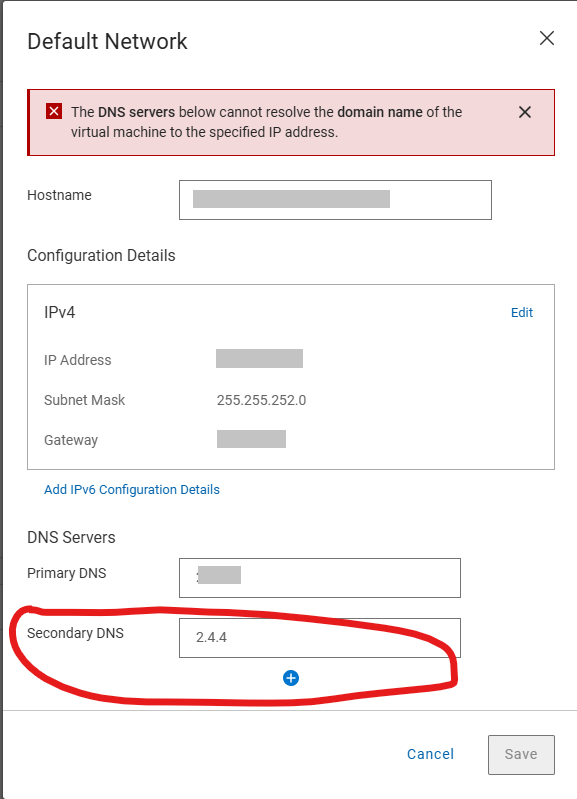
La pagina delle impostazioni di rete predefinite mostra:
The DNS Servers below cannot resolve the domain name of the virtual machine to the specific IP address.
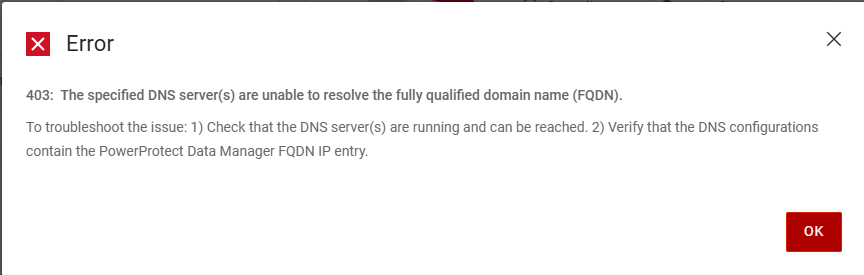
Il seguente errore viene generato quando si tenta di salvare i dettagli corretti del server DNS nella pagina delle impostazioni di rete predefinite
Error
403: The specific DNS server(s) are unable to resolve the fully qualified domain name (FQDN).
To troubleshoot the issue: 1)Check that the DNS server(s) are running and can be reached. 2) Verify that the DNS configurations contain the PowerProtect Data manager FQDN IP entry.
La colonna /var/log/brs/sysmgr/sysmgr-health-check.log Mostra:
YYYY-MM-DD HH:MM:SS INFO [] [Health-Check] [][][][TRACE_ID:bbd731535f2a4450][] [c.e.b.s.s.h.CDRSHealthCheck.check(72)] -  Start CDRS health check
YYYY-MM-DD HH:MM:SS INFO [] [Health-Check] [][][][TRACE_ID:bbd731535f2a4450][] [c.e.b.s.s.h.CDRSHealthCheck.check(77)] -  CDRA is not enabled, will not perform CDRS health check.
YYYY-MM-DD HH:MM:SS INFO [] [Health-Check] [][][][TRACE_ID:bbd731535f2a4450][] [c.e.b.s.s.h.CDRSHealthCheck.check(97)] -  End CDRS health check
YYYY-MM-DD HH:MM:SS INFO [] [Health-Check] [][][][TRACE_ID:bbd731535f2a4450][] [c.e.b.s.s.h.DiskHealthCheck.check(61)] -  Start disk health check
YYYY-MM-DD HH:MM:SS INFO [] [Health-Check] [][][][TRACE_ID:bbd731535f2a4450][] [c.e.b.s.s.h.ESSettingsHealthCheck.check(40)] -  Start ES settings health check.
YYYY-MM-DD HH:MM:SS INFO [] [Health-Check] [][][][TRACE_ID:bbd731535f2a4450][] [c.e.b.s.s.h.DumpHealthCheck.check(45)] -  Start dump health check
YYYY-MM-DD HH:MM:SS INFO [] [Health-Check] [][][][TRACE_ID:bbd731535f2a4450][] [c.e.b.s.s.h.MemoryHealthCheck.check(73)] -  Start memory health check
YYYY-MM-DD HH:MM:SS INFO [] [Health-Check] [][][][TRACE_ID:bbd731535f2a4450][] [c.e.b.s.s.h.ESSettingsHealthCheck.check(42)] -  ES settings health check finished.
YYYY-MM-DD HH:MM:SS INFO [] [Health-Check] [][][][TRACE_ID:bbd731535f2a4450][] [c.e.b.s.s.h.OsAccountHealthCheck.check(70)] -  Start Os account health check
YYYY-MM-DD HH:MM:SS INFO [] [Health-Check] [][][][TRACE_ID:bbd731535f2a4450][] [c.e.b.s.s.h.NTPHealthCheck.check(62)] -  Start NTP Servers health check.
YYYY-MM-DD HH:MM:SS INFO [] [Health-Check] [][][][TRACE_ID:bbd731535f2a4450][] [c.e.b.s.s.h.ReportingHealthCheck.check(67)] -  Start Reporting health check
YYYY-MM-DD HH:MM:SS INFO [] [Health-Check] [][][][TRACE_ID:bbd731535f2a4450][] [c.e.b.s.s.h.DNSHealthCheck.check(57)] -  Start DNS Servers health check.
YYYY-MM-DD HH:MM:SS INFO [] [Health-Check] [][][][TRACE_ID:bbd731535f2a4450][] [c.e.b.s.s.h.SearchClusterHealthCheck.check(69)] -  Start Search Cluster health check
YYYY-MM-DD HH:MM:SS INFO [] [Health-Check] [][][][TRACE_ID:bbd731535f2a4450][] [c.d.p.c.c.h.e.s.i.ESCatalogHealthCheck.check(51)] -  Start ES Catalog cluster health check.
YYYY-MM-DD HH:MM:SS INFO [] [Health-Check] [][][][TRACE_ID:bbd731535f2a4450][] [c.d.p.c.c.h.e.d.ESHealthCheckDao.checkESShardsHealth(43)] -  es connection port is 14300
YYYY-MM-DD HH:MM:SS INFO [] [Health-Check] [][][][TRACE_ID:bbd731535f2a4450][] [c.d.p.c.c.h.e.s.i.ESCatalogInspector.inspect(54)] -  The cluster status is green
YYYY-MM-DD HH:MM:SS INFO [] [Health-Check] [][][][TRACE_ID:bbd731535f2a4450][] [c.d.p.c.c.h.e.s.i.ESCatalogHealthCheck.check(53)] -  ES Catalog cluster health check finished.
YYYY-MM-DD HH:MM:SS INFO [] [Health-Check] [][][][TRACE_ID:bbd731535f2a4450][] [c.e.b.s.s.h.DumpHealthCheck.check(59)] -  End dump health check
YYYY-MM-DD HH:MM:SS INFO [] [Health-Check] [][][][TRACE_ID:bbd731535f2a4450][] [c.e.b.s.s.h.ReportingHealthCheck.check(90)] -  End Reporting health check
YYYY-MM-DD HH:MM:SS INFO [] [Health-Check] [][][][TRACE_ID:bbd731535f2a4450][] [c.e.b.s.s.h.SearchClusterHealthCheck.check(97)] -  End Search Cluster health check
YYYY-MM-DD HH:MM:SS INFO [] [Health-Check] [][][][TRACE_ID:bbd731535f2a4450][] [c.e.b.s.s.h.OsAccountHealthCheck.check(89)] -  End Os account health check
YYYY-MM-DD HH:MM:SS INFO [] [Health-Check] [][][][TRACE_ID:bbd731535f2a4450][] [c.e.b.s.s.h.MemoryHealthCheck.check(112)] -  End memory health check
YYYY-MM-DD HH:MM:SS INFO [] [Health-Check] [][][][TRACE_ID:bbd731535f2a4450][] [c.e.b.s.s.h.DNSHealthCheck.check(81)] -  Cannot resolve the host my-ppdm.my-domain.com with dns server XXX.XXX.XXX.XXX.
YYYY-MM-DD HH:MM:SS INFO [] [Health-Check] [][][][TRACE_ID:bbd731535f2a4450][] [c.e.b.s.s.h.DNSHealthCheck.check(81)] -  Cannot resolve the host my-ppdm.my-domain.com with dns server XXX.XXX.XXX.
YYYY-MM-DD HH:MM:SS INFO [] [Health-Check] [][][][TRACE_ID:bbd731535f2a4450][] [c.e.b.s.s.h.DNSHealthCheck.check(84)] -  End DNS Servers health check.
YYYY-MM-DD HH:MM:SS INFO [] [Health-Check] [][][][TRACE_ID:bbd731535f2a4450][] [c.e.b.s.s.h.DiskHealthCheck.check(82)] -  End disk health check
YYYY-MM-DD HH:MM:SS INFO [] [Health-Check] [][][][TRACE_ID:bbd731535f2a4450][] [c.e.b.s.s.h.NTPHealthCheck.isNTPServersValid(93)] -  Specified ntp server is valid my-timeserver.my-domain.com
YYYY-MM-DD HH:MM:SS INFO [] [Health-Check] [][][][TRACE_ID:bbd731535f2a4450][] [c.e.b.s.s.h.NTPHealthCheck.check(75)] -  End NTP Servers health check.
YYYY-MM-DD HH:MM:SS INFO [] [Health-Check-Request] [][][][TRACE_ID:bbd731535f2a4450][] [c.d.p.c.c.h.s.i.HealthAlertService.handleResult(52)] -  health check total 11, success 10, failed 1
YYYY-MM-DD HH:MM:SS INFO [] [Health-Check-Request] [][][][TRACE_ID:bbd731535f2a4450][] [c.d.p.c.c.h.s.i.HealthAlertService.onEvent(38)] -  On event SYS0075 None of the specified DNS servers are accessible. []
YYYY-MM-DD HH:MM:SS INFO [] [Health-Check-Request] [][][][TRACE_ID:bbd731535f2a4450][] [c.d.p.c.c.h.s.i.HealthCheckPersistenceSubscriber.onComplete(66)] -  health check entity 02538bab-2ff8-4ee4-bc57-0a40c1061ca1 is completed and persisted
Cause
Si è verificato un errore di battitura e le impostazioni di rete predefinite durante il deployment iniziale. La post-configurazione per la rete predefinita prevede la convalida per le voci del server DNS, ma il deployment iniziale non esegue alcuna convalida. La convalida non riesce nell'errore di battitura e non consente la modifica delle impostazioni.
Resolution
I server DNS possono essere aggiornati utilizzando PowerProtect /usr/local/brs/puppet/manifests/extdata/common.json file di configurazione. Assicurarsi che non vi siano backup o processi di restore in esecuzione nell'ambiente in quanto è necessario riavviare l'appliance PowerProtect per applicare le modifiche.
- Verificare che non vi siano sessioni di backup o restore attive.
- Aprire una sessione SSH in PowerProtect Data Manager ed eseguire l'autenticazione con l'account amministratore.
- Confermare le impostazioni correnti di
common.jsonFile di configurazione:cat /usr/local/brs/puppet/manifests/extdata/common.json - Aprire il file
common.jsonfile di configurazione e modificare il filednsServersvalori:vi /usr/local/brs/puppet/manifests/extdata/common.json

- Confermare le impostazioni correnti di
common.jsonFile di configurazione:cat /usr/local/brs/puppet/manifests/extdata/common.json - Riavviare l'appliance PowerProtect:
sudo reboot - Consentire all'appliance PowerProtect di inizializzarsi completamente
- Verificare che le impostazioni di rete predefinite siano state aggiornate correttamente.
Article Properties
Article Number: 000343331
Article Type: Solution
Last Modified: 18 Jul 2025
Version: 1
Find answers to your questions from other Dell users
Support Services
Check if your device is covered by Support Services.