PowerEdge: XE9685L Reseating NVMe drives cause Mellanox NICs to disappear in RHEL 9.4
Summary: Mellanox Network Interface Controllers (NIC) disappear in RHEL 9.4 when NVMe drives are reseated.
This article applies to
This article does not apply to
This article is not tied to any specific product.
Not all product versions are identified in this article.
Symptoms
Mellanox NICs disappear from the Red Hat Enterprise Linux (RHEL) version 9.4 if NVMe drives are reseated. Replacing or swapping out an NVMe drive also triggers this symptom.
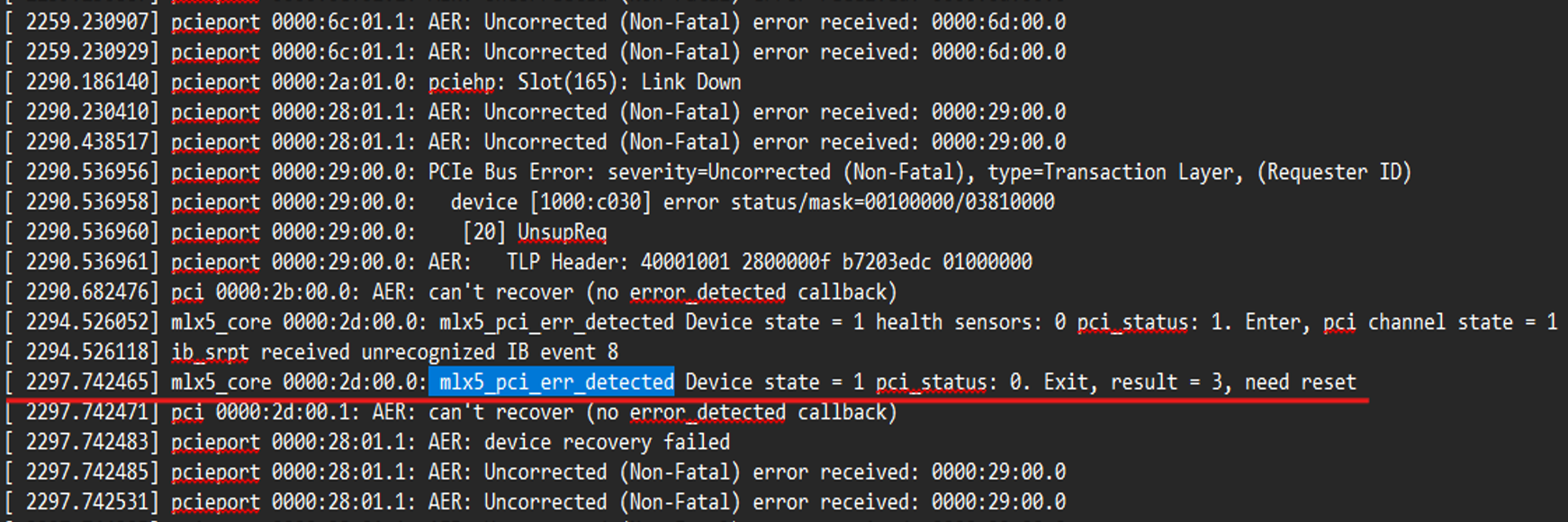
The following screenshot displays an example of error events recorded when an NVMe drive is reseated. Error events are displayed with "ip -br a" and "ifconfig" commands.
Figure 1: Error Events
NOTE: This issue is seen only in RHEL 9.4 and no other Linux operating systems.
Cause
PCI BAR allocation conflict
Resolution
This issue is resolved in the RHEL 9.6.z kernel.
The issue is limited only to RHEL 9.4 and is not seen on any other Linux operating system. Three workarounds have been prescribed for use in RHEL 9.4. None of the following require a restart of the operating system.
- Toggle the PCIe secondary bus reset bit using
setpci.
setpci -s 5b:00.0 BRIDGE_CONTROL=0x40sleep 1setpci -s 5b:00.0 BRIDGE_CONTROL=0x00
- Rescan devices (coldest software reset).
NOTE: The following commands remove the device from the kernel and then reenumerates it on the PCI bus.
echo 1 > /sys/bus/pci/devices/0000:5b:00.0/removeecho 1 > /sys/bus/pci/rescan
- Reload the driver mlx5_ib & mlx5_core.
rmmod mlx5_ibrmmod mlx5_coremodprobe mlx5_ibmodprobe mlx5_core
This article is updated as more information becomes available.
Affected Products
Mellanox Family of Adapters, PowerEdge XE9685L, Red Hat Enterprise Linux Version 9Article Properties
Article Number: 000356827
Article Type: Solution
Last Modified: 23 Mar 2026
Version: 3
Find answers to your questions from other Dell users
Support Services
Check if your device is covered by Support Services.