Virtuelle PPDM-Maschine startet nicht Warnung: dracut-initqueue: Timeout-Skripte werden gestartet
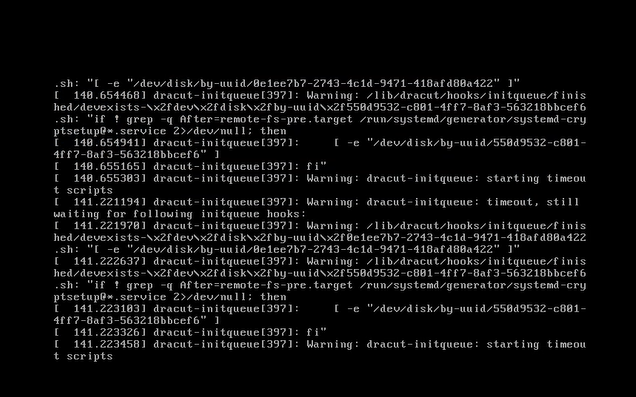
Summary: PowerProtect Data Manager (PPDM) kann nicht gestartet werden mit der Meldung "Warning: dracut-initqueue: starting timeout scripts", nachdem der Small Computer System Interface (SCSI)-Controller von "LSI Logic Parallel" geändert wurde ...
This article applies to
This article does not apply to
This article is not tied to any specific product.
Not all product versions are identified in this article.
Symptoms
Startproblem mit PowerProtect Data Manager
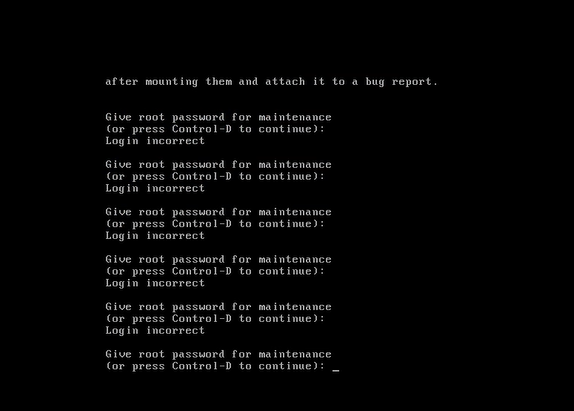
Die virtuelle PPDM-Maschine wird nicht gestartet und die Warnmeldung wird in der Konsole angezeigt: “Warning: dracut-initqueue: starting timeout scripts“
Cause
Ursache des Problems
Die Ursache des Problems hängt mit der Konfiguration des PPDM-SCSI-Controllers zusammen.
- Der PPDM-SCSI-Controller wurde in einen anderen als "LSI Logic Parallel" geändert.
Diese Änderung in der Controller-Konfiguration führte zum PPDM-Startproblem
Resolution
Problemlösung bei PPDM-Starts.
Um das PPDM-Startproblem zu beheben, ändern Sie den PPDM-SCSI-Controller in "LSI Logic Parallel".
Dies kann durch Ändern der Einstellungen der virtuellen PPDM-Maschine in vSphere erfolgen.
Nach dieser Änderung sollte die PPDM-Instanz ohne Probleme gestartet werden.
Affected Products
PowerProtect Data ManagerArticle Properties
Article Number: 000357133
Article Type: Solution
Last Modified: 23 May 2026
Version: 3
Find answers to your questions from other Dell users
Support Services
Check if your device is covered by Support Services.