Unisphere for VMAX: Unisphere에서 Workload Planner가 작동하는 방식
Summary: Unisphere for VMAX/PowerMax에서 STABLE, MARGINAL 및 CRITICAL 규정 준수 알림은 무엇을 의미합니까?
This article applies to
This article does not apply to
This article is not tied to any specific product.
Not all product versions are identified in this article.
Instructions
종종 고객은 스토리지 그룹이 MARGINAL 또는 CRITICAL로 표시되는 이유를 알고 싶어합니다.
설명은 다음과 같습니다.
Unisphere for PowerMax는 30분마다 스토리지 그룹의 성능을 평가하고 적절한 알림 수준을 트리거합니다.
스토리지 그룹(워크로드)이 규정을 준수한다는 것은 연결된 응답 시간 범위 내에서 작동 중임을 의미합니다. 스토리지 그룹의 규정 준수 여부를 평가할 때 Workload Planner는 지난 4시간 및 지난 2주 동안의 가중치가 적용된 응답 시간을 계산합니다.
그런 다음 Workload Planner는 두 값을 지정된 서비스 수준과 관련된 최대 응답 시간과 비교합니다. 계산된 두 값이 모두 서비스 수준에서 정의된 응답 시간 대역 내(미만)에 속하는 경우 규정 준수 상태는 STABLE입니다. 둘 중 하나는 규정을 준수하고 다른 하나는 규정을 준수하지 않는 경우 규정 준수 상태는 MARGINAL입니다. 둘 다 규정을 준수하지 않는 경우 규정 준수 상태는 CRITICAL입니다.
Additional Information
OLTP 또는 DSS 워크로드와 관련된 서비스 수준은 다음과 같은 응답 시간을 제공해야 합니다.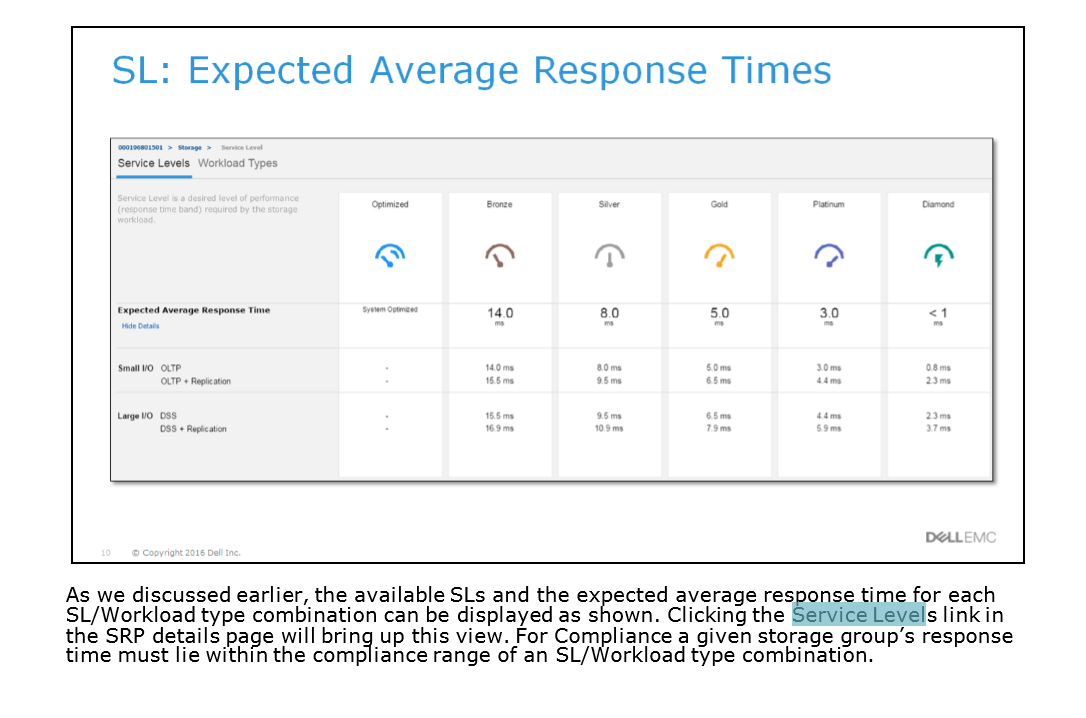
Affected Products
Unisphere for VMAX, Unisphere for PowerMaxArticle Properties
Article Number: 000022528
Article Type: How To
Last Modified: 01 Aug 2025
Version: 5
Find answers to your questions from other Dell users
Support Services
Check if your device is covered by Support Services.