Trin til nulstilling af MaxxAudio Pro-funktionaliteten
Summary: Oplysninger om, hvordan du aktiverer MaxxAudio Pro-funktionalitet, når den er gået tabt.
This article applies to
This article does not apply to
This article is not tied to any specific product.
Not all product versions are identified in this article.
Symptoms
Cause
Ingen tilgængelige oplysninger om årsag.
Resolution
Nulstil MaxxAudio Pro
For at nulstille MaxxAudio Pro-programmet skal du deaktivere og aktivere MaxxAudio Pro-funktionen "Afspilning". Det nulstiller alle funktioner i MaxxAudio Pro-applikationen, og du kan justere lydindstillingerne.
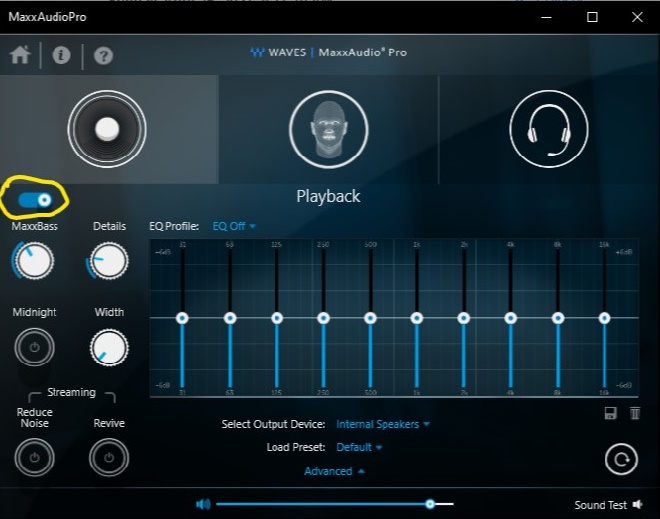
Løsning
Den nemmeste måde at løse dette problem på er at deaktivere og aktivere funktionen "Afspilning" i MaxxAudio Pro-applikationen.
Yderligere oplysninger:
Sådan installeres Waves "MaxxAudio Pro" -applikationen efter kommandolinje:
- Download den nyeste version af Waves MaxxAudio Pro-programmet fra Dells supportwebsted.
- Kør Powershell som administrator.
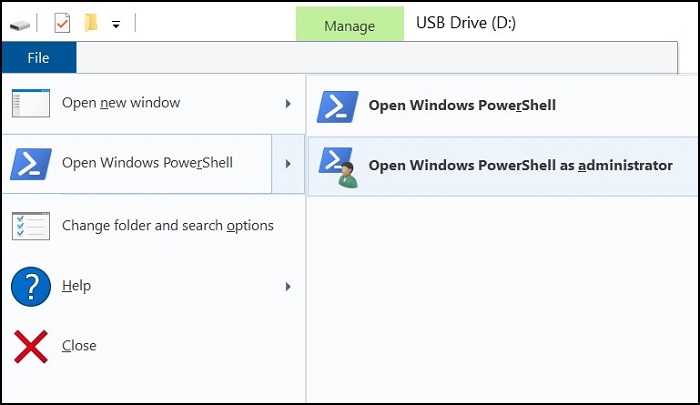
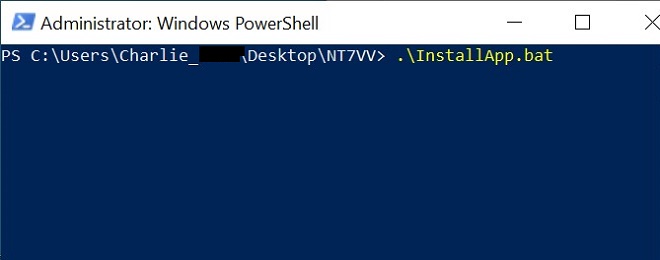
- Kør følgende kommando i den mappe, hvor programfilen blev downloadet: .\InstallApp.bat
Article Properties
Article Number: 000187742
Article Type: Solution
Last Modified: 10 May 2026
Version: 4
Find answers to your questions from other Dell users
Support Services
Check if your device is covered by Support Services.