PowerEdge: Windows Server 2022 Essentials Branding Explained
Summary: Microsoft Windows Server 2022 Essentials operating system offering does not include "Essentials" branding within the operating system and re-installation media.
This article applies to
This article does not apply to
This article is not tied to any specific product.
Not all product versions are identified in this article.
Symptoms
Windows Server 2022 Essentials end-users may notice that "Essentials" is missing from all the operating system branding. Windows Server 2022 Essentials re-installation media will only list the "Windows Server 2022 Standard"
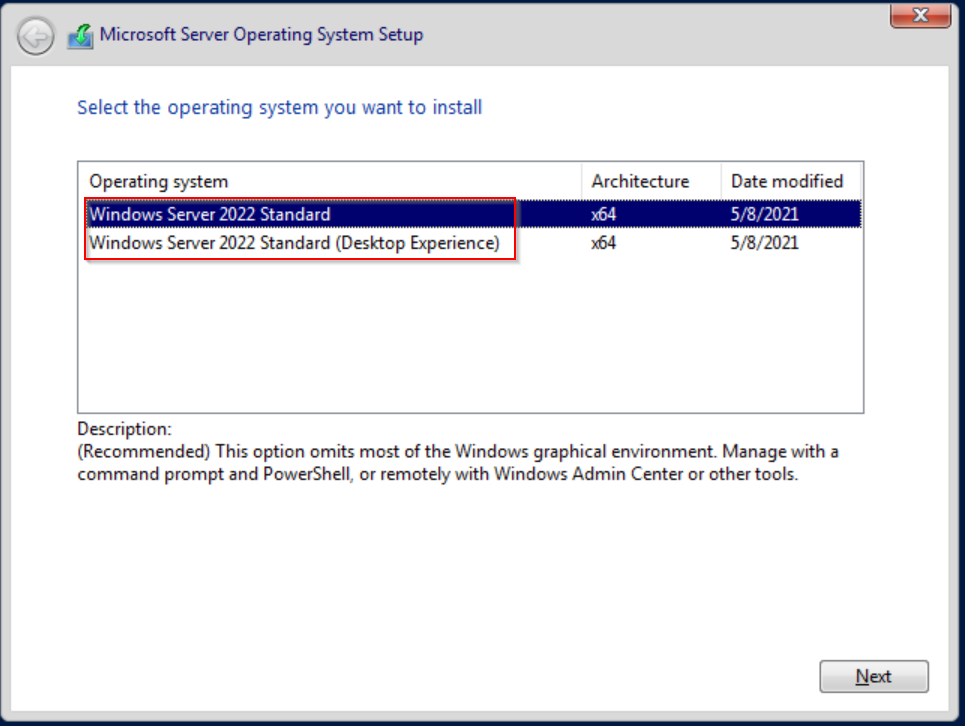
Figure 1: Microsoft Server 2022 Essentials Operating System Setup Wizard Example
Microsoft System Information tool (Figure 2) and the Windows Version About window (Figure 3) will display "Microsoft Windows Server 2022 Standard" as the OS Name value.
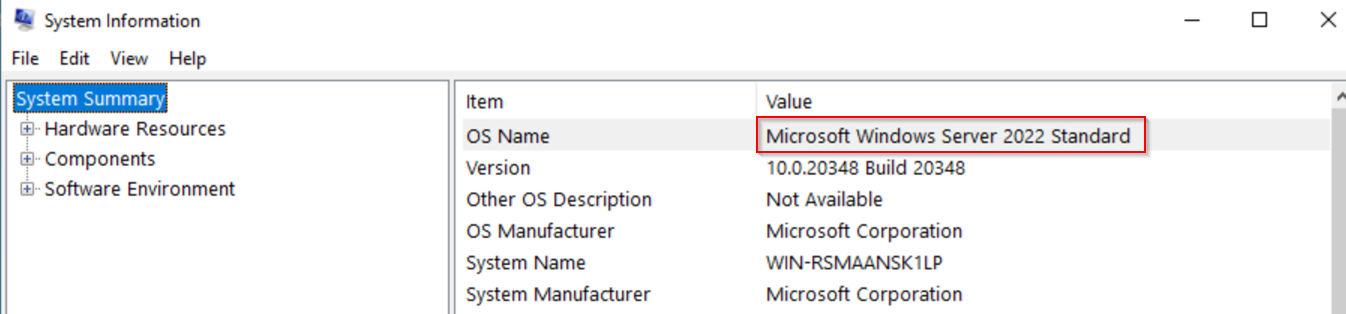
Figure 2: Msinfo32.exe System Information System Summary Example
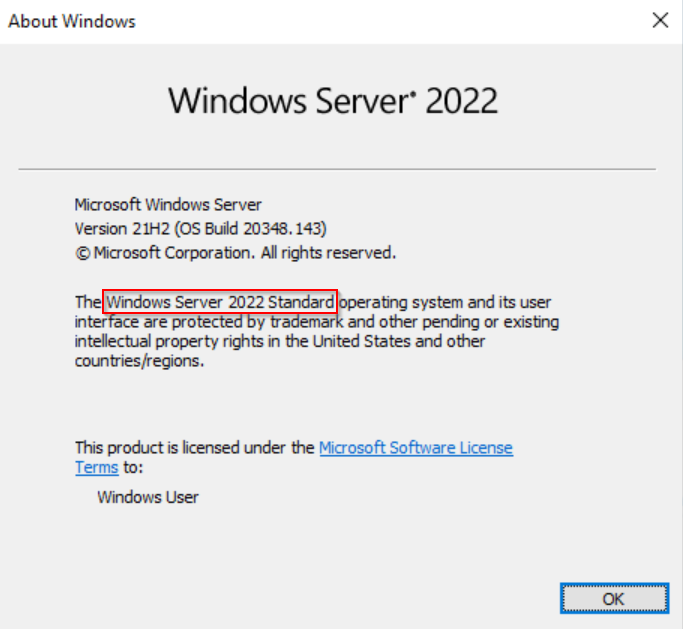
Figure 3: Winver.exe Windows About Example
wim images (Figure 1).
Figure 1: Microsoft Server 2022 Essentials Operating System Setup Wizard Example
Microsoft System Information tool (Figure 2) and the Windows Version About window (Figure 3) will display "Microsoft Windows Server 2022 Standard" as the OS Name value.
Figure 2: Msinfo32.exe System Information System Summary Example
Figure 3: Winver.exe Windows About Example
Cause
Microsoft Windows Server 2022 Essentials is a branding name only for Microsoft licensing purposes. The "Essentials" Sales Kit Units (SKUs) are only available for single-socket severs with 10 or less cores. The installation image is Microsoft Windows Server 2022 Standard Edition.
Resolution
No additional action is required. The behavior defined in this article is expected for Microsoft Windows Server 2022 Essentials SKUs.
Affected Products
Microsoft Windows Server 2022Products
PowerEdge FC640, PowerEdge M640, PowerEdge M640 (for PE VRTX), PowerEdge MX740C, PowerEdge MX750c, PowerEdge MX760c, PowerEdge MX840C, PowerEdge R240, PowerEdge R250, PowerEdge R260, PowerEdge R340, PowerEdge R350, PowerEdge R360, PowerEdge R440
, PowerEdge R450, PowerEdge R540, PowerEdge R550, PowerEdge R640, PowerEdge R6415, PowerEdge R650, PowerEdge R650xs, PowerEdge R6515, PowerEdge R6525, PowerEdge R660, PowerEdge R660xs, PowerEdge R6615, PowerEdge R6625, PowerEdge R740, PowerEdge R740XD, PowerEdge R740XD2, PowerEdge R7415, PowerEdge R7425, PowerEdge R750, PowerEdge R750XA, PowerEdge R750xs, PowerEdge R7515, PowerEdge R7525, PowerEdge R760, PowerEdge R760XA, PowerEdge R760xd2, PowerEdge R760xs, PowerEdge R7615, PowerEdge R7625, PowerEdge R840, PowerEdge R860, PowerEdge R940, PowerEdge R940xa, PowerEdge R960, PowerEdge T140, PowerEdge T150, PowerEdge T160, PowerEdge T340, PowerEdge T350, PowerEdge T360, PowerEdge T40, PowerEdge T440, PowerEdge T550, PowerEdge T560, PowerEdge T640
...
Article Properties
Article Number: 000191204
Article Type: Solution
Last Modified: 11 May 2026
Version: 5
Find answers to your questions from other Dell users
Support Services
Check if your device is covered by Support Services.