VxRail: Event VXR028008
Summary: Event VXR028008 SSL certificate is within 30 days of expiring
This article applies to
This article does not apply to
This article is not tied to any specific product.
Not all product versions are identified in this article.
Symptoms
Event VXR028008 occurs and a YELLOW alarm 'VXR028008' is present in the vCenter portal.
Cause
SSL certificate is within 30 days of expiring.
Resolution
- VxRail Manager TLS Certificate-Automated Renewal is disabled.
- Enable VxRail Manager (VXM) TLS Certificate-Automated Renewal or replace VXM certificates manually.
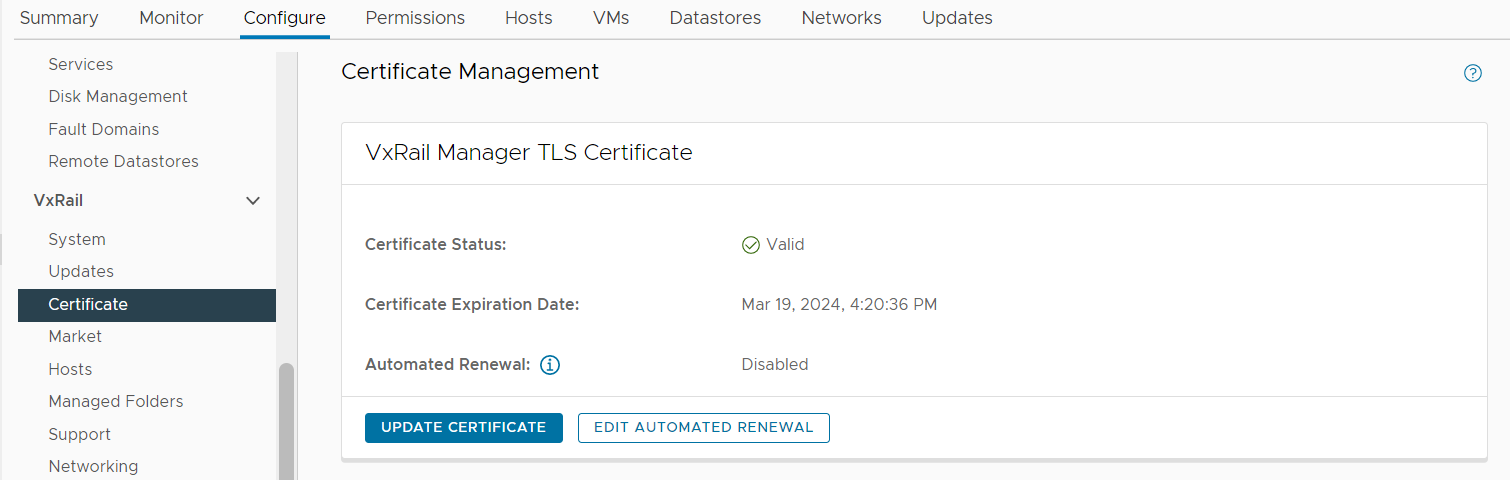
- If VxRail Manager TLS Certificate-Automated Renewal is enabled:
- If the parameter Renew Certificate Before Expiration is set to less than 30 days
- Ignore it.
- If VXM certificates have not enrolled
- Enroll VXM certificates.
- If VxRail Manager TLS Certificate-Automated Renewal automated renewal failed
- Contact Dell Technical Support or your Authorized Service Representative
- If the parameter Renew Certificate Before Expiration is set to less than 30 days
Affected Products
VxRailArticle Properties
Article Number: 000194212
Article Type: Solution
Last Modified: 05 Feb 2026
Version: 2
Find answers to your questions from other Dell users
Support Services
Check if your device is covered by Support Services.