PowerStore: Volumes Mapped Through REST API By an Application Are Not Visible on the host
Summary: The default scan range for hosts can be lower than the highest supported LUN ID. PowerStore increments the automatically assigned LUN ID up to the maximum supported LUN ID for the host type, potentially exceeding lower defaults. This can prevent hosts from discovering newly assigned LUNs. ...
This article applies to
This article does not apply to
This article is not tied to any specific product.
Not all product versions are identified in this article.
Symptoms
External backup software like AppSync, Commvault, or cloud computing orchestration repeatedly map and unmap volumes or clones to external hosts, without specifying a LUN ID. External Applications use REST API to automate the mapping process.
The automatically assigned LUN ID increases on each mapping cycle until the maximum LUN ID defined by the Operating System selected in PowerStore Manager is reached.
Newly mapped volumes with high LUN IDs may not be discovered by hosts when rescanning storage.
Cause
PowerStore LUN ID assignment considerations
When mapping new volumes, PowerStore automatically assigns a LUN ID unless a specific ID is requested.
PowerStore Manager User Interface (UI), REST API, and PowerStore CLI (PSTCLI) return the next incrementally higher available LUN ID. Once the maximum LUN ID for the selected host type is reached, this restarts assignment to the first free LUN ID starting on ID 1.
The counter for the last automatically assigned ID by UI is separate from the counter used by REST and PSTCLI.
Manually assigning a new LUN with a higher ID does not increase the counter.
Depending on host or driver configuration, the host might not scan all supported LUN IDs.
If the automatically assigned LUN ID is higher than the configured limit, the Host is unable to identify newly mapped LUNs.
ESXi
The Disk.MaxLUN parameter in ESXi defines the highest visible LUN ID. The default value is 1024, allowing the host to discover the LUN IDs 0-1023.
This can be increased to a maximum of 16384 (LUN ID 0-16383)
Linux
While most Linux distributions support LUN IDs up to 65536, PowerStore supports 0-16383.
The Emulex FC driver however limits this with default configuration to LUN IDs 0-255. This can be increased to the Dell Technologies supported limited of 16384 (0-16383).
Resolution
There are two workarounds available to increase the highest scanned LUN ID on the Hosts:
ESXi
Increase Disk.MaxLUN on all VMware ESXi hosts in the cluster:
-
- Click Manage in the VMware Host Client Inventory and click Advanced Settings.
- Scroll down to Disk.MaxLUN.
- Right-click Disk.MaxLUN, and click Edit option.
- Enter a new value and click Save. The SCSI scan code does not scan the LUNs with IDs greater than or equal to the value you enter. For example, to discover LUN IDs from 0 to 100, set Disk.MaxLUN to 101.
Linux with Emulex FC driver
See the Host Connectivity Guide for Linux linked on PowerStore: Info Hub - Product Documentation and Videos or consult host OS documentation on modifying the FC driver.
Add a dummy host with operating system type Windows to the Host Group in PowerStore
-
Create a New Host object in PowerStore.
- Select Windows as Operating System (Windows only supports the LUN IDs 0-254, forcing the PowerStore to reuse lower LUN IDs before reaching 1023.)
- Select the respective Transport Type (FC, iSCSI, or NVMe)
- Manually Add an Initiator to the host object:
- For FC: 10:00:00:00:00:00:00:00
- For iSCSI: iqn.1991-05.com.microsoft:dummy
- Add the Host to the Host Group of the ESXi/Linux servers.
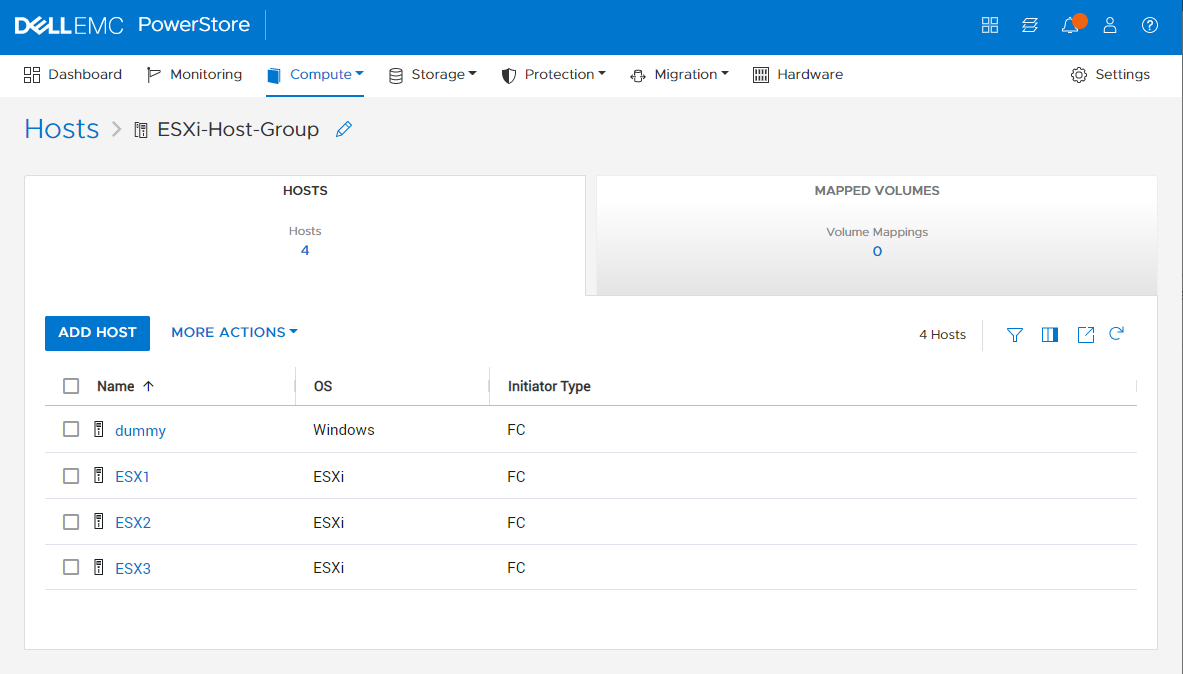
Figure 1: Screenshot of Adding the Host to the Host Group of the ESXi servers in PowerStore
Additional Information
Example for automatic LUN ID assignment
A new volume is mapped to an Existing Host (or Host group).
Only one volume is mapped to this host group, LUN ID 101 was manually assigned to it.
The highest ID assigned automatically by the UI is 100.
The highest ID assigned automatically by REST or PSTCLI is 200.
When you map a volume manually to LUN ID 250 on UI, and use REST API to map a second volume to LUN ID 251.
A backup job requests a Clone to be mapped to this host group using REST API.
The highest LUN ID automatically assigned by REST or PSTCLI is 200, and LUN ID 201 is not in use.
-> PowerStore Assigns LUN ID 201.
A new Volume is then mapped using the PowerStore Manager UI, without specifying LUN ID.
The highest LUN ID automatically assigned by UI is 100, the next increment would be 101. LUN ID 102 is not in use.
-> PowerStore Assigns LUN ID 102 automatically.
Affected Products
PowerStore, PowerStore 1000X, PowerStore 1000T, PowerStore 3000X, PowerStore 3000T, PowerStore 5000X, PowerStore 5000T, PowerStore 500T, PowerStore 7000X, PowerStore 7000TProducts
PowerStore 9000X, PowerStore 9000TArticle Properties
Article Number: 000199943
Article Type: Solution
Last Modified: 24 Jul 2025
Version: 4
Find answers to your questions from other Dell users
Support Services
Check if your device is covered by Support Services.