Intel Thunderbolt Controller Driver Installation Failed on Intel Generation 12 Processor System with Windows 11
Summary: An installation failure occurs with the Intel Thunderbolt Controller driver on a computer using an Intel generation 12 processor and Windows 11.
This article applies to
This article does not apply to
This article is not tied to any specific product.
Not all product versions are identified in this article.
Symptoms
An error message is seen stating that there has been a driver installation failure (Figure 1 [English only]).
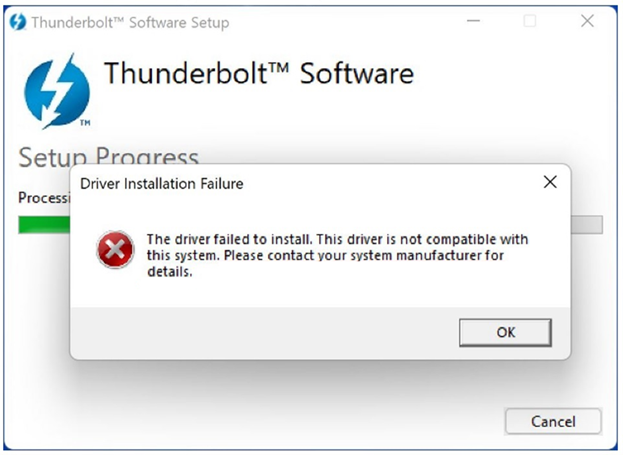
Figure 1: Thunderbolt Software driver failed to install message
If the Thunderbolt Control Center application was manually installed from the Microsoft Store, it also does not list out any of the Thunderbolt devices attached. The controller driver version does not display in the Thunderbolt Control Center.
Affected Platforms:
- Alienware X14
- Alienware M15 R7
- Alienware X15 R2
- Alienware X17 R2
- Dell G15 5520
- Dell G16 7620
- Inspiron 13 5320
- Inspiron 14 PLUS 7420
- Inspiron 14 5420
- Inspiron 16 5620
- Inspiron 16 PLUS 7620
- Inspiron 16 7620 2-in-1
- Latitude 5330
- Latitude 5531
- Latitude 7330
- Latitude 9330 2-in-1
- Latitude 5430
- Latitude 5431
- Latitude 7430
- Latitude 9430
- Latitude 5530
- Latitude 7530
- Precision 3470
- Precision 5470
- Precision 3570
- Precision 3571
- Precision 5570
- Vostro 5320
- Vostro 7620
- XPS 13 9315
- XPS 13 Plus 9320
- Dell Pro 13 Premium
Cause
A computer with an Intel generation 12 processor has integrated Thunderbolt. Windows 11 already contains the necessary driver for a Thunderbolt device to work properly.
Resolution
On Dell computers running Windows 11, click Important Information under the Additional details section of the driver page. A list is displayed of Dell computers that do not need this driver installed if the computer's operating system is Windows 11.
Affected Products
Alienware m15 R7, Alienware x14, Alienware x15 R2, Alienware x17 R2, Alienware x14, Dell Pro 13 Premium PA13250, Dell G15 5520, Inspiron 13 5320, Inspiron 14 5420, Inspiron 14 Plus 7420, Inspiron 16 5620, Inspiron 16 7620 2-in-1
, Inspiron 16 Plus 7620, Latitude 7330, Latitude 9330, Latitude 5431, Latitude 7430, Latitude 9430, Latitude 5530, Latitude 5531, Latitude 7530, Latitude 5430, Latitude E5430, Precision 3470, Precision 5470, Precision 3570, Precision 3571, Precision 5570, Vostro 5320, Vostro 7620, XPS 13 9315, XPS 13 Plus 9320
...
Article Properties
Article Number: 000201086
Article Type: Solution
Last Modified: 14 May 2026
Version: 8
Find answers to your questions from other Dell users
Support Services
Check if your device is covered by Support Services.