PowerFlex: Error 500 In The PFxM UI After 3.X Migration To 4.X
Summary: After doing a 3.x to 4.x migration, the PFxM UI displays a 500 error throughout multiple pages.
This article applies to
This article does not apply to
This article is not tied to any specific product.
Not all product versions are identified in this article.
Symptoms
PFxM Legacy started at a version older than 3.6 and was upgraded to 3.6 or later.
Screenshot showing the error 500:
An error occurred, Expand the list to view the details of the Error. (500)
Request processing failed nested exception is com.dell.asm.asmcore.asmmanager.exception.AsmManagerDAOException: Caught exception during get all devices in inventory.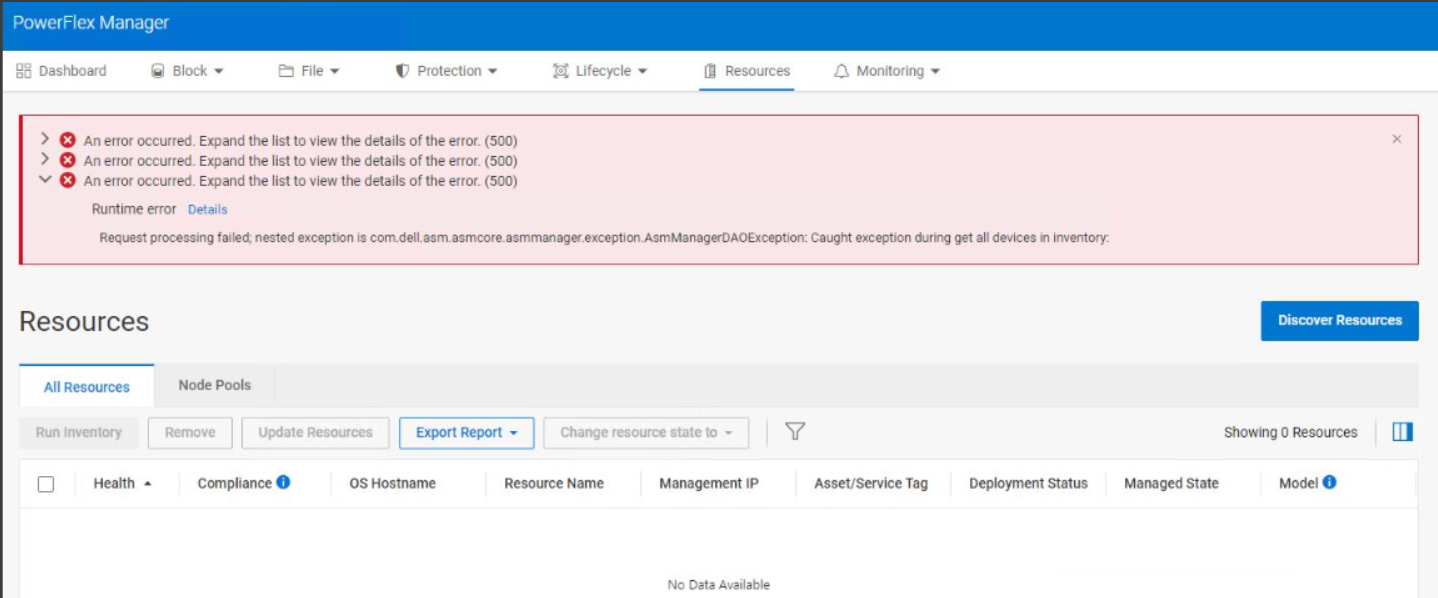
Asmmanager logs may show the following:
2024-02-12T12:46:02.445682598-06:00 stdout F 2024-02-12 18:46:02,445 [https-jsse-nio-9080-exec-9] (SqlExceptionHelper.java:142) [ERROR] ERROR: relation "virtualmachine_inventory" does not exist

2024-02-12T12:46:02.457539095-06:00 stdout F 2024-02-12 18:46:02,454 [https-jsse-nio-9080-exec-9] (PFXMErrorController.java:85) [ERROR] Status: 500, PFXM error: Request processing failed; nested exception is com.dell.asm.asmcore.asmmanager.exception.AsmManagerDAOException: Caught exception during get all devices in inventory: , attributes: timestamp:Mon Feb 12 18:46:02 GMT 2024
2024-02-12T12:46:02.457563247-06:00 stdout F status:500
2024-02-12T12:46:02.457570749-06:00 stdout F error:Internal Server Error
2024-02-12T12:46:02.457576719-06:00 stdout F path:/AsmManager/ManagedDevice
Impact
Unable to fully use the PFxM UI.
Cause
In PFxM legacy version 3.6 and beyond, the chassis_ra database was removed. However, due to a software code oversight, if a PFxM legacy system was upgraded to version 3.6 or later, the chassis_ra database was not removed. This can pose problems when attempting a one-time migration to PFxM 4.x, as the presence of this database causes the migration process to fail, leading to complications in the PFxM 4.x UI.
Resolution
The chassis_ra database must be removed before doing the one-time migration to PFxM 4.x.
If the 4.x PFxM system is currently in a broken state, it must be corrected. If possible revert the PFMP VMs to a previous snapshot where the PFxM is healthy. If there are no snapshots, the PFMP system must be redeployed.
To remove the chassis_ra database, perform the below steps:
-
Connect to the Legacy PFxM VM through an SSH putty session.
-
Paste the following command:
dropdb -U postgres chassis_ra
The expected output from the command above should not print anything on the screen. If the output is displayed on the screen, please contact Dell support. -
Perform the one-time migration again while the database chassis_ra is removed and the 4.x PFxM system is in a healthy state.
Impacted Version
PFMP 4.x
Fixed In Version
PFMP 4.6
Article Properties
Article Number: 000222225
Article Type: Solution
Last Modified: 30 Dec 2025
Version: 3
Find answers to your questions from other Dell users
Support Services
Check if your device is covered by Support Services.