PowerProtect: Dashboard Intermittently Shows none of the NTP servers are available
Summary: The PowerProtect Data Manager Dashboard components intermittently indicate a component issue that decreases the health score.
This article applies to
This article does not apply to
This article is not tied to any specific product.
Not all product versions are identified in this article.
Symptoms
The PowerProtect Data Manager Dashboard components intermittently indicate a component issue that decreases the health score after upgrading to 19.16.0-15.
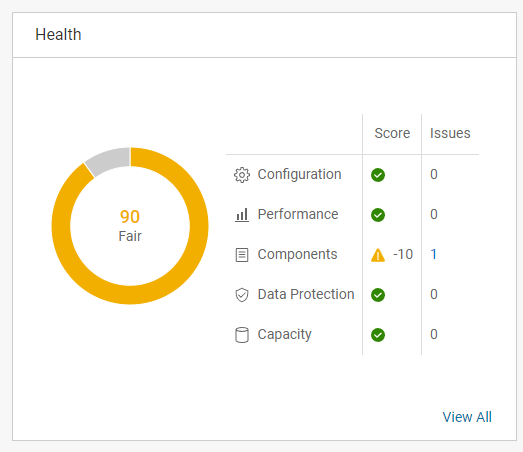
The Health screen shows that the issue is related to the Network Time Protocol (NTP) Server.
None of the specified NTP servers are available for time synchronization.
The /var/log/brs/sysmgr/sysmgr.log shows that the NTP check is every 2 minutes and intermittently completes successfully.
YYYY-MM-DD HH:MM:SS INFO [] [Health-Check] [][][][TRACE_ID:8f75f42833c659eb][] [c.e.b.s.s.h.NTPHealthCheck.check(62)] -  Start NTP Servers health check.
YYYY-MM-DD HH:MM:SS INFO [] [Health-Check] [][][][TRACE_ID:8f75f42833c659eb][] [c.e.b.s.s.h.NTPHealthCheck.isNTPServersValid(96)] -  Cannot sync time with the ntp server my-ntpserver.my-domain.com
YYYY-MM-DD HH:MM:SS INFO [] [Health-Check] [][][][TRACE_ID:8f75f42833c659eb][] [c.e.b.s.s.h.NTPHealthCheck.check(75)] -  End NTP Servers health check.
YYYY-MM-DD HH:MM:SS INFO [] [Health-Check] [][][][TRACE_ID:87183f216141786d][] [c.e.b.s.s.h.NTPHealthCheck.check(62)] -  Start NTP Servers health check.
YYYY-MM-DD HH:MM:SS INFO [] [Health-Check] [][][][TRACE_ID:87183f216141786d][] [c.e.b.s.s.h.NTPHealthCheck.isNTPServersValid(93)] -  Specified ntp server is valid my-ntpserver.my-domain.com
YYYY-MM-DD HH:MM:SS INFO [] [Health-Check] [][][][TRACE_ID:87183f216141786d][] [c.e.b.s.s.h.NTPHealthCheck.check(75)] -  End NTP Servers health check.
YYYY-MM-DD HH:MM:SS INFO [] [Health-Check] [][][][TRACE_ID:a3ffd0cfa81d750a][] [c.e.b.s.s.h.NTPHealthCheck.check(62)] -  Start NTP Servers health check.
YYYY-MM-DD HH:MM:SS INFO [] [Health-Check] [][][][TRACE_ID:a3ffd0cfa81d750a][] [c.e.b.s.s.h.NTPHealthCheck.isNTPServersValid(96)] -  Cannot sync time with the ntp server my-ntpserver.my-domain.com
YYYY-MM-DD HH:MM:SS INFO [] [Health-Check] [][][][TRACE_ID:a3ffd0cfa81d750a][] [c.e.b.s.s.h.NTPHealthCheck.check(75)] -  End NTP Servers health check.
Cause
The Time Zone configuration is using the my-ntpserver.my-domain.com server alias, which resolves to multiple IP addresses. All the server alias IP addresses are reachable by the PowerProtect Data Manager Appliance. The PowerProtect NTP Health check code is not able to properly handle the NTP traffic load balancing for the NTP server alias.
Resolution
This is a known issue that is addressed in PowerProtect Data Manager version 19.17.0-23. For your convenience, all our PowerProtect Data Manager documentation is available online or for download on the Dell Support site.
Workaround:
Update the Time Zone configuration to use two of the NTP server IP addresses instead of the server alias.
Article Properties
Article Number: 000225406
Article Type: Solution
Last Modified: 07 Oct 2025
Version: 3
Find answers to your questions from other Dell users
Support Services
Check if your device is covered by Support Services.