Connectrix SANnav: How to Enable or Disable SNMP Informs through SANnav
Summary: Enabling SNMP Informs allows SANnav to acknowledge traps. It also helps enabling or disabling Informs at the switch level on Informs-capable products.
This article applies to
This article does not apply to
This article is not tied to any specific product.
Not all product versions are identified in this article.
Instructions
To enable or disable SNMP Informs, perform the following steps:
- Click SANnav in the navigation bar, and then select Fault Management è SNMP Informs. The SNMP Informs page displays.
- Select a fabric from the Select Fabric drop-down list, and then click OK to list all the Informs-capable products. You can also enter the fabric name in the search bar.
- Select a single switch or multiple switches to enable or disable SNMP Informs in bulk.
- For enabling or disabling SNMP Informs in bulk, click the hamburger icon on the upper right corner of the window and select Enable or Disable.
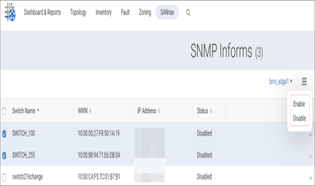
- For enabling or disabling SNMP Informs for a single switch, select the switch and select Enable or Disable from the action menu.
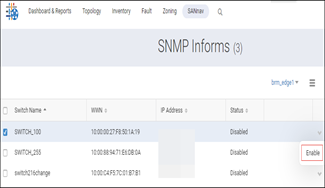
Note: SNMP Informs are enabled or disabled at the switch level. To receive Informs, select the enable Informs option in the Registration tab. (Under SANnav è Fault management è SNMP and Syslog Management è Registration è Enable Informs.)
Affected Products
Connectrix SANnavArticle Properties
Article Number: 000225944
Article Type: How To
Last Modified: 21 Nov 2025
Version: 3
Find answers to your questions from other Dell users
Support Services
Check if your device is covered by Support Services.