PowerEdge: 17G AMD - PSOD related to PCI Multi-Segment during ESXi 8.0 U3 installation
Summary: Observing system stop responding or Purple Screen Of Death (PSOD) during ESXi 8.0 U3 installation,
This article applies to
This article does not apply to
This article is not tied to any specific product.
Not all product versions are identified in this article.
Symptoms
When booting or installing ESXi 8.0 U3 Operating System (OS), ESXi may stop responding or stop.
Cause
VMware ESXi 8.0 U3 does not support PCI multi-Segment (Two segments).
Resolution
Workaround:
Disable PCI Multi-Segment (Set it to One Segment) in the server BIOS. This setting change allows ESXi 8.0 U3 to install and boot on PowerEdge R7725, R6725, R7715, and R6715 systems.
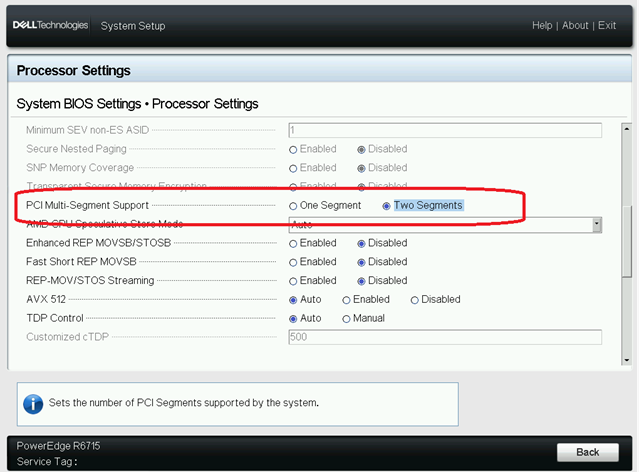
FIX:
VMware through ESXi is providing the long-term solution, which includes PCI Multi-Segment support for AMD IOMMU.
Affected Products
OEMR XL R6715, OEMR XL R6725, OEMR XL R7715, OEMR XL R7725, PowerEdge R6715, PowerEdge R6725, PowerEdge R7715, PowerEdge R7725Article Properties
Article Number: 000241608
Article Type: Solution
Last Modified: 21 May 2026
Version: 4
Find answers to your questions from other Dell users
Support Services
Check if your device is covered by Support Services.