Dell Thunderbolt Dock WD22TB4 "Error: Failed to get Dell Dock information" and USB Ports Stop Working
Summary: Learn what to do when the Dell Thunderbolt Dock - WD22TB4 Dell Firmware Update Utility states "Error: Failed to get Dell Dock information" or USB ports do not work.
This article applies to
This article does not apply to
This article is not tied to any specific product.
Not all product versions are identified in this article.
Symptoms
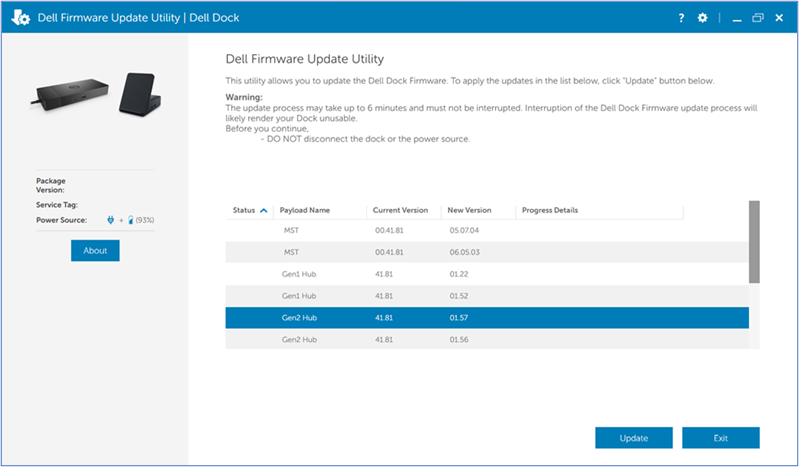
Opening the Dell Firmware Update utility quickly while the computer detects the Dell Thunderbolt Dock - WD22TB4 may cause extra firmware to be shown. This can include two MST items, two Gen1 Hub items, two Gen2 Hub items, and so on. After clicking the Update button, it flashes the dock with the incorrect firmware revision.
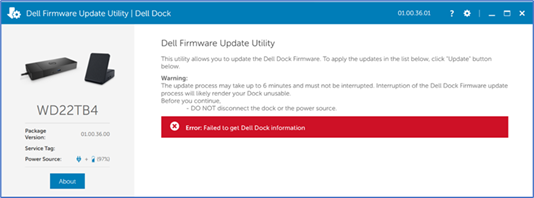
If the Dell Firmware Update Utility is reopened, it shows an "Error: Failed to get Dell Dock information" message.
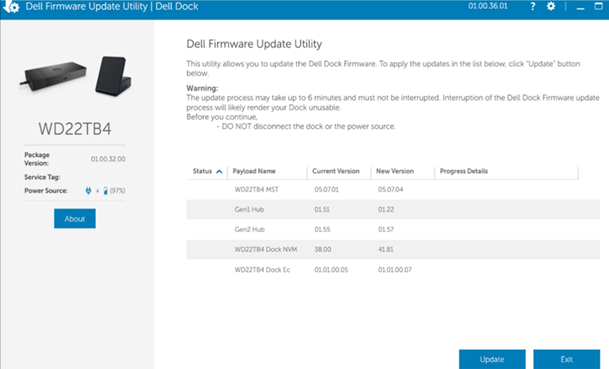
If incorrect USB hub firmware is shown in the Current Version column of the Dell Firmware Update Utility, the USB ports may not function.
Incorrect USB hub firmware is:
Gen1 Hub: 01.51 (Package Version: 01.00.32)
Gen1 Hub: 01.52 (Package Version: 01.00.36)
Gen2 Hub: 01.55 (Package Version 01.00.32)
Gen2 Hub: 01.56 (Package Version: 01.00.36)
Affected Platforms:
- Dell Thunderbolt Dock - WD22TB4
Cause
When the computer is detecting the dock, before the dock is fully recognized, the dock type is not determined. Because of this, the Dell Firmware Update Utility loads all firmware components in the package and shows in the Dell Firmware Update Utility UI.
Resolution
Updating to firmware version 01.00.42 or later on the dock resolves the issue. To download and install the dock firmware, reference How to Download and Install Dell Drivers.
Affected Products
Dell Thunderbolt Dock – WD22TB4Article Properties
Article Number: 000242628
Article Type: Solution
Last Modified: 22 May 2026
Version: 4
Find answers to your questions from other Dell users
Support Services
Check if your device is covered by Support Services.