Dell AIops: Deployment of Long-Running Workload Blueprints Fail with Memory Error
Summary: Deployments of long-running workloads (for example, DataRobot deployment, Cohere, ClearML, and so forth) fail when using Dell Automation Platform (DAP) 1.2 and 2.0.
This article applies to
This article does not apply to
This article is not tied to any specific product.
Not all product versions are identified in this article.
Symptoms
Long-running deployments fail.
Sidecar containers (hzp_iam_proxy) indicate an Out of Memory error. The following is an example:
  - containerID: containerd://63054fd6b999e08cc13add411b96e40bfd28d197e0008deff7a4e13d62411218
    image: 172.28.177.1:5000/hzp/hzp-iam-proxy:1.2.0.0-204fa20-f30c4736
    imageID: 172.28.177.1:5000/hzp/hzp-iam proxy@sha256:98d808392f2e67e7bd56d7e55b788f8fd3c3f152cc38051dcd9003eec121bdab
    lastState:
      terminated:
        containerID: containerd://ccb2e7ca18aabe8bc3a813893f2f885c66323974a51dba63bd9b0a699fcf8a21
        exitCode: 137
        finishedAt: "2026-04-21T16:10:57Z"
        reason: OOMKilled
        startedAt: "2026-04-10T17:53:05Z"
Cause
The Dell Automation Platform Helm Plugin version 1.4.3 and later uses more memory than expected in the "fusion-api container" and in the sidecar within the "hzp-eoproxy svc container."
Resolution
-
Increase the memory limit in the "fusion-api service."
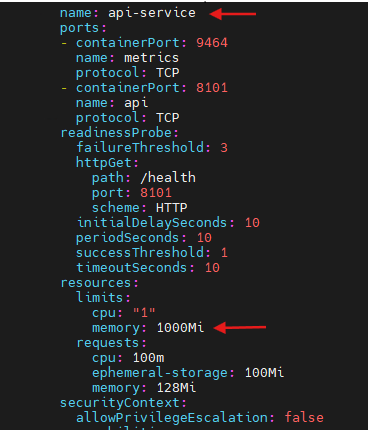
kubectl edit deploy -n dapo fusion-api-serviceWhen the deployment editor opens, find the resources section under the main container (api-service). Edit the "limits.memory" value.
Change the value from 512Mi to 1000Mi:
resources:
  limits:
    cpu: "1"
    memory: 512Mi      # <-- change this value
  requests:
    cpu: 100m
    ephemeral-storage: 100Mi
    memory: 128Mi
Note: There are two resource blocks in this deployment. The correct block to edit is the "api-service container," not the "api-service-init container."Example of change applied:
-
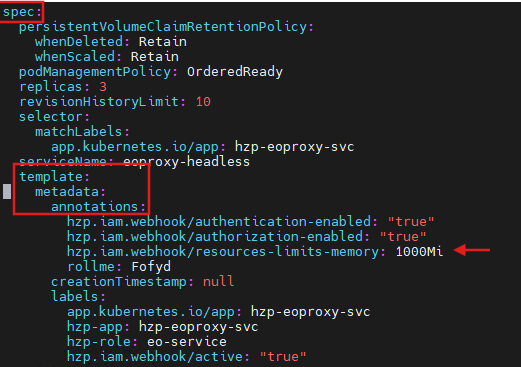
Increase the stateful set of "hzp-eoproxy-svc."
kubectl edit sts -n dapo hzp-eoproxy-svcserviceName: eoproxy-headless template: metadata: annotations: hzp.iam.webhook/authentication-enabled: "true" hzp.iam.webhook/authorization-enabled: "true" hzp.iam.webhook/resources-limits-memory: 1000Mi # <-- add this lineExample of applying the change for the "hzp-eoproxy-svc":
Additional Information
This issue is planned to be addressed in a future release of Dell Automation Platform.
If this issue occurs on a deployment in a Dell Automation Platform as a Service environment, contact Dell Support to engage Engineering. Reference this article ID when contacting support. An example of the deployment failure is helpful to determine whether the issue matches this issue.
Affected Products
Dell Automation Platform, Dell Automation Platform ComponentsArticle Properties
Article Number: 000461813
Article Type: Solution
Last Modified: 09 Sep 2026
Version: 5
Find answers to your questions from other Dell users
Support Services
Check if your device is covered by Support Services.