PowerEdge: How to Configure PERC12 (H965) and Newer Controllers for ESXi 9 4Kn End-to-End (E2E)
Summary: This article explains the requirements to deploy VMware ESXi 9 virtual machines with 4Kn end‑to‑end (E2E) storage when using Dell PowerEdge PERC12 (H965) and newer controllers. It also covers how to identify when ESXi is using 4Kn software emulation (SWE) instead of true 4Kn E2E, and what conditions prevent E2E. ...
This article applies to
This article does not apply to
This article is not tied to any specific product.
Not all product versions are identified in this article.
Instructions
Definitions (Quick Reference)
- 512n: 512-byte logical sector and 512-byte physical sector.
- 512e: 512-byte logical sector with 4096-byte physical sectors (emulation at the device level).
- 4Kn: 4096-byte logical sector and 4096-byte physical sector (native 4K).
- 4Kn SWE: ESXi identifies the device as 4Kn but uses a software emulation path (reported as "4Kn SWE" in ESXi output).
- 4Kn E2E: The virtual machine (VM) uses a 4Kn Virtual Machine Disk (VMDK) on a 4Kn backing device, avoiding 512-byte emulation. VMs can understand a 4Kn backend and issue 4K I/O through a 4Kn virtual disk starting with vSphere 9.0.
PERC12+ Default Virtual Disk Sector Size
With PERC12 (H965) and later controller families, all virtual disks are created by default as 4Kn regardless of the physical disk sector format (512e, 512n, or 4Kn).
Example: If a PERC H965 virtual disk is created using physical disks that are 512e, 512n, or 4Kn, the virtual disk is still presented as 4Kn to the operating system.
Note: PERC12+ controllers cannot create 512n virtual disks.
Older Controller Behavior (PERC10/PERC11)
Older generations (for example, PERC11 H755 and PERC10 H745/H740) typically created virtual disks based on the sector size of the member physical disks:
- If member disks were 512e/512n, the virtual disk sector size was 512B.
- If member disks were 4Kn, the virtual disk sector size was 4Kn.
ESXi 4Kn Support — What Changed in ESXi 9
VMware introduced support for 4Kn devices in ESXi 6.7, but prior to ESXi 9 this support was not end-to-end. In those earlier versions, a VM created on a 4Kn device typically used a 512B emulated virtual disk layered on top of the underlying 4Kn device.
With ESXi 9, VMware adds true 4Kn end-to-end (E2E) support, allowing VMs to reside on 4Kn VMDKs without requiring 512B software emulation.
Requirements for 4Kn End-to-End (E2E)
ESXi/vSphere Requirements
To create and run VMs with 4Kn E2E, the following must be true:
- ESXi 9 host
- VM hardware version 21 or later
- PERC driver version 8.11 or later
- Storage devices are NVMe or SSD
- Spinning hard drives are not supported for ESXi 9 4Kn E2E in this scenario
- vCenter 9 or the ability to use
vmkfstools - An older ESXi version must not have previously claimed the virtual disk/datastore
- The virtual machine OS or appliance must support installation on a 4K device
Note: (Upgrade behavior) If upgrading from ESXi 8 to ESXi 9, a datastore originally claimed by ESXi 8 retains the legacy 4Kn (SWE) identification even if all requirements are met after the upgrade. This prevents data loss because the format type cannot safely change in-place.
Note: (UI limitation) vCenter 9 provides sector-size and disk-format options that are not available in the local ESXi UI.
Note: (CLI method) Creating a 4Kn E2E VMDK without vCenter is possible using
vmkfstools.
Caution: Incorrect use of
vmkfstools can cause data loss. Dell Technologies recommends engaging a VMware specialist if you are not already familiar with creating VMDKs and selecting the correct disk format.
Why 4Kn End-to-End Alignment Matters (Performance Impact)
If the workload issues 4K I/O (common for databases and many modern file systems), 4Kn E2E alignment avoids ESXi kernel translation overhead.
Example Impact Scenario
When running a 50 GB FIO 4K write test inside a VM:
- If the VM is on a 4Kn device using 512B software emulation, ESXi must translate 4K writes into 512B-sector semantics in real time.
- This translation can increase kernel latency. For example, Kernel Average (KAVG) spikes in ESXTOP sometimes report sustained latency far above expected values (+1000 ms).
- The storage device itself may be healthy; the observed penalty is often at the ESXi kernel translation layer, resulting in IOPS and throughput below expected performance.
This can be worsened if the VM has snapshots present, because additional overhead and translation are introduced for snapshots.
Note: Review VMware guidance on snapshot performance impact: VMware vSphere Snapshots: Performance and Best Practices 
Verifying 4Kn E2E Support
Figure 1: A virtual disk created on a PERC H965i with NVMe drives running firmware version 8.14. The disk is identified as Disk (SSD), which is a requirement for 4Kn E2E support.

Figure 2: Using the esxcli command esxcli storage core device capacity list displays physical and logical block sizes and the format type, which must be 4K to support E2E.
In the example below, there is one NVMe drive in Passthrough Mode reported as 512n and three PERC virtual disks reported as 4K.
Note: The t10.NVMe BOSS is a separate controller and is not related to this article.
Note: Passthrough devices retain their original physical and logical sector parameters.

Figure 3: Using the esxcli command esxcli storage core device capacity list displays physical and logical block sizes and the format type, which must be 4K to support E2E.
In the example below, the virtual disk was created on a PERC H965i controller under one or more of these conditions:
- Firmware version earlier than 8.11
- Previously claimed by an ESXi version earlier than ESXi 9
- Hardware version earlier than 21
- Driver version earlier than 8.11
The format type is reported as "4Kn SWE" and the logical block size is software-emulated to 512B. This device does not meet the requirements for 4Kn E2E.
Note: Virtual disks created using spindle hard drive devices report a 4Kn SWE format type by default.

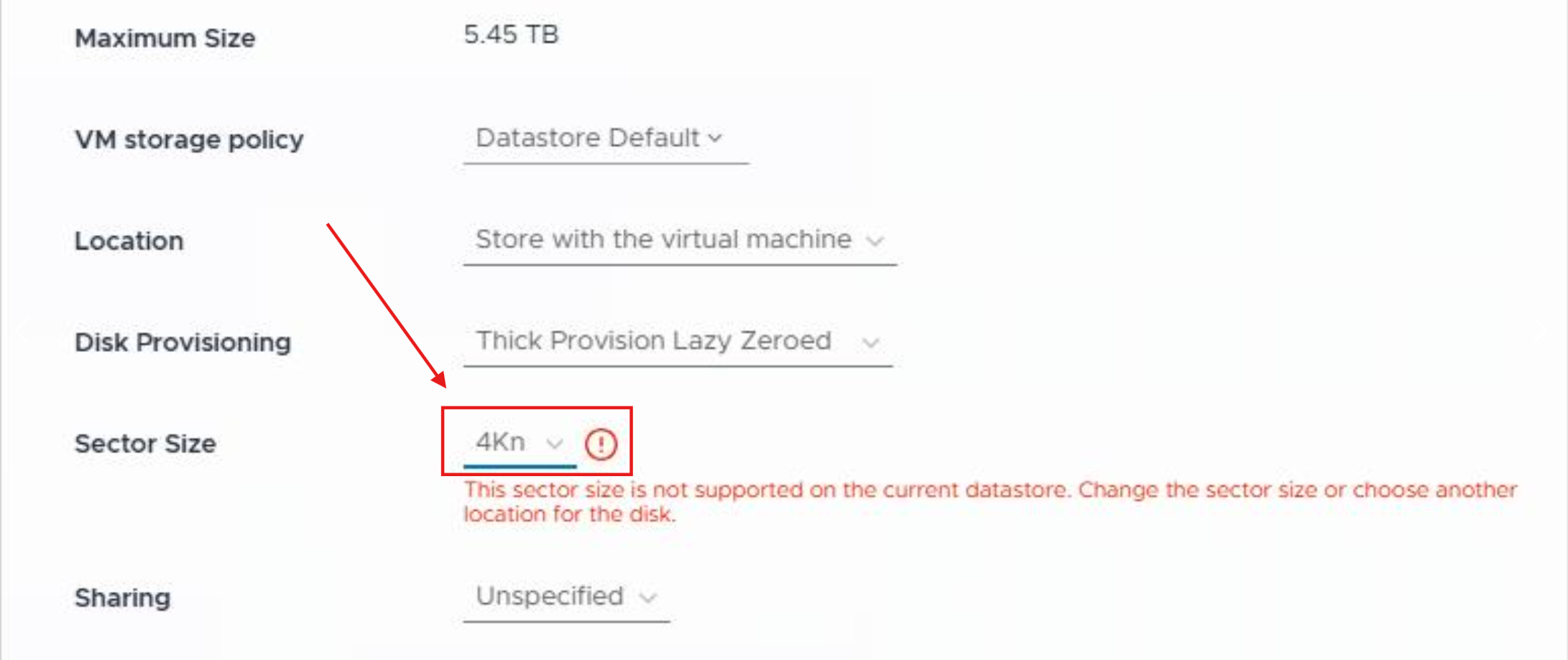
Figure 4: vCenter 9 — selecting the sector size in the Virtual Hardware UI during VM creation.
Note: If the 4Kn E2E requirements are not met on the attached storage device, selecting a 4Kn sector size reports a "not supported" message.
Additional Information
Additional Resources
For more information about sector formats for storage devices in ESXi 9, see Sector Formats for Storage Devices
Affected Products
OEMR XL R470, OEMR XL R570, OEMR XL R670, OEMR XL R770, OEMR R260, OEMR XE R260, OEMR R360, OEMR XE R360, OEMR R660, OEMR XL R660, OEMR R660xs, OEMR R6615, OEMR R6625, OEMR R760, OEMR R760xa, OEMR R760XD2, OEMR XL R760, OEMR R760xs, OEMR R7615
, OEMR R7625, OEMR R860, OEMR R960, OEMR T360, OEMR T560, OEMR XL R660xs, OEMR XL R6615, OEMR XL R6625, OEMR XL R6715, OEMR XL R6725, OEMR XL R760xs, OEMR XL R7615, OEMR XL R7625, OEMR XL R7715, OEMR XL R7725, OEMR XR5610, OEMR XR7620, PowerEdge RAID Controller H965i Adapter, PowerEdge RAID Controller H965i Front, PowerEdge RAID Controller H965i MX, PowerEdge RAID Controller H975i Front, PowerEdge R260, PowerEdge R360, PowerEdge R470, PowerEdge R4715, PowerEdge R570, PowerEdge R5715, PowerEdge R660, PowerEdge R660xs, PowerEdge R6615, PowerEdge R6625, PowerEdge R670, PowerEdge R6715, PowerEdge R6725, PowerEdge R760, PowerEdge R760XA, PowerEdge R760xd2, PowerEdge R760xs, PowerEdge R7615, PowerEdge R7625, PowerEdge R770, PowerEdge R770AP, PowerEdge R7715, PowerEdge R7725, PowerEdge R7725xd, PowerEdge R860, PowerEdge R960, PowerEdge RAID Controller H965e Adapter, PowerEdge T160, PowerEdge T360, PowerEdge T560, VMware ESXi 8.x, VMware ESXi 9.x
...
Article Properties
Article Number: 000467282
Article Type: How To
Last Modified: 01 Sep 2026
Version: 4
Find answers to your questions from other Dell users
Support Services
Check if your device is covered by Support Services.