Dell Unity: Windows host using native MPIO unable to see LUNs on depopulated Unity XT 380 (Dell Correctable)
Summary: Windows hosts using native MPIO are unable to see LUNs on a Unity XT 380/380F with depopulated service processors. This occurs when using the last two ports of the IOModule (port 2 or 3). Or when using the two CNA ports (4 or 5) without an IOModule installed. ...
This article applies to
This article does not apply to
This article is not tied to any specific product.
Not all product versions are identified in this article.
Symptoms
- Windows hosts using native MPIO are unable to see LUNs
- Unity OE 5.2.x
- Unity XT 380 or 380F with depopulated (no onboard Ethernet ports) service processors (SPs)
- Using the last two ports of the IOModule (port 2 or 3) or using the two CNA ports (4 or 5) without an IOModule installed.
- The issue happens on both ISCSI connected and FC connected hosts.
- The issue happens with direct connect hosts and hosts connected through a switch.
- Windows VM with MPIO enabled shows two disks in Disk Management instead of having two connections seen as one disk.
Cause
The Unity XT 380/380F running OE 5.2.x supports the new depopulated storage processors with the onboard Ethernet ports removed.
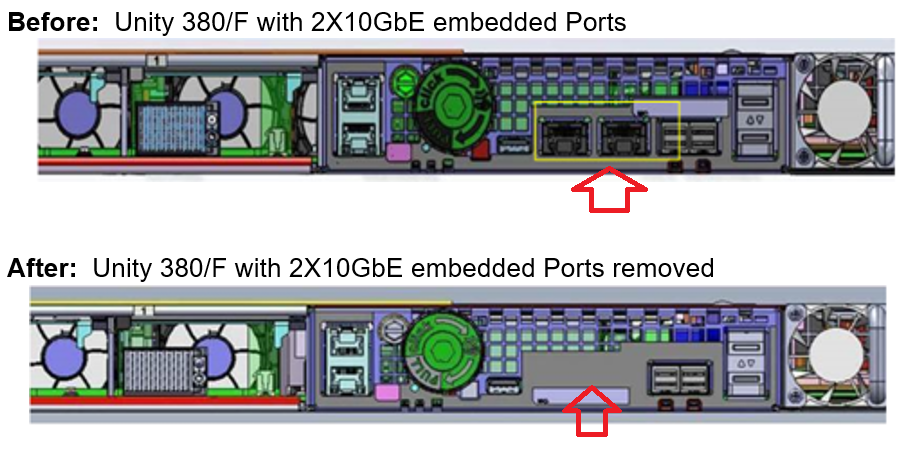
Windows hosts using native MPIO are unable to see LUNs on a Unity XT 380/380F with depopulated service processors. This occurs when using the last two ports of the IOModule (port 2 or 3). Or when using the two CNA ports (4 or 5) without an IOModule installed.
Windows hosts using native MPIO are unable to see LUNs on a Unity XT 380/380F with depopulated service processors. This occurs when using the last two ports of the IOModule (port 2 or 3). Or when using the two CNA ports (4 or 5) without an IOModule installed.
Resolution
Fix:
Workaround:
- This issue is fixed in Unity OS: 5.3.1.0.5.008
- Hotfixes are also available for Unity OE version 5.2. Contact Dell Technical Support or your Authorized Service Provider and quote this Dell Knowledge Base article ID to obtain those fixes.
Workaround:
- If an IOModule is installed, use CNA ports 4 & 5 and IOModule ports 0 & 1.
- Use PowerPath instead of Windows native MPIO.
- If there is no IOModule installed, CNA ports 4 and 5 do not work for Windows hosts using native MPIO.
Affected Products
Dell EMC Unity XT 380, Dell EMC Unity XT 380FArticle Properties
Article Number: 000212923
Article Type: Solution
Last Modified: 25 Jul 2025
Version: 11
Find answers to your questions from other Dell users
Support Services
Check if your device is covered by Support Services.