Avamar: Quiesced snapshot fails after restore of VVM
Summary: Quiesced snapshot creating failed unexpectedly
This article applies to
This article does not apply to
This article is not tied to any specific product.
Not all product versions are identified in this article.
Symptoms
Quiesced snapshot creating failed during backup running, the below error message can be found from the Windows event log viewer.

Cause
The VSS snapshot provider is called and registered during the quiesced snapshot creation stage. It should be unregistered from VSS after the call finishes.
During some rare situations, the unregister action is not applied. The quiesced snapshot creation will then start to fail.
During some rare situations, the unregister action is not applied. The quiesced snapshot creation will then start to fail.
Resolution
Open the Registry Editor using command "regedit" and enter the below path:
HKEY_LOCAL_MACHINE\SYSTEM\CurrentControlSet\services\VSS\Providers
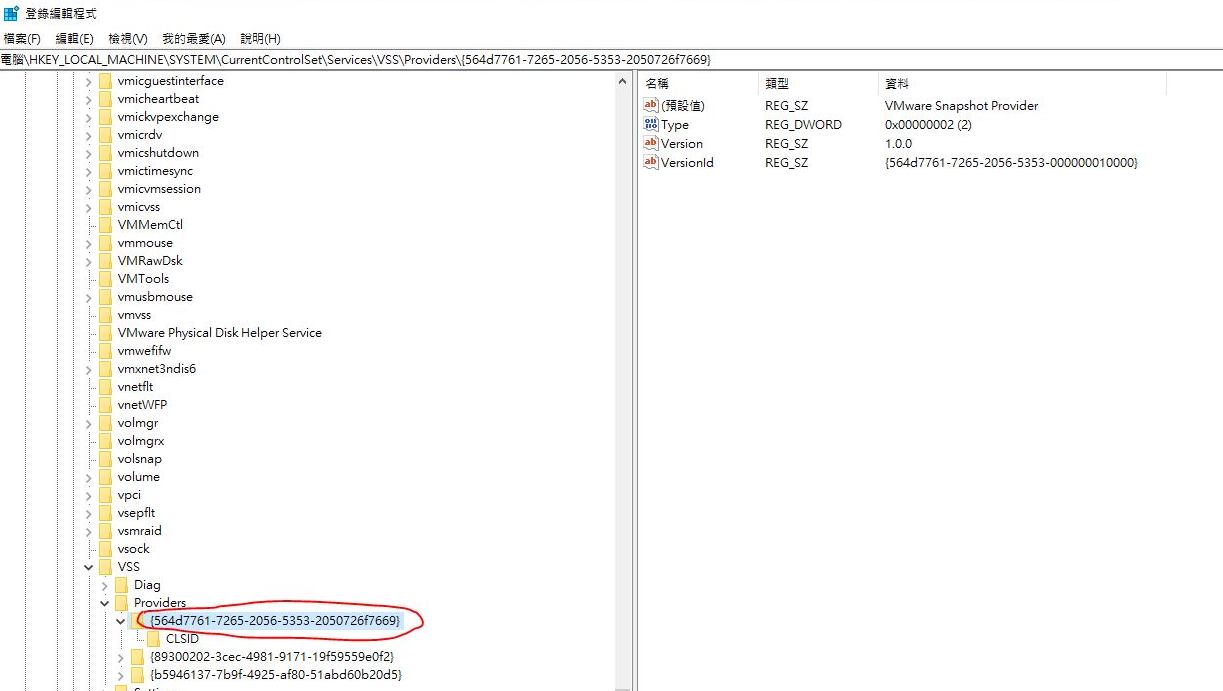
Most of the time we see only two items under "Providers". Both of them are released by Microsoft as embedded. If see "{564d7761-7265-2056-5353-2050726f7669}" exits like in the figure below, the VMware snapshot provider was not unregistered from last time of backup action.
We must delete it manually because the VMware snapshot provider must be registered once again during quiesced snapshot creating next time.
Make a backup on the current register location then just have ""{564d7761-7265-2056-5353-2050726f7669}"" deleted as well. Then the quiesced snapshot can be created successfully.
HKEY_LOCAL_MACHINE\SYSTEM\CurrentControlSet\services\VSS\Providers
Most of the time we see only two items under "Providers". Both of them are released by Microsoft as embedded. If see "{564d7761-7265-2056-5353-2050726f7669}" exits like in the figure below, the VMware snapshot provider was not unregistered from last time of backup action.
We must delete it manually because the VMware snapshot provider must be registered once again during quiesced snapshot creating next time.
Make a backup on the current register location then just have ""{564d7761-7265-2056-5353-2050726f7669}"" deleted as well. Then the quiesced snapshot can be created successfully.
Affected Products
Dell Engineered Solution for VMware EVO:RAILProducts
VMware ESXi 8.x, VMware vCenter Server, VMware VSANArticle Properties
Article Number: 000221709
Article Type: Solution
Last Modified: 16 Feb 2024
Version: 3
Find answers to your questions from other Dell users
Support Services
Check if your device is covered by Support Services.